
Optimization of Isosceles Triangles
Loading the math board and drawing, please wait…
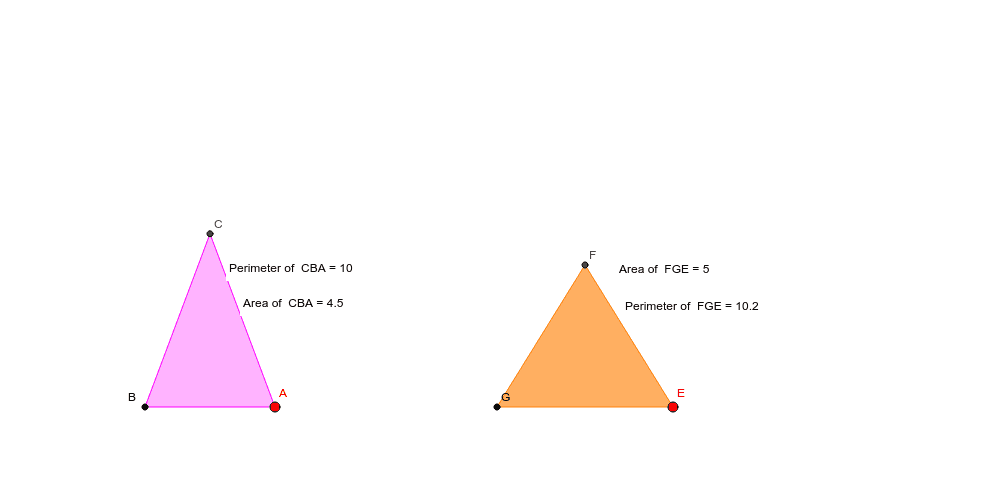
This example demonstrates how an isosceles triangle maximizes its area under a fixed perimeter and minimizes its perimeter under a fixed area. Key math concepts include isosceles triangle properties, perimeter and area formulas, and optimization principles. GeoGebra commands like Segment, Point, Midpoint, Mirror, Circle, Intersect, Polygon, Perimeter, and PointIn are used to construct and manipulate the triangle dynamically. Suitable for high school mathematics education to understand geometric optimization and parametric thinking.
GeoGebra Commands & Parameters
Segment((-1, 0), (-6, 0)) → aPoint(Segment[(-3.5, 0), (-1, 0)]) → AMidpoint(a) → A_1Mirror(A, A_1) → BCircle(A, b) → cCircle(B, b) → dIntersect(c, d, 2) → CPolygon(C, B, A) → poly1, b_1, c_1, b'Perimeter(poly1) → perimeterpoly1PointIn(poly1) → Pointpoly1_1PointIn(poly1) → Pointpoly1Point(xAxis) → DPoint(xAxis) → EMirror(E, D) → GPolygon(F, G, E) → poly2, e_1, f, e'PointIn(poly2) → Pointpoly2_1Perimeter(poly2) → perimeterpoly2PointIn(poly2) → Pointpoly2
AI Drawing Prompt Reference
Draw an isosceles triangle with its base on the x-axis and the apex above it. Start by drawing a line segment on the x-axis, then take a point on the left of the midpoint of this segment as one base vertex, and use reflection to get the other vertex. Connect these three points to form the isosceles triangle. Adjust the size of the triangle to observe changes in its perimeter and area, and understand the optimization principles.
The prompt above was compiled from the original drawing commands and is for reference only.