
Offset of an Astroid and a Safety Zone for a Mobile Device
Loading the math board and drawing, please wait…
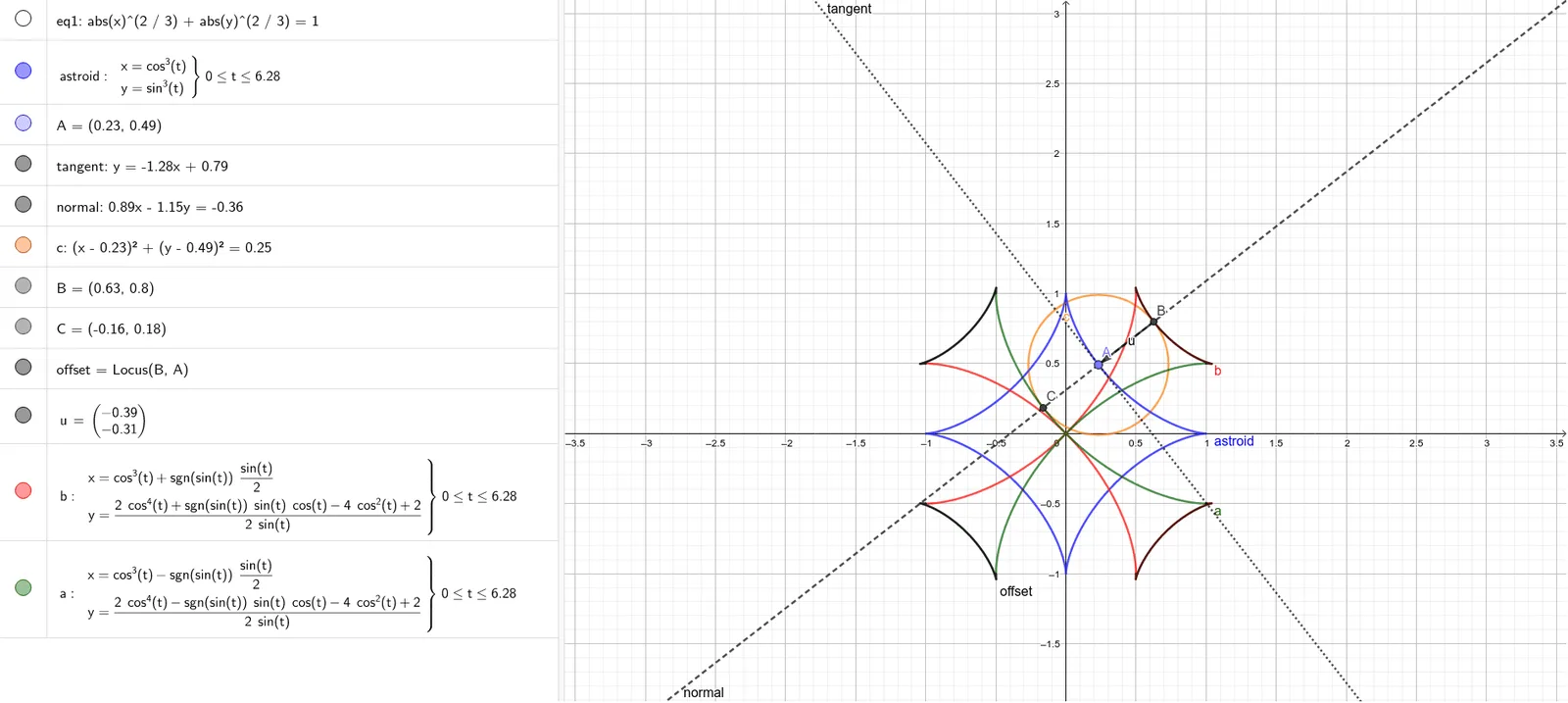
This example demonstrates how to offset an astroid by constructing its tangent and normal directions, then using those directions to form a surrounding “safety zone” (a buffer region) around a mobile device concept. It highlights key ideas from curve sketching and analytic geometry: tangent and normal geometry on parametric curves, vector-based direction and distance control, circle-based radius constraints, and locus construction to generate the resulting offset curve. In GeoGebra, the astroid (eq1) is created with CurveCartesian, a moving point A is taken on the curve, Tangent is used to obtain the tangent line, and OrthogonalLine constructs the normal. A Circle (c) sets the offset distance, Intersect finds the required points (B, C) on the constructed lines/constraints, and Locus together with Vector builds the offset curve (offset) as the parameter changes, visually encoding the normal vector and offset distances (u, b, a). Suitable for advanced secondary school or early university users studying curve geometry, transformations/offsets, and parametric curve visualization.
GeoGebra Commands & Parameters
CurveCartesian(cos(t)^(3), sin(t)^(3), t, 0, (2 * π)) → astroidPoint(astroid) → ATangent(A, astroid) → tangentOrthogonalLine(A, tangent) → normalCircle(A, 1 / 2) → cIntersect(c, normal) → B, CLocus(B, A) → offsetVector(B, A) → uCurveCartesian(cos(t)^(3) + (sgn(sin(t)) * sin(t) / 2), ((2 * cos(t)^(4)) + ((sgn(sin(t)) * sin(t)) * cos(t)) - (4 * cos(t)^(2)) + 2) / ((2 * sin(t))), t, 0, (2 * π)) → bCurveCartesian(cos(t)^(3) - (sgn(sin(t)) * sin(t) / 2), ((2 * cos(t)^(4)) - ((sgn(sin(t)) * sin(t)) * cos(t)) - (4 * cos(t)^(2)) + 2) / ((2 * sin(t))), t, 0, (2 * π)) → a
AI Drawing Prompt Reference
Draw an astroid curve, then take a point on it and construct the tangent and normal at that point. Use the normal as the center of a circle with radius 1/2, find the intersection points of the circle and the normal. Use these intersection points as starting points and the origin as the endpoint to draw vectors, then construct an offset curve using these vectors and intersection points to represent the safety zone.
The prompt above was compiled from the original drawing commands and is for reference only.