
Number Decomposition and Geometric Construction Practice (Question 9)
Loading the math board and drawing, please wait…
In collections
Grade 2 Eureka M4L6
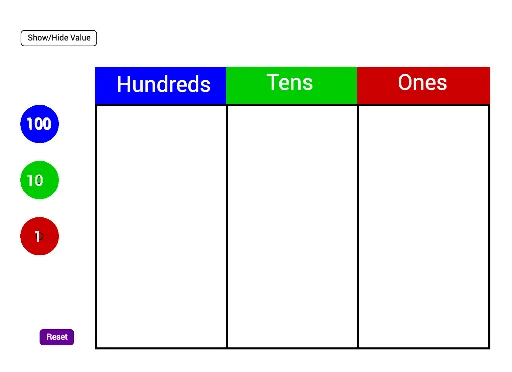
① This example is a comprehensive math exercise that combines the decomposition of natural numbers (e.g., splitting into 100s, 10s, and 1s) with the construction of various geometric figures (polygons, circumcircles, histograms) in GeoGebra, illustrating the connection between numbers and shapes. ② Core mathematical concepts include addition of natural numbers, ratios, place value (hundreds, tens, ones), dilation, normal distribution, circumscribed circles, and histogram data representation. ③ Construction highlights: From the summary, commands such as Polygon, Make100, Make10, Make1, and Sum are used; objects include multiple points (C_2, D_2, E_2, etc.), segments (c_5, d_5, etc.), polygons (poly1, poly2, poly3), and text labels (text51, etc.), showing dynamic linking between numeric values and geometric elements. ④ Suitable for upper elementary to middle school students, this activity reinforces number composition, ratio concepts, and introduces geometric construction and statistical charts, also useful for cross-curricular project-based learning.
GeoGebra Commands & Parameters
Polygon(C_2, D_2, E_2, F_2) → poly1, c_5, d_5, e_4, f_4Polygon(F_2, E_2, G_2, H_2) → poly2, f_5, e_5, g_4, h_4Polygon(H_2, G_2, I_2, J_2) → poly3, h_5, g_5, i_2, j_2Make100(A) → c, text1Make100(B) → d, text2Make100(C) → e, text3Make100(D) → f, text4Make100(E) → g, text5Make100(F) → h, text6Make100(G) → k, text7Make100(H) → p, text8Make100(I) → q, text9Make100(J) → r, text10Make10(K) → s, text11Make10(L) → t, text12Make10(M) → c_1, text13Make10(N) → d_1, text14Make10(O) → e_1, text15Make10(P) → f_1, text16Make10(Q) → g_1, text17Make10(R) → h_1, text18Make10(S) → k_1, text19Make10(T) → p_1, text20Make10(U) → q_1, text21Make10(V) → r_1, text22Make10(W) → s_1, text23Make10(Z) → t_1, text24Make10(A_1) → c_2, text25Make10(B_1) → d_2, text26Make10(C_1) → e_2, text27Make10(D_1) → f_2, text28Make10(E_1) → g_2, text29Make10(F_1) → h_2, text30Make1(G_1) → k_2, text31Make1(H_1) → p_2, text32Make1(I_1) → q_2, text33Make1(J_1) → r_2, text34Make1(K_1) → s_2, text35Make1(L_1) → t_2, text36Make1(M_1) → c_3, text37Make1(N_1) → d_3, text38Make1(O_1) → e_3, text39Make1(P_1) → f_3, text40Make1(Q_1) → g_3, text41Make1(R_1) → h_3, text42Make1(S_1) → k_3, text43Make1(T_1) → p_3, text44Make1(U_1) → q_3, text45Make1(V_1) → r_3, text46Make1(W_1) → s_3, text47Make1(Z_1) → t_3, text48Make1(A_2) → c_4, text49Make1(B_2) → d_4, text50Polygon(D_2, K_2, L_2, E_2) → poly4, d_6, k_4, l_2, e_6Polygon(E_2, L_2, M_2, G_2) → poly5, e_7, l_1, m_2, g_6Polygon(G_2, M_2, N_2, I_2) → poly6, g_7, m_1, n_2, i_1Sum(Sequence[IsInRegion[Element[listOnes, i], poly6], i, 1, 20]) → valueOnes
AI Drawing Prompt Reference
On a plane, first draw a closed quadrilateral by connecting four given points, then create a second and a third adjacent quadrilateral that follow the same point order and share the relevant vertices/edge connections, forming a strip of three connected quadrilateral tiles. Next, place text labels near the key vertices to represent number decomposition: add annotations for the hundreds part on several of those points, add annotations for the tens part on another set of points, and then add annotations for the ones part on the remaining set, keeping each text label aligned with its corresponding vertex to connect numeric decomposition with the geometric construction.
The prompt above was compiled from the original drawing commands and is for reference only.