
Geogebra Polygon Construction & Calculation Example
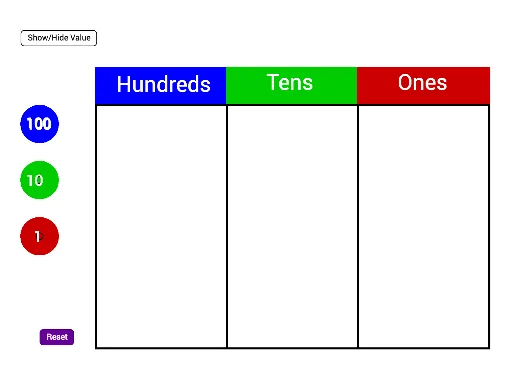
Loading the math board and drawing, please wait…
In collections
Grade 2 Eureka M4L6
This example demonstrates polygon construction and area calculation using GeoGebra; core math concepts include polygons, line segments, coordinate geometry, natural and real numbers; construction highlights from the summary involve commands like Polygon, Make100/Make10/Make1, Sum, and objects such as text series for visualization; suitable for middle school and above students learning polygon construction, coordinate calculations, and mathematical visualization.
GeoGebra Commands & Parameters
Polygon(C_2, D_2, E_2, F_2) → poly1, c_5, d_5, e_4, f_4Polygon(F_2, E_2, G_2, H_2) → poly2, f_5, e_5, g_4, h_4Polygon(H_2, G_2, I_2, J_2) → poly3, h_5, g_5, i_2, j_2Make100(A) → c, text1Make100(B) → d, text2Make100(C) → e, text3Make100(D) → f, text4Make100(E) → g, text5Make100(F) → h, text6Make100(G) → k, text7Make100(H) → p, text8Make100(I) → q, text9Make100(J) → r, text10Make10(K) → s, text11Make10(L) → t, text12Make10(M) → c_1, text13Make10(N) → d_1, text14Make10(O) → e_1, text15Make10(P) → f_1, text16Make10(Q) → g_1, text17Make10(R) → h_1, text18Make10(S) → k_1, text19Make10(T) → p_1, text20Make10(U) → q_1, text21Make10(V) → r_1, text22Make10(W) → s_1, text23Make10(Z) → t_1, text24Make10(A_1) → c_2, text25Make10(B_1) → d_2, text26Make10(C_1) → e_2, text27Make10(D_1) → f_2, text28Make10(E_1) → g_2, text29Make10(F_1) → h_2, text30Make1(G_1) → k_2, text31Make1(H_1) → p_2, text32Make1(I_1) → q_2, text33Make1(J_1) → r_2, text34Make1(K_1) → s_2, text35Make1(L_1) → t_2, text36Make1(M_1) → c_3, text37Make1(N_1) → d_3, text38Make1(O_1) → e_3, text39Make1(P_1) → f_3, text40Make1(Q_1) → g_3, text41Make1(R_1) → h_3, text42Make1(S_1) → k_3, text43Make1(T_1) → p_3, text44Make1(U_1) → q_3, text45Make1(V_1) → r_3, text46Make1(W_1) → s_3, text47Make1(Z_1) → t_3, text48Make1(A_2) → c_4, text49Make1(B_2) → d_4, text50Polygon(D_2, K_2, L_2, E_2) → poly4, d_6, k_4, l_2, e_6Polygon(E_2, L_2, M_2, G_2) → poly5, e_7, l_1, m_2, g_6Polygon(G_2, M_2, N_2, I_2) → poly6, g_7, m_1, n_2, i_1Sum(Sequence[IsInRegion[Element[listOnes, i], poly6], i, 1, 20]) → valueOnes
AI Drawing Prompt Reference
Draw a composite shape made of several quadrilaterals arranged in a stepped or grid-like pattern. Start by constructing three adjacent quadrilaterals, each formed by connecting four vertices in order, with neighboring quadrilaterals sharing a common side to create a continuous region. Then, add a series of numeric labels around or inside the shape, representing different place values such as hundreds, tens, and ones, to illustrate numerical decomposition in coordinate or area calculations. Place all labels as text near corresponding vertices or edges, keeping the layout clear for observing the relationship between polygon area and coordinate values.
The prompt above was compiled from the original drawing commands and is for reference only.