
New Hexagon Exploration
Loading the math board and drawing, please wait…
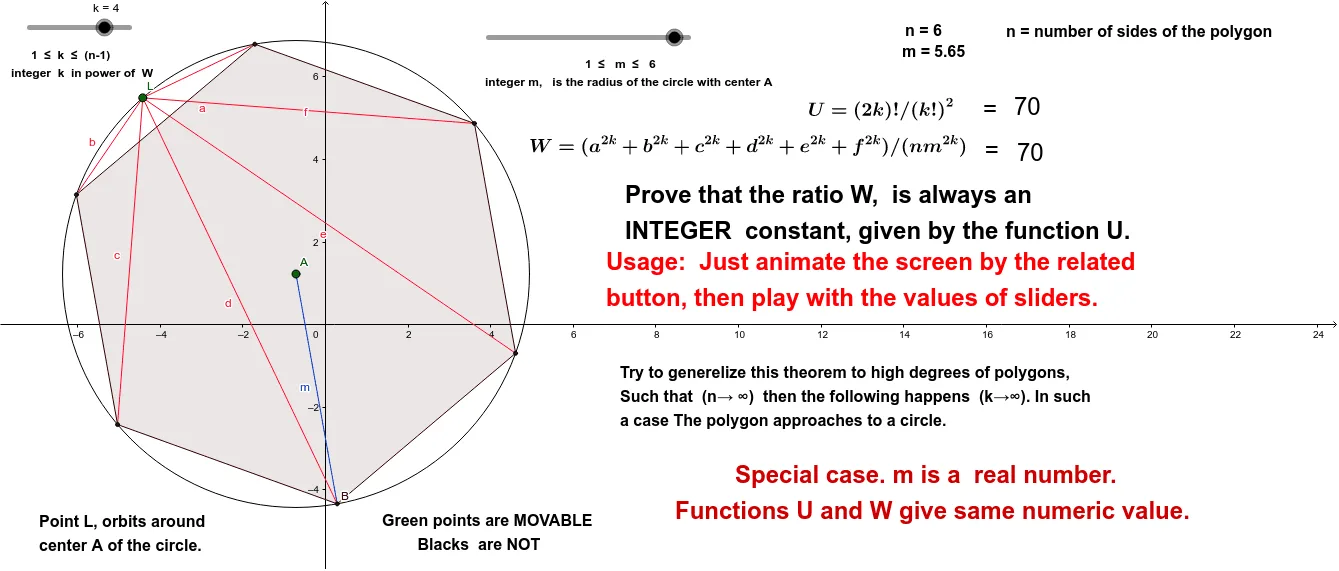
This example demonstrates new geometric concepts. Using GeoGebra commands such as Circle, Point, Segment, Rotate, Line, Intersect, etc., a hexagon is constructed and its geometric properties are explored. Suitable for middle school and above students to learn about geometric transformations and polygon characteristics.
GeoGebra Commands & Parameters
Circle(A, m_0) → e_1Point(e_1) → BSegment(A, B) → mRotate(B, 60°, A) → B'Rotate(B', 60°, A) → B''Rotate(B'', 60°, A) → B'''Rotate(B''', 60°, A) → KRotate(B, (-(60°)), A) → B'_1Point(e_1) → LSegment(L, K) → bSegment(L, B''') → aSegment(L, B'') → fSegment(L, B') → eSegment(L, B'_1) → cSegment(L, B) → dCircle(C, m_0) → c_1Point(c_1) → DLine(D, C) → j_1Intersect(c_1, j_1, 2) → IAttachCopyToView(PolyLine[(12.100000000000005,0.2599999999999979), (NaN,NaN), (12.100000000000005,0.2599999999999979), (12.080000000000004,0.19999999999999787), (12.020000000000005,0.2199999999999979), (12.020000000000005,0.29999999999999793), (12.020000000000005,0.379999999999998), (12.020000000000005,0.4599999999999981), (12.080000000000004,0.41999999999999804), (12.140000000000004,0.359999999999998), (12.160000000000004,0.29999999999999793), (12.160000000000004,0.2199999999999979), (12.140000000000004,0.15999999999999784), (12.060000000000004,0.15999999999999784), (12.000000000000004,0.17999999999999786), (11.960000000000004,0.2399999999999979), (11.960000000000004,0.31999999999999795), (11.960000000000004,0.399999999999998), (12.040000000000004,0.399999999999998), (12.140000000000004,0.399999999999998), (12.220000000000004,0.399999999999998), (12.260000000000005,0.33999999999999797), (12.280000000000005,0.2599999999999979), (12.280000000000005,0.17999999999999786), (12.220000000000004,0.2599999999999979), (12.220000000000004,0.33999999999999797), (12.200000000000005,0.4599999999999981), (12.160000000000004,0.5399999999999981), (12.120000000000005,0.5999999999999982), (12.040000000000004,0.5999999999999982), (11.960000000000004,0.5799999999999982), (11.880000000000004,0.5999999999999982), (11.880000000000004,0.6799999999999982), (11.800000000000004,0.7399999999999982), (11.880000000000004,0.6799999999999982), (11.920000000000005,0.6199999999999982), (11.940000000000005,0.5599999999999982), (12.040000000000004,0.5399999999999981), (12.160000000000004,0.49999999999999806), (12.220000000000004,0.4599999999999981), (12.180000000000005,0.399999999999998), (12.140000000000004,0.33999999999999797), (12.180000000000005,0.399999999999998), (12.240000000000004,0.41999999999999804), (12.280000000000005,0.33999999999999797), (12.280000000000005,0.2599999999999979), (12.320000000000004,0.15999999999999784), (12.340000000000005,0.2199999999999979), (12.260000000000005,0.2199999999999979), (12.180000000000005,0.2199999999999979), (12.100000000000005,0.19999999999999787), (12.000000000000004,0.19999999999999787), (11.900000000000004,0.19999999999999787), (11.860000000000005,0.2599999999999979), (11.840000000000005,0.31999999999999795), (11.800000000000004,0.379999999999998), (11.880000000000004,0.379999999999998), (11.940000000000005,0.33999999999999797), (12.000000000000004,0.29999999999999793), (12.060000000000004,0.359999999999998), (12.040000000000004,0.2799999999999979), (NaN,NaN), (7.460000000000003,-1.7000000000000035), true], 1, (-5.120000000000001, -5.000000000000006), (18.720000000000006, 6.620000000000003), (0, 581), (1192, 0)) → stroke1Segment(A, B') → hSegment(A, B'') → iSegment(A, B''') → jSegment(K, A) → lSegment(A, B'_1) → pPolygon(K, B''', B'', B', B, B'_1) → poly1, k_1, b''', b'', b', b_1, b'_1
AI Drawing Prompt Reference
Draw a regular hexagon by starting at a central point and rotating each vertex by 60 degrees to create the next, then connect adjacent vertices with line segments to form the hexagon. Also, draw line segments from the center to each vertex and connect the center to each vertex to highlight the symmetry and rotational properties of the hexagon.
The prompt above was compiled from the original drawing commands and is for reference only.