
Nested Fibonacci Prisms Construction
Loading the math board and drawing, please wait…
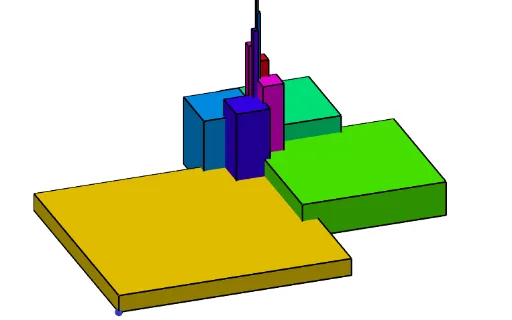
This example demonstrates how to build an eye-catching “nested Fibonacci prisms” geometric form by iteratively combining rotations, polygonal faces, and circular arcs. It visually connects the Fibonacci-type growth of a sequence to the scaling and placement of successive nested prisms. Key mathematical ideas include Fibonacci sequences (via iterative sequence generation), geometric transformation (Rotate), and circle-based geometry (Circle and CircleArc) that supplies boundary shapes and constraints. Construction highlights: Intersect is used to compute key vertices from intersecting geometric entities; Polygon and Segment define the prism-like edges and faces; Rotate generates repeated, nested orientations; Polynomial supports derived relationships or curve definitions; Sequence provides the iterative parameters that drive nesting; and Element manages the dependence between constructed objects (tracking points/parameters across iterations). Multiple auxiliary objects (including function-like components and constants such as phi) help encode angles/scales and finalize the overall nested structure. Suitable for high-school to early university levels—especially lessons on sequences, geometric construction, and visualizing connections between algebraic growth and 3D-inspired geometry.
GeoGebra Commands & Parameters
Intersect(xAxis, yAxis) → JPolynomial(l2) → pPolygon(A, B, 4) → poly1, f, g, h, i, C, DSegment(G, A) → kSegment(C, F) → jIntersect(j, k) → HRotate(H, (p(Anime) * 360°), I) → ECircle(I, H) → cRotate(H, (Anime * 360°), I) → H'Sequence(Rotate[Dilate[poly1, (1 / phi)^(k), E], (k * 90°), E], k, 0, b) → l1Element(l1, A1) → B1Element(l1, A2) → B2Element(l1, A3) → B3Element(l1, A4) → B4Element(l1, A5) → B5Element(l1, A6) → B6Element(l1, A7) → B7Element(l1, A8) → B8Element(l1, A9) → B9Element(l1, A10) → B10Element(l1, A11) → B11Element(l1, A12) → B12Element(l1, A13) → B13Element(l1, A14) → B14Element(l1, A15) → B15Element(l1, A16) → B16Element(l1, A17) → B17Element(l1, A18) → B18Element(l1, A19) → B19Element(l1, A20) → B20Element(l1, A21) → B21Element(l1, A1) → C1Element(l1, A3) → C3Element(l1, A4) → C4Element(l1, A5) → C5Element(l1, A6) → C6Element(l1, A7) → C7Element(l1, A8) → C8Element(l1, A9) → C9Element(l1, A10) → C10Element(l1, A11) → C11Element(l1, A12) → C12Element(l1, A13) → C13CircleArc(C, D, B) → dSequence(Rotate[Dilate[C, (1 / phi)^(k), E], (k * 90°), E], k, 0, b) → l3Sequence(Rotate[Dilate[D, (1 / phi)^(k), E], (k * 90°), E], k, 0, b) → l4Sequence(Rotate[Dilate[B, (1 / phi)^(k), E], (k * 90°), E], k, 0, b) → l5Sequence(CircleArc[Element[l3, i], Element[l4, i], Element[l5, i]], i, 1, Length[l4]) → l6Sequence(Prism[Element[l1, i], (0.15 * i)], i, 1, Length[l1]) → l1cubeElement(l1cube, A1) → D1Element(l1cube, A2) → D2Element(l1cube, A3) → D3Element(l1cube, A4) → D4Element(l1cube, A5) → D5Element(l1cube, A6) → D6Element(l1cube, A7) → D7Element(l1cube, A8) → D8Element(l1cube, A9) → D9Element(l1cube, A10) → D10Element(l1cube, A11) → D11Element(l1cube, A12) → D12Element(l1cube, A13) → D13Element(l1cube, A14) → D14Element(l1cube, A15) → D15Element(l1, A2) → C2Sequence(Element[l3, i] + (0, 0, (0.15 * i)), i, 1, b) → l3bSequence(Element[l4, i] + (0, 0, (0.15 * i)), i, 1, b) → l4bSequence(Element[l5, i] + (0, 0, (0.15 * i)), i, 1, b) → l5bSequence(CircleArc[Element[l3b, i], Element[l4b, i], Element[l5b, i], xOyPlane], i, 1, Length[l4b]) → l7
AI Drawing Prompt Reference
Draw a set of nested Fibonacci prisms sharing a common rotation center. Start with a regular quadrilateral as the base prism, then repeatedly scale it down by the golden ratio and rotate it by 90 degrees around the center, creating a spiral stack of prisms. Each prism's vertices are derived from the base quadrilateral through scaling and rotation, with connecting segments highlighting the edges. Add a circular arc on one face of the base prism, and replicate this arc across all scaled and rotated prisms to form a continuous spiral curve. The overall composition is symmetric, rhythmic, and visually striking, illustrating the connection between sequence growth and geometric transformation.
The prompt above was compiled from the original drawing commands and is for reference only.