
Mesh Generation on a Pentakis Dodecahedron and Its Dual Truncated Icosahedron
Loading the math board and drawing, please wait…
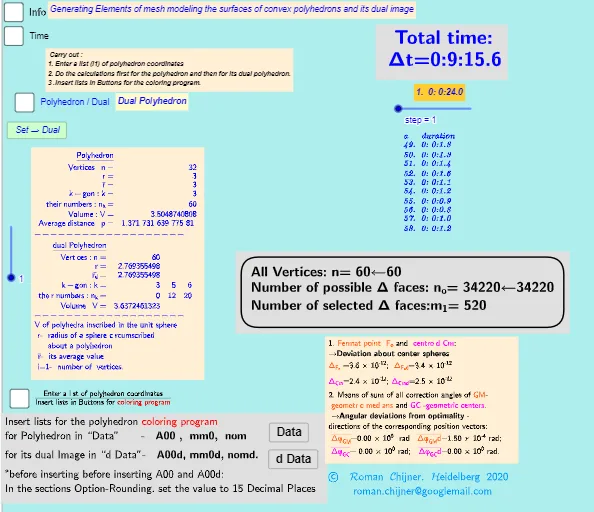
This GeoGebra example demonstrates how to generate and visualize mesh elements on the surfaces of a Pentakis Dodecahedron (V=32) and its dual solid, the Truncated Icosahedron (V=60). It highlights the relationship between a polyhedron and its dual through surface discretization and geometry-based volume-related quantities. Key concepts include solid geometry, dual polyhedra, surface meshing/discretization, geometric transformations in 3D, and iterative construction driven by sequences and indexing. Construction-wise, the workflow uses Text and TableText for labeling, Sequence together with Div to parameter-split the surface into elements, and If to conditionally include or filter mesh parts. Length is used to compute geometric measures from constructed objects, while IndexOf and Element retrieve specific items from lists/collections. Max provides control for bounds or comparisons during the build, and the various indexed objects (e.g., parameters/indices like i, n, i1–i3 and mesh/volume-related objects such as Volsphere, Vol, Vol_r, Volsphere_d) organize the final display. Suitable for secondary–undergraduate learners, for lessons on geometric construction, 3D visualization, and how discretized models can support volume-style computations in mathematics education.
GeoGebra Commands & Parameters
Text("" + p) → txt_pSum(Flatten[Sequence[Append[Sequence[Element[txt_p, i], i, m01(k), m02(k)], " "], k, 1, 5]]) → txtUm1If(bu0, A00, A00d) → A00_0Length(A00_0) → nLength(l2) → läl2Sequence(sgn(Determinant[{Element[A00_0, i1] - Element[A00_0, j], Element[A00_0, i2] - Element[A00_0, j], Element[A00_0, i3] - Element[A00_0, j]}]), j, 1, n) → l01Length(A00d) → zzzSum(Zip[(T * F), T, SysTimeAkt1, F, {1, 1000, 60000, 3600000, 86400000}]) → TimeAbs1Sum(Zip[(T * F), T, SysTimeAkt2, F, {1, 1000, 60000, 3600000, 86400000}]) → TimeAbs2Div(TimeRelab, 3600) → HDiv(TimeRelab - (H * 3600), 60) → MElement(ZwZeit, step) → text10TableText({Append["a duration", Last[ZwZeit, Min[10, Length[ZwZeit]]]]}, "v") → text2cLength(A00) → lm1If(Length[Unique[l01 \ {0}]] ≟ 1, 7, -7) → a7Sum(Zip[(T * F), T, SysTimeAkt0, F, {1, 1000, 60000, 3600000, 86400000}]) → TimeAbs0Div(TimeRelab0, 3600) → H0Div(TimeRelab0 - (H0 * 3600), 60) → M0Text("" + (TimeRelab0 - (H0 * 3600) - (M0 * 60))) → S0aText("" + (TimeRelab - (H * 3600) - (M * 60))) → SIndexOf(".", S) → indexIndexOf(".", S0a) → indexaFirst(S, index + 1) → txtSFirst(S0a, indexa + 1) → txtS0aIf(bu0, " ", "d") → txtbuoMax(Length[A00], Length[A00d]) → maxläElement(A00, 24) → m11TableText({{"\underline{Polyhedron}"}, Append["Vertices: n=", {Length[A00]}], Append["r=", {r}], Append["\bar{r}=", {r_m}], Append["k-gon : k=", mm5a], Append["their\; numbers: n_k=", mm7a], Append["Volume: V=", {Vol_r}], Append["Average\; distance: p=", {txtUm1}]}, "hr ") → text7TableText({{"\underline{dual\;Polyhedron}"}, Append["Vertices: n=", {Length[A00d]}], Append["r=", {r_d}], Append[" \bar{r_d}= ", {r_md}], Append["k-gon : k=", mm5ad], Append["their\; numbers: n_k=", mm7ad], Append["Volume: V=", {Vold_r}]}, "hr ") → text20
AI Drawing Prompt Reference
In 3D, construct and visualize a dual pair of polyhedra: a pentakis dodecahedron and its dual, the truncated icosahedron. First define each solid by its vertex set, then discretize their surfaces by splitting the faces into mesh elements using parameters, keeping consistent indexing so particular mesh parts can be selected or filtered. Next compute and display geometry-related quantities tied to the discretization and volume-style measures for both solids, such as the number of vertices, the volume V, and an average-distance metric. Present the two mesh-generated solids side by side in one view with clear text annotations for the computed values and corresponding k-gon/numbering information.
The prompt above was compiled from the original drawing commands and is for reference only.