
Constructing Ruled Surfaces with Geometric Transformations
Loading the math board and drawing, please wait…
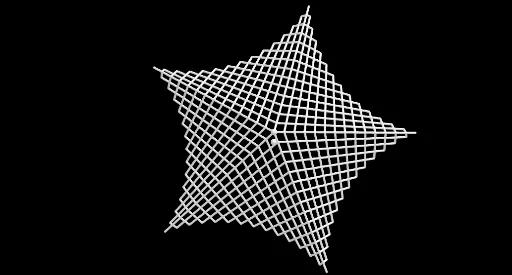
This example demonstrates how to build and visualize ruled surfaces by generating a family of straight “generator” segments that sweep through space. The key mathematical ideas are ruled surfaces (surfaces formed by connecting points of two sets with straight lines), spatial geometry, and metric relationships related to triangle geometry and length/distance reasoning (including Pythagorean-theorem style measures that guide construction). The construction uses GeoGebra commands listed in the build summary: Line, Circle, Point, Rotate, Sequence, Segment, Mirror, and Join. These create base curves and circles, generate key control points (e.g., a, R, A, g, c, etc.), use Rotate and Sequence to position points parametrically, form the generator segments with Segment, and employ Mirror plus Join to combine symmetric/connected components into the final surface geometry (objects such as D, l2, l4, l6 and intermediate constructs like l6', f, and image1). Suitable for high-school to early university geometry lessons, especially for teaching/learning 3D surface generation through dynamic visualization.
GeoGebra Commands & Parameters
Line(A, zAxis) → gCircle(A, R, xOyPlane) → cPoint(c) → CRotate(C, a, A) → BSequence(Rotate[B, k, g], k, 0, (2 * π / n), 1 / (m + n)) → l6Point(g) → DSequence(Translate[B, Vector[(i * Vector[B, D])]], i, 0, 1, 1 / Length[l6]) → l2Rotate(B, (2 * π / n), A) → B'Sequence(Translate[D, Vector[(i * Vector[D, B'])]], i, 0, 1, 1 / Length[l6]) → l4Segment(B', B) → fMirror(l6, f) → l6'Sequence(Segment[Element[l6', i], Element[l2, i]], i, 1, Length[l2]) → l3Sequence(Segment[Element[l6', i], Element[l4, i]], i, 1, Length[l4]) → l5Join(Sequence[Rotate[l5, i, g], i, 0, (2 * π), (2 * π / n)]) → l1Sequence(Rotate[l3, i, g], i, 0, (2 * π), (2 * π / n)) → l7
AI Drawing Prompt Reference
Create a 3D construction starting from a fixed point and an axis line as the spatial reference. Draw a circle in a plane through the center with a given radius, mark a point on the circle, then rotate this point around the center to obtain another key point. Using parameterized stepping around the circle, generate families of points that sweep along the circular direction, and use translations guided by direction vectors and the relative lengths of the generated point families to place corresponding points on two sides. Connect the rotated endpoints to form a generator reference segment, then create a reflected copy of one point family with respect to that reference segment. Finally, connect corresponding points in each family pair to form the ruled generator segments, and rotate the resulting set through a full turn subdivided by the chosen number of steps so the collection sweeps into the complete ruled surface appearance.
The prompt above was compiled from the original drawing commands and is for reference only.