
Multiplication of Imaginary Points
Loading the math board and drawing, please wait…
In collections
Imaginary Multiplication
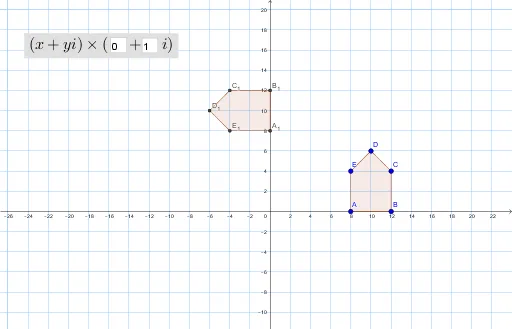
This example demonstrates the multiplication of imaginary points in geometric contexts. Key mathematical concepts include complex number operations, geometric transformations, and coordinate systems. Construction involves using GeoGebra commands such as Polygon, Textfield, and InputBox to create polygons and annotations. Suitable for high school students or math enthusiasts to understand the geometric significance of complex number multiplication and drawing techniques.
GeoGebra Commands & Parameters
Polygon(A, B, C, D, E) → poly1, a, b, c, d, eTextfield(a_1) → InputBox1Textfield(b_1) → InputBox2Polygon({A_1, B_1, C_1, D_1, E_1}) → poly2
AI Drawing Prompt Reference
Draw a pentagon with five vertices connected in order. Place two input boxes nearby for entering values. Then, apply a transformation to map the original five vertices to new positions, and connect these new points to form a second pentagon. The scene shows the correspondence between the two pentagons, illustrating the geometric effect of complex number multiplication.
The prompt above was compiled from the original drawing commands and is for reference only.