
Area Grid with Length and Width: Visualizing Multiplication
Loading the math board and drawing, please wait…
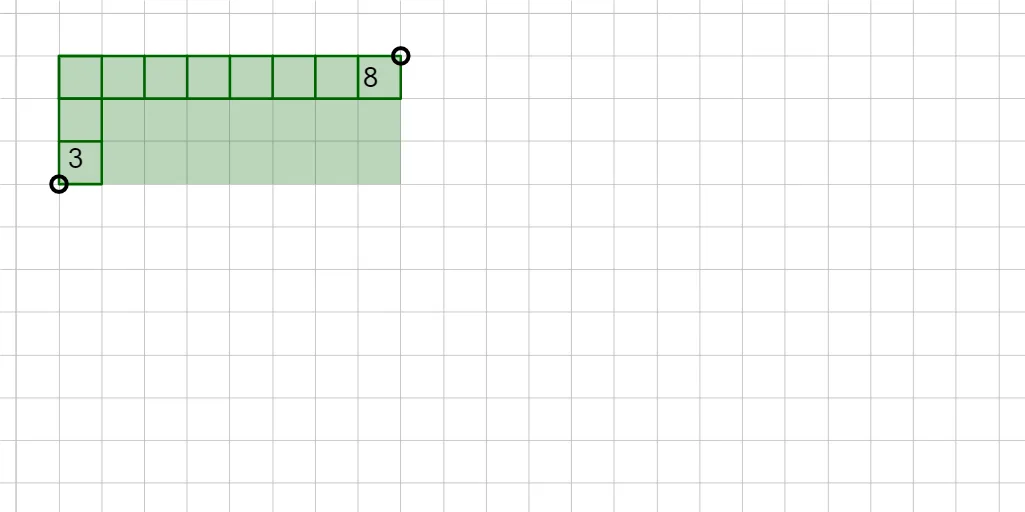
① This interactive GeoGebra example demonstrates how the area of a rectangle is calculated by multiplying its length and width, using a dynamic grid of unit squares. ② Core mathematical concepts include area, multiplication of natural numbers, and the relationship between rectangular and parallelogram areas. ③ Construction details: The grid is built using GeoGebra commands such as Ray, Point, Polygon, and Sequence; the Area command computes the total area, while sliders control the number of rows and columns, dynamically updating the grid and displaying the area value via text objects. ④ Suitable for upper elementary to middle school students learning area concepts, multiplication, and geometric construction, as well as for classroom demonstrations or self-guided exploration of area formulas.
GeoGebra Commands & Parameters
Ray(A, (x(A), y(A) - 1)) → fRay(A, (x(A) + 1, y(A))) → gPoint(g) → BPoint(f) → CPolygon(A, C, D, B) → q1, h, i, j, kSequence(Segment[(x(A), y(A) - k), (x(A) + Min[1, x(B) - x(A)], y(A) - k)], k, 1, y(A) - y(C) - 1) → l1Polygon({A, F, E, C}) → rowsSequence(Segment[(x(A) + k, y(A)), (x(A) + k, y(A) - Min[1, y(A) - y(C)])], k, 2, x(B) - x(A) - 1) → l2Polygon({A, B, G, H}) → colsArea(cols) → numColsArea(rows) → numRows