
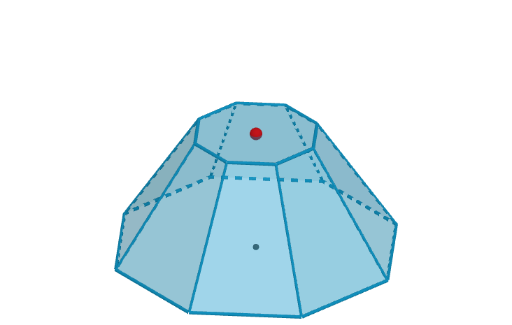
Interactive Regular Truncated Pyramid (Frustum) 3D Modeling
Loading the math board and drawing, please wait…
In collections
The GeoGebra's Toolbox for Teachers and Students
This GeoGebra example demonstrates how to construct an interactive 3D model of a regular truncated pyramid (frustum of a pyramid). The core mathematical concepts include: geometric definition of a frustum, similarity between top and bottom regular polygons, parallel relationship of lateral edges, and volume calculation. Construction highlights: Using Sequence command to generate regular polygon vertices, Polygon command to draw top and bottom bases, Pyramid command to construct the frustum, with Slider controls for parametric modeling (number of sides n, bottom radius R, top radius r, height h, etc.). The construction also utilizes Circle, Point, IntersectPath, and Zip commands for precise spatial geometry. This example is suitable for high school solid geometry teaching, demonstrating the relationship between frustum and pyramid, exploring cross-sectional properties, calculating lateral surface area and volume, and serving as a visual aid for integral methods in volume calculation for calculus courses.
GeoGebra Commands & Parameters
Sequence(Rotate[K + (r, 0), ((k * 2) * pi / n), K], k, 0, n) → verticesPolygon(vertices) → poli1Circle(K, r, xOyPlane) → eSequence(Segment[Element[vertices, k], Element[vertices, k + 1]], k, 1, n) → sidesBasePyramid(poli1, P) → b, face10, edge15, edge16, edge17, edge18, edge19, edge20, edge21, edge1, edge2, face12, face13, face14, face15, face16, face11, face1, face2Segment((0, 0, 0), P - (0, 0, 0.1)) → hPoint(h) → VIntersectPath(p, b) → topPoly, A, f, g, i, j, k, l, m, q, s, B, C, D, E, F, G, H, IZip(Segment[A, B], A, vertices, B, vertTop) → edgesSequence(Polygon[{vertices(t), vertices(t + 1), vertTop(t + 1), vertTop(t)}], t, 1, n) → faces
AI Drawing Prompt Reference
Create an interactive 3D model of a regular truncated pyramid (frustum), showing top and bottom bases as regular polygons with adjustable number of sides, radiuses, and height. Use sequence to generate vertices, draw the bases, construct the frustum, and define lateral faces with parallel edges. The model should be dynamic, allowing manipulation of parameters to explore geometric properties and volume calculations, suitable for teaching solid geometry and calculus concepts.
The prompt above was compiled from the original drawing commands and is for reference only.