
More Messing with Surfaces and Splines
Loading the math board and drawing, please wait…
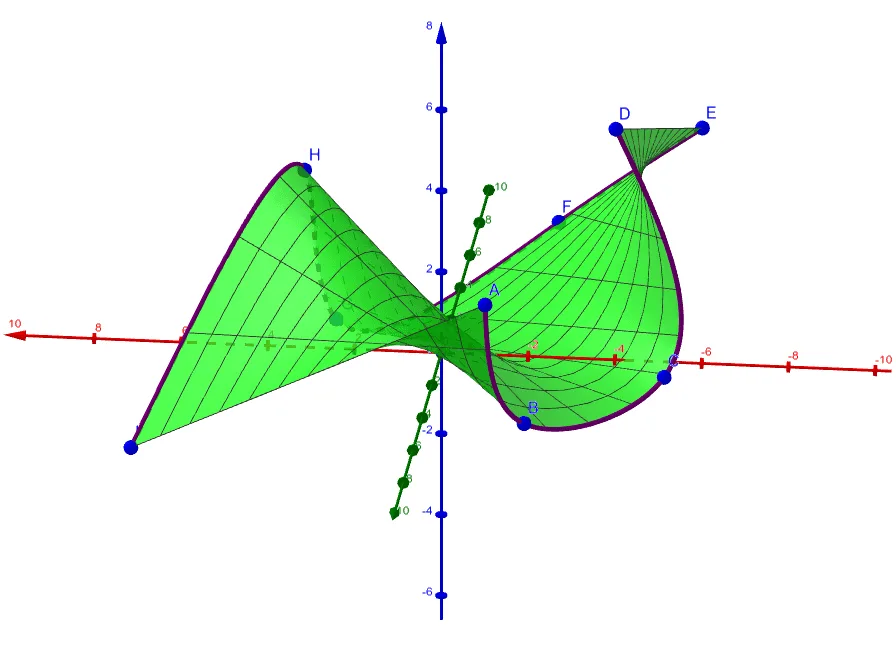
① This example demonstrates how to construct dynamic surfaces using Spline and Surface commands in GeoGebra, with multiple control points, and shows their connections to basic geometric elements like cones, circles, and parallelograms. ② Core mathematical concepts include parametric surfaces, spline interpolation, geometric transformations, and topological relationships among multiple objects in 3D space. ③ Construction highlights: from the summary, commands Spline and Surface are used, involving objects A through I and auxiliary objects a, b, c; these points serve as control points or path definitions for spline curves, which then generate surfaces; basic shapes like cones, circles, and parallelograms are also included, possibly for comparison or as cross-sections. ④ Suitable for high school to university-level mathematics teaching, especially in analytic geometry, calculus, or introductory computer graphics, helping students intuitively understand parametric surfaces and spline properties, and also useful for artistic surface modeling exploration.
GeoGebra Commands & Parameters
Spline({A, B, C, D}, 3) → aSpline({E, F, G, H, I}, 3) → bSurface((u * x(a(t))) + ((1 - u) * x(b(1 - t))), (u * y(a(t))) + ((1 - u) * y(b(1 - t))), (u * z(a(t))) + ((1 - u) * z(b(1 - t))), t, 0, 1, u, 0, 1) → c