
Module 7: Rhombi and Trapezoids from Hexagonal Cuts
Loading the math board and drawing, please wait…
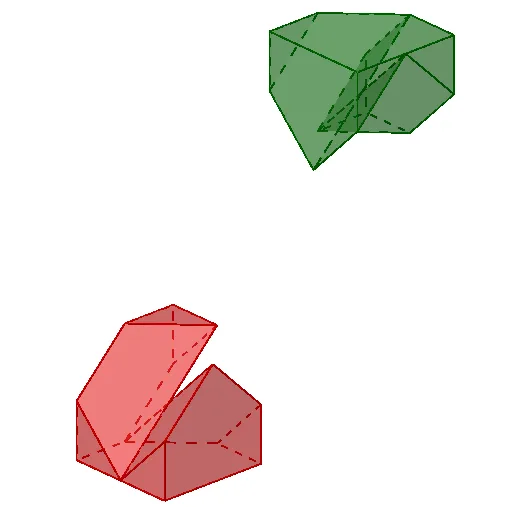
This example demonstrates how three hexagonal cross-sections (cuts) in solid geometry produce recognizable quadrilateral patterns such as rhombi and trapezoids. By organizing vertices through consistent geometric transformations, it reveals the underlying symmetry and structural constraints that make these quadrilaterals appear as the cuts vary. Key concepts include 3D cross-sections, relationships tied to regular polygon geometry, classification of quadrilaterals (rhombus and trapezoid), and the use of rigid motions (rotation/translation) to build a coherent configuration. Construction highlights in GeoGebra: Circle and Point define foundational circles and key centers (e.g., r and O), while Line and Segment mark edges and intersections. Rotate and Translate generate the required transformed positions; Midpoint provides midpoint constraints needed for the cross-section geometry. A Cube is used to create the 3D object, and Polygon connects the computed cross-section vertices (e.g., faces labeled like caraABCD, caraADHE, caraABFE, caraBCGF, caraCDHG, caraEFGH). The corresponding “arista*” edges then visually form the rhombus/trapezoid structures. Suitable for advanced middle school through introductory university geometry, especially for teaching and exploring solid geometry sections and transformation-based reasoning.
GeoGebra Commands & Parameters
Circle(O, r, xOyPlane) → cPoint(c) → A1Rotate(A1, π / 2, O) → A2Midpoint(A1, A2) → B5Cube(A1, A2, zAxis) → a, A3, caraBCGF, caraCDHG, caraEFGH, aristaAD_1, aristaAB, aristaBC_1, aristaCD, aristaAE_1, aristaDH, arista, A4, aristaEF, aristaBF, aristaFG_1, aristaCG_1, aristaGH_1, A5, A6, A7, A8, caraABCD, caraADHE, caraABFEMidpoint(A6, A2) → B2Polygon(B5, B2, A2) → t3, a2, s_2, t_2Midpoint(A4, A8) → B4Midpoint(A1, A7) → centroMidpoint(A3, A7) → B3Midpoint(A1, A5) → B1Polygon(B5, B1, A1) → t1, a1, n_2, p_2Midpoint(A3, A4) → B7Polygon(A3, B3, B7) → t4, i_3, j_3, k_3Midpoint(A7, A8) → BCPolygon(BC, B4, A8) → t5, l_3, m_3, n_3Midpoint(A4, A1) → B8Polygon(A3, A2, A1, B8, B7) → p2, j_4, k_4, l_4, m_4, n_4Polygon(centro, BC, B4, B8) → c8, s_3, t_3, a_3, b_3Midpoint(A8, A5) → BDPolygon(B8, A1, B1, BD, A8, B4) → p3, c_3, d_3, e_3, f_4, g_4, h_4Polygon(BD, A8, BC) → t2, q_2, r_2, a8Polygon(B1, BD, BC, B5) → c5, j_2, k_2, l_2, m_2Midpoint(A6, A7) → BBPolygon(B8, BB, B3, B7) → c7, p_3, q_3, r_3, i_4Polygon(A2, A3, B3, BB, B2) → p1, e_2, a3, f_3, g_3, h_3Polygon(B5, B2, BB, centro) → c6, a_2, b_2, c_2, d_2Midpoint(A2, A3) → B6Vector(A5, A8) → u4Polygon(A2, A3, A8, A5) → c4, k_1, l_1, m_1, n_1Midpoint(A5, A6) → BAPolygon(A4, A1, A6, A7) → c3, g_1, h_1, i_1, j_1Polygon(A1, A3, A7, A5) → c2, q, s, e, f_1Vector(B1, B3) → u1Vector(B1, B3) → u3Sequence(Max[0, Min[1, t - s]], s, 0, 10) → slLine(A5, A3) → kSegment(A7, A1) → hMidpoint(A1, A6) → O1Midpoint(A2, A7) → O2Midpoint(A3, A8) → O3Midpoint(A8, A1) → O4Midpoint(A5, A7) → O5Vector(B8, BB) → u2Polygon(A4, A2, A6, A8) → c1, l, m, n, pPolygon(A4, BD, A6, B6) → c3_1, e_1, f_2, g_2, h_2Translate(c1, u1) → c1'Polygon(A7, BD, A1, B6) → c2_1, f, g, i, jTranslate(c3, u3) → c3'Translate(c2, u2) → c2'Translate(c1', Vector[((-sl(1)) * u1)]) → c1''Translate(c2', Vector[((-sl(2)) * u2)]) → c2''Translate(c3', Vector[((-sl(3)) * u3)]) → c3''Line(B1, B2) → t_1Translate(c4, u4) → c4'Translate(c4', Vector[((-sl(4)) * u4)]) → c4''Vector(A1, A8) → vLine(O1, O3) → bcLine(O5, O) → bbLine(O2, O4) → bdVector(A2, A8) → v3Vector(BC, B5) → v1_1Vector(A6, A1) → v2_1Polygon(BC, B3, B6, B5, B1, BD) → po1, p_1, b3, b6, b5, b1, q_1Polygon(BC, B4, B8, B5, B2, BB) → po2, r_1, b4, b8, s_1, b2, a_1Polygon(BB, B3, B7, B8, B1, BA) → po3, b_1, c_1, b7, d_1, i_2, baTranslate(po1, u1) → po1'Translate(po2, u2) → po2'Translate(po3, u1) → po3'Translate(po1', Vector[((-sl(1)) * u1)]) → po1''Translate(po2', Vector[((-sl(2)) * u2)]) → po2''Translate(po3', Vector[((-sl(3)) * u3)]) → po3''Translate(ll1, u5) → ll2Rotate(ll2, (sl(6) * π), bd) → ll3Rotate(ll3, (sl(7) * π / 2), bb) → ll4Translate(ll2, Vector[((-sl(10)) * v)]) → ll5Translate(ll4, Vector[(sl(10) * v)]) → ll6
AI Drawing Prompt Reference
Draw a hexagonal prism and cut out rhombi and trapezoids from three different hexagonal cross-sections. Start by drawing the hexagonal base and sides of the prism, then use rotation and midpoints to construct the vertices of the rhombi and trapezoids. Finally, connect these vertices to form the rhombi and trapezoids.
The prompt above was compiled from the original drawing commands and is for reference only.