
Modular Section 3: Triangles
Loading the math board and drawing, please wait…
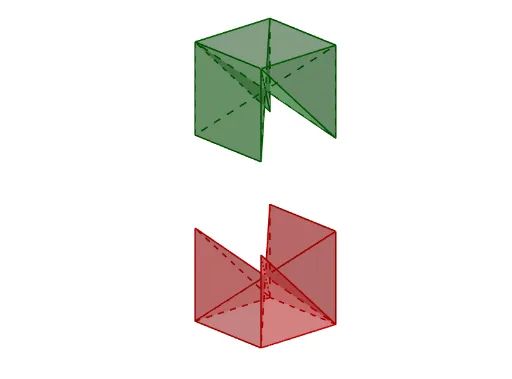
This example demonstrates the modular section of a cube, focusing on the geometric properties of triangles. Key mathematical concepts include triangles, solid geometry, and trigonometry. Using GeoGebra commands such as Circle, Point, Rotate, and Cube, various faces of the cube and triangles are constructed. Suitable for middle school and above students or teachers for geometric construction and solid geometry education.
GeoGebra Commands & Parameters
Circle(O, r, xOyPlane) → cPoint(c) → A1Rotate(A1, π / 2, O) → A2Cube(A1, A2, zAxis) → a, A3, caraBCGF, caraCDHG, caraEFGH, aristaAD_1, aristaAB, aristaBC_1, aristaCD, aristaAE_1, aristaDH, arista, A4, aristaEF, aristaBF, aristaFG_1, aristaCG_1, aristaGH_1, A5, A6, A7, A8, caraABCD, caraADHE, caraABFEMidpoint(A1, A7) → centroSequence(Max[0, Min[1, t - s]], s, 0, 6) → slMidpoint(A4, A8) → B4Midpoint(A6, A2) → B2Line(A5, A3) → kSegment(A7, A1) → hMidpoint(A1, A5) → B1Midpoint(A3, A7) → B3Midpoint(A1, A2) → B5Midpoint(A2, A3) → B6Midpoint(A3, A4) → B7Midpoint(A4, A1) → B8Midpoint(A5, A6) → BAMidpoint(A6, A7) → BBMidpoint(A7, A8) → BCMidpoint(A8, A5) → BDMidpoint(A1, A6) → O1Midpoint(A2, A7) → O2Midpoint(A3, A8) → O3Midpoint(A8, A1) → O4Midpoint(A5, A7) → O5Vector(A1, A6) → u1Vector(A2, A5) → u2Vector(A3, A6) → u3Polygon(A1, A6, A7, A4) → c1, a_1, b_1, c_1, d_1Polygon(A5, A6, A3, A4) → c3, e_1, f_2, g_2, h_2Translate(c1, u1) → c1'Polygon(A8, A5, A2, A3) → c2, f, g, i, jTranslate(c2, u2) → c2'Translate(c3, u3) → c3'Translate(c1', Vector[((-sl(1)) * u1)]) → c1''Translate(c2', Vector[((-sl(2)) * u2)]) → c2''Translate(c3', Vector[((-sl(3)) * u3)]) → c3''Line(B1, B2) → t_1Polygon(A1, A2, A7, A8) → c4, a1, p_2, a7, q_2Vector(A2, A7) → u4Translate(c4, u4) → c4'Translate(c4', Vector[((-sl(4)) * u4)]) → c4''Point(a7) → APolygon(centro, A6, A7) → t1, l, a_2, c_2Polygon(centro, A1, A4) → t2, a4, m, nPolygon(A4, A8, centro) → t3, p, q, a8Polygon(A1, centro, A5) → t4, a5, s, ePolygon(A1, A5, A2) → t5, a2, f_1, g_1Polygon(A4, A8, A3) → t6, a3, h_1, i_1Polygon(A3, centro, A8) → t7, j_1, k_1, l_1Polygon(A2, centro, A5) → t8, m_1, n_1, p_1Polygon(A2, A6, centro) → t9, q_1, r_1, s_1Polygon(A3, centro, A7) → t10, i_2, j_2, d_2Polygon(A2, A3, A7, A6) → c5, k_2, l_2, m_2, b_2Polygon(A1, A2, A3, A4) → c6, n_2, r_2, s_2, t_2Translate(ll1, Vector[(sl(7) * v / 2)]) → ll2Mirror(ll2, centro) → ll3
AI Drawing Prompt Reference
Draw a modular section of a cube focusing on triangles. Start by creating a circle on the base plane and derive points from it, then rotate to form the cube's faces. Identify midpoints of faces and line segments, connecting them to form triangles. Translate these triangles using vectors and draw lines between midpoints to complete the geometric illustration with multiple triangles and cube faces.
The prompt above was compiled from the original drawing commands and is for reference only.