
Half of a Cube and Its Symmetry
Loading the math board and drawing, please wait…
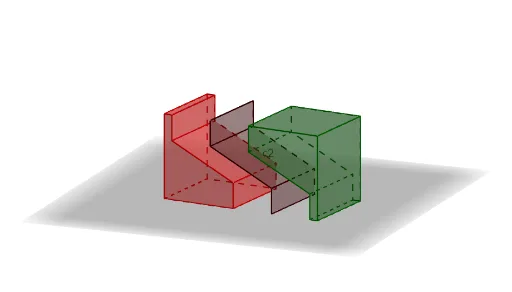
This example presents a half‑cut cube that exhibits symmetry through mirror, rotation and translation transformations. It illustrates how the six faces of a cube form regular polygonal surfaces and how symmetry operations map the half‑cube onto its mirror image. The core mathematical concepts involve solid geometry (properties of a cube), symmetry transformations (reflections, rotational symmetry, translations), vector representation of displacements, and the use of midpoints and lines to divide three‑dimensional objects. The GeoGebra construction employs commands such as Circle, Point, Rotate, Cube, Midpoint, Line, Sequence, Mirror, Polygon, Vector, and Translate, and defines objects (b, O, r, c, A1…A8, etc.) to build the geometric framework of the cube. Interactive sliders and animations enable students to explore spatial symmetry intuitively, making it suitable for high‑school and early‑university geometry and visualization courses, as well as for mathematical modeling and computer‑aided design instruction.
GeoGebra Commands & Parameters
Circle(O, r, xOyPlane) → cPoint(c) → A1Rotate(A1, π / 2, O) → A2Cube(A1, A2, zAxis) → a, A3, caraBCGF, caraCDHG, caraEFGH, aristaAD_1, aristaAB, aristaBC_1, aristaCD, aristaAE_1, aristaDH, aristaEH, A4, aristaEF, aristaBF, aristaFG_1, aristaCG_1, aristaGH_1, A5, A6, A7, A8, caraABCD, caraADHE, caraABFEMidpoint(A8, A3) → AMidpoint(A5, A2) → B0Line(A5, A3) → kMidpoint(A1, A7) → centroSequence(Max[0, Min[1, t - s]], s, 0, 1) → slMidpoint(A1, A7) → BMidpoint(A8, A3) → C0Mirror(B2, B0) → B2'Mirror(B1, B0) → B1'Mirror(C1, C0) → C1'Mirror(C2, C0) → C2'Polygon(B1, B2, C2, C1) → c1, b1, b2, c2_1, fPolygon(B2, B2', C2', C2) → c2, g, b2', c2', iPolygon(B2', B1', C1', C2') → c3, j, b1', c1', lVector(A2, A1) → vVector(A4, A1) → uTranslate(c1, u) → d1Translate(c2, u) → d2Translate(c3, u) → d3Translate(d1, Vector[((-sl(1)) * u)]) → d1'Translate(d2, Vector[((-sl(1)) * u)]) → d2'Translate(d3, Vector[((-sl(1)) * u)]) → d3'Polygon(A1, B1, B2, B2', B1', A5) → cu7, a1, m, n, p, q, a5Polygon(A4, A1, A5, A8) → cu1, a4, s, f_1, a8Polygon(A5, B1', C1', A8) → cu2, g_1, h_1, i_1, j_1Polygon(A4, A8, C1', C2', C2, C1) → cu8, k_1, l_1, m_1, n_1, p_1, q_1Polygon(A4, C1, B1, A1) → cu3, r_1, s_1, t_1, a_1Polygon(B1, C1, C2, B2) → cu4, b_1, c_1, d_1, e_1Polygon(C2, C2', B2', B2) → cu5, f_2, g_2, h_2, i_2Polygon(B2', C2', C1', B1') → cu6, j_2, k_2, l_2, m_2Translate(ll1, Vector[(sl(2) * v / 2)]) → ll2Mirror(ll2, B) → ll3
AI Drawing Prompt Reference
In 3D space, first draw a circle in a reference plane with center and radius as given, then choose a point on the circle as a base vertex for a cube construction. Rotate this point about the circle’s center by about 90 degrees to obtain a second point, and use these two points with a vertical axis to build a cube, keeping track of several key vertices and the cube’s faces as polygonal outlines. Compute midpoints on selected edges and draw a line connecting corresponding vertices to establish a symmetry divider. Using the same reference center, mirror certain vertices/faces across that line to form their reflected counterparts, then construct closed polygonal faces for both the original and mirrored halves. Finally, translate the corresponding polygons along a specific direction with a slider-like parameter to show a moving, partial cube together with its symmetry mapping (mirror/rotation/translation).
The prompt above was compiled from the original drawing commands and is for reference only.