
Modular Cross-Section in a Cube: Constructing a Trapezoid Section
Loading the math board and drawing, please wait…
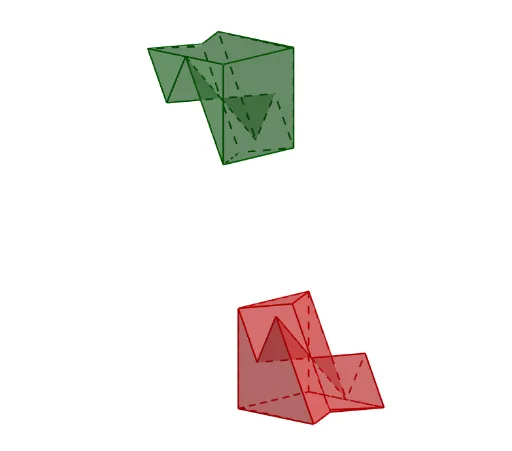
This example demonstrates how a modular selection of points inside a cube leads to a trapezoid cross-section, highlighting the geometric constraints imposed by symmetry and midpoint-based connectivity. The key math concepts include solid-geometry cross-sections, how planes/lines determine polygonal intersections, congruence/similarity behavior via symmetry, and vector/midpoint positioning for locating section vertices in 3D. Construction-wise, it uses GeoGebra commands from the provided workflow: Cube and Polygon to build the solid and the trapezoid boundary; Point and Sequence to define key vertices; Vector plus Line/Segment to connect structure-defining elements; Midpoint to obtain critical points; Intersect to compute intersection vertices of the section; and Rotate, Translate, Mirror to produce and verify symmetric configurations. Suitable for middle/high school students studying spatial geometry, and for classroom demonstrations or competition prep focused on constructing and reasoning about cross-sections under symmetry.
GeoGebra Commands & Parameters
Circle(O, r, xOyPlane) → cPoint(c) → A1Rotate(A1, π / 2, O) → A2Cube(A1, A2, zAxis) → a, A3, caraBCGF, caraCDHG, caraEFGH, aristaAD_1, aristaAB, aristaBC_1, aristaCD, aristaAE_1, aristaDH, arista, A4, aristaEF, aristaBF, aristaFG_1, aristaCG_1, aristaGH_1, A5, A6, A7, A8, caraABCD, caraADHE, caraABFEMidpoint(A4, A1) → B8Midpoint(A8, A5) → BDMidpoint(A2, A3) → B6Polygon(A4, BD, A6, B6) → c3, a4, g_1, a6, h_1Polygon(A7, BD, A1, B6) → c2, q, s, e, f_1Vector(A1, BD) → u2Midpoint(A1, A2) → B5Midpoint(O, B5) → AMidpoint(A1, A7) → centroPolygon(A1, BD, centro, A) → c8, l_4, m_4, n_4, a_5Point(n_4) → DVector(A2, B8) → u3Sequence(Max[0, Min[1, t - s]], s, 0, 6) → slMidpoint(A4, A8) → B4Midpoint(A6, A2) → B2Line(A5, A3) → kSegment(A7, A1) → hMidpoint(A1, A5) → B1Midpoint(A3, A7) → B3Midpoint(A3, A4) → B7Midpoint(A5, A6) → BAMidpoint(A6, A7) → BBMidpoint(A7, A8) → BCMidpoint(A1, A6) → O1Midpoint(A2, A7) → O2Midpoint(A3, A8) → O3Midpoint(A8, A1) → O4Midpoint(A5, A7) → O5Vector(A2, B8) → u1Polygon(A8, B8, A2, BB) → c1, a_1, b_1, c_1, d_1Polygon(A4, BD, A6, B6) → c3_1, e_1, f_2, g_2, h_2Translate(c1, u1) → c1'Polygon(A7, BD, A1, B6) → c2_1, f, g, i, jTranslate(c3, u3) → c3'Translate(c2, u2) → c2'Translate(c1', Vector[((-sl(1)) * u1)]) → c1''Translate(c2', Vector[((-sl(2)) * u2)]) → c2''Translate(c3', Vector[((-sl(3)) * u3)]) → c3''Line(B1, B2) → t_1Polygon(A1, A2, A7, A8) → c4, a1, p_2, a7, q_2Translate(c4, u4) → c4'Translate(c4', Vector[((-sl(4)) * u4)]) → c4''Intersect(a_1, e_1) → C1Intersect(c_1, g_2) → C2Polygon(A8, C1, BD, A1, A4) → p1, k_2, l_2, bd, m_2, n_2Intersect(d_1, f) → C3Polygon(A8, C3, A7) → t3, r_2, s_2, t_2Polygon(A8, C3, centro, C1) → c10, b_2, e_2, f_3, g_3Polygon(C3, A7, B6, centro) → c11, h_3, i_3, b6, j_3Polygon(A7, B6, A3) → t4, k_3, l_3, m_3Polygon(A3, A7, A8, A4) → c12, n_3, p_3, q_3, r_3Point(r_3) → BPolygon(A2, A3, B, A1, A) → p2, s_3, t_3, b_3, a_3, a_4Polygon(A2, C2, B6) → t5, c_3, d_3, e_3Polygon(B6, C2, centro) → t6, f_4, g_4, h_4Polygon(C1, centro, BD) → t7, i_4, j_4, k_4Polygon(A2, D, centro, C2) → c9, l, m, n, pTranslate(ll1, u4) → ll2Translate(ll2, Vector[(v * sl(6))]) → ll3Mirror(ll3, centro) → ll4
AI Drawing Prompt Reference
Draw a cube and cut out a trapezoidal section through its center. Start by creating a cube, then find four key points at the center of the cube to construct a trapezoid. Rotate and move these trapezoids to generate four symmetric trapezoidal sections. Ensure all trapezoidal sections intersect with the cube's edges to form the complete section.
The prompt above was compiled from the original drawing commands and is for reference only.