
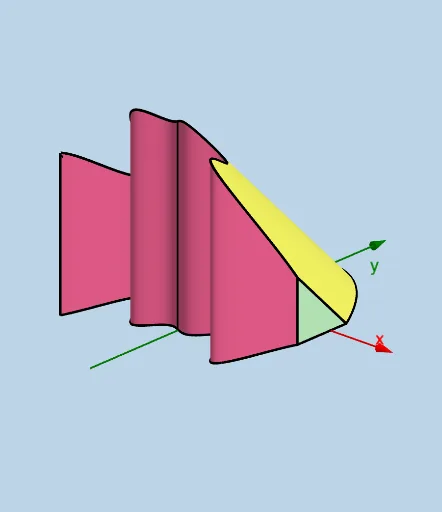
Modifiable Solid: Isosceles Right Triangle Cross Sections Parallel to yAxis
Loading the math board and drawing, please wait…
This example demonstrates how to create a modifiable solid in calculus, showing cross sections that are isosceles right triangles parallel to the y-axis. The key mathematical concepts involve solid geometry, cross-sectional area calculation, and function graphing. Construction requires using GeoGebra commands such as Intersect, Line, Sphere, Translate, and CurveCartesian. It is suitable for high school students or college students learning calculus and geometry.
GeoGebra Commands & Parameters
Intersect(upper, h, (-0.14282132839208828, 9.997960206815632)) → BIntersect(lower, h, (-0.14282132839208828, -7.929316413566142)) → CLine(B, D) → iSphere(B, d) → eTranslate(C, Vector[(0, 0, d)]) → C'CurveCartesian(t, lower(t), upper(t) - lower(t), t, a, b) → kSurface(u, lower(u), (v * (upper(u) - lower(u))), u, a, b, v, 0, 1) → jSegment(C, B) → pSegment(C, B) → qSegment(C, C') → rAngle(B, C, C') → αIntersect(upper, q, (-0.14282132839208825, 9.997960206815632)) → GPolygon(C, G, C') → q1, f_1, g_1, a_1Polygon(K, J, M) → q2, c, i_1, j_1Segment(J, K) → q_1Segment(K, M) → r_1Segment(H, I) → s_1Polygon(Q, P, R) → q3, m, s, tTextfield(upper) → InputBox1Textfield(lower) → InputBox2Segment(P, R) → fTextfield(a) → InputBox3Textfield(b) → InputBox4Segment(C', G) → n_1Surface(u, (v * lower(u)) + ((1 - v) * upper(u)), (v * (upper(u) - lower(u))), u, a, b, v, 0, 1) → nSegment(J, M) → lPoint(f) → ESegment(E, Q) → g