
Modeling Equations with Balance Models
Loading the math board and drawing, please wait…
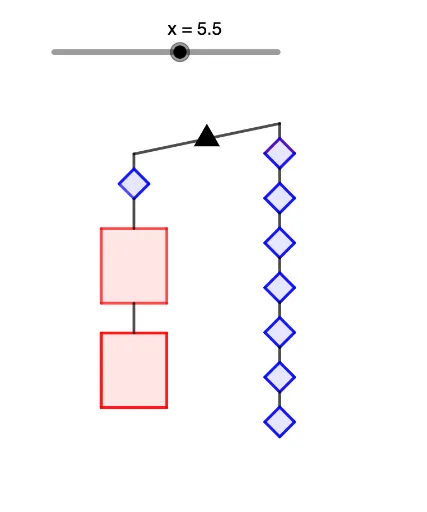
This example demonstrates how changes in variable values affect equations. It involves the core mathematical concepts of equations and their solutions. Using GeoGebra commands such as Line, Circle, Intersect, etc., a balance model of equations is constructed. Suitable for middle school and above students to learn about the concept of equation solutions.
GeoGebra Commands & Parameters
Line(C, A) → fCircle(B, 2.5) → cIntersect(c, f, 2) → DIntersect(c, f, 1) → ESegment(E, D) → gOrthogonalLine(D, h) → iOrthogonalLine(E, h) → jCircle(D, 0.5) → dCircle(E, 0.5) → eIntersect(d, i, 1) → FCircle(F, 1) → kIntersect(k, i, 1) → HLineBisector(F, H) → lIntersect(i, l) → ICircle(I, 0.5) → pIntersect(p, l, 1) → JIntersect(p, l, 2) → KSegment(D, F) → mSegment(F, J) → nSegment(F, K) → qSegment(K, H) → rSegment(J, H) → sPolygon(F, J, H, K) → q1, f_1, j_1, h_1, k_1DrawSquare(h, H) → L, M, N, O, q2, t, a, b, g_1, i_1DrawSquare(h, O) → P, Q, R, S, q3, l_1, m_1, n_1, p_1, q_1DrawSquare(h, S) → T, U, V, W, q4, r_1, s_1, t_1, a_1, b_1DrawSquare(h, W) → Z, A_1, B_1, C_1, q5, c_1, d_1, e_1, f_2, g_2DrawSquare(h, C_1) → D_1, E_1, F_1, G_1, q6, h_2, i_2, j_2, k_2, l_2DrawSquare(h, G_1) → H_1, I_1, J_1, K_1, q7, m_2, n_2, p_2, q_2, r_2DrawSquare(h, E) → G, L_1, M_1, N_1, q8, s_2, t_2, a_2, b_2, c_2Circle(N_1, 1) → d_2Intersect(d_2, j, 1) → O_1OrthogonalLine(O_1, j) → e_2Circle(O_1, answer / 5) → c_3Intersect(c_3, e_2, 1) → P_1Intersect(c_3, e_2, 2) → Q_1OrthogonalLine(P_1, e_2) → f_3OrthogonalLine(Q_1, e_2) → g_3Circle(P_1, 2.5) → d_3Circle(Q_1, 2.5) → e_3Intersect(d_3, f_3, 2) → R_1Intersect(e_3, g_3, 2) → S_1Polygon(Q_1, P_1, R_1, S_1) → q9, h_3, i_3, j_3, k_3Segment(N_1, O_1) → l_3LineBisector(S_1, R_1) → m_3Intersect(m_3, j_3) → T_1DrawX(B, solution, answer, h, T_1) → q10, n_3, p_3, q_3, r_3, s_3, U_1, V_1