
Lissajous Curve Drawing Machine
Loading the math board and drawing, please wait…
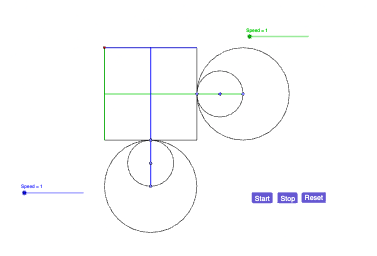
This example demonstrates the generation of Lissajous curves. Lissajous curves are the trajectories of two sine waves with integer frequency ratios and different phase differences. The example uses parametric equations to draw Lissajous curves, involving key GeoGebra commands such as Point, Segment, Midpoint, Circle, Rotate, OrthogonalLine, Mirror, and Intersect. Suitable for high school mathematics education, particularly for coordinate geometry and parametric equations.
GeoGebra Commands & Parameters
Point(xAxis) → ASegment(B, E) → fSegment(E, D) → gSegment(D, C) → hSegment(C, B) → iMidpoint(C, D) → FPoint(xAxis) → GCircle(G, F) → cRotate(H, α, G) → H'Circle(H', 0.5) → dPoint(d) → ISegment(H', G) → jOrthogonalLine(H', xAxis) → kMirror(G, k) → G'Segment(G', H') → lCircle(G', 2) → eIntersect(e, xAxis, 1) → JOrthogonalLine(J, xAxis) → mPoint(yAxis) → KCircle(K, 1) → pPoint(yAxis) → LRotate(L, β, K) → L'Circle(L', K) → qSegment(K, L') → nOrthogonalLine(L', yAxis) → rMirror(K, r) → K'Segment(L', K') → sCircle(K', 2) → tIntersect(t, yAxis, 2) → MOrthogonalLine(M, yAxis) → aIntersect(m, a) → NIntersect(m, i) → OIntersect(m, g) → PIntersect(a, f) → QIntersect(a, h) → RSegment(Q, R) → bSegment(O, P) → f_1Segment(J, G') → g_1Segment(M, K') → h_1
AI Drawing Prompt Reference
Draw a Lissajous curve formed by the trajectories of two sine waves, illustrating the use of parametric equations. Start by constructing a geometric framework with points and line segments. Use midpoints and circles, then apply rotations and reflections to create symmetrical shapes. Generate two circles along the x-axis and y-axis respectively. Finally, find intersections and draw lines connecting these points to form the intricate Lissajous curve.
The prompt above was compiled from the original drawing commands and is for reference only.