
Linear Equation in Two Variables: Intersection of Lines
Loading the math board and drawing, please wait…
In collections
CLASS IX CBSE MATHS ACTIVITIES
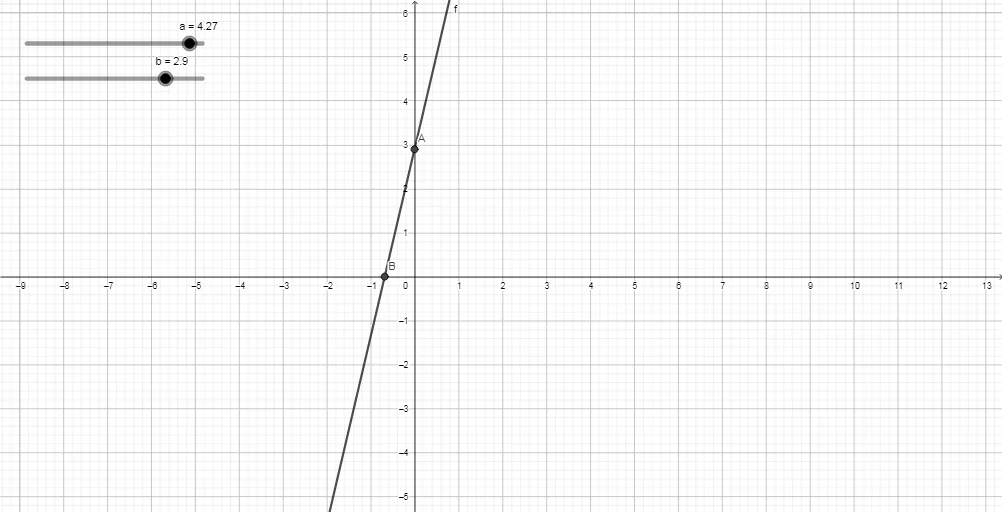
This GeoGebra example demonstrates the graphical representation of linear equations in two variables, showing each equation as a straight line on the coordinate plane. The core mathematical concept is the solution of a system of two linear equations, visualized as the intersection point of the two lines. The construction uses the Intersect command on objects a, b, f, and points A and B to find the common point(s). This is ideal for middle school to high school students learning coordinate geometry and systems of equations, and for teachers to illustrate the algebraic-geometric connection.
GeoGebra Commands & Parameters
Intersect(yAxis, f) → AIntersect(xAxis, f) → B
AI Drawing Prompt Reference
Draw two straight lines in a coordinate system representing two linear equations, and mark their intersection point. First, draw the x-axis and y-axis, then draw the first line and find its intersections with both axes. Next, draw the second line and find its intersections with the axes as well. Finally, mark the intersection point of the two lines to show the solution of the system of linear equations.
The prompt above was compiled from the original drawing commands and is for reference only.