
Lesson 13.3: Translating, Rotating, and Reflecting with Vectors
Loading the math board and drawing, please wait…
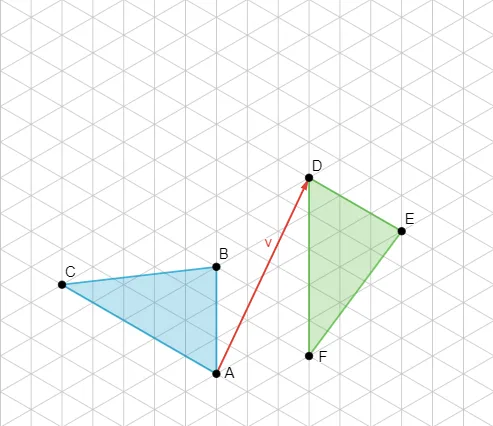
This GeoGebra example demonstrates how the same geometric figure changes under three core transformations—translation, rotation, and reflection—by explicitly constructing the corresponding image points and their connecting elements. It helps learners visualize what stays invariant (shape structure and correspondence) while positions move to new locations. The key math concepts include geometric transformations, vector-based translation, rotation referenced by an angle/parameter, and reflection across a symmetry axis, all expressed through point-to-point mapping between the original figure and its image. Construction is driven by the provided GeoGebra components: Polygon is used to build the base polygon from points A, B, C, D, E, and F; Vector creates the vector element v that represents direction/translation input; additional parameter objects (t1, t2) and linked scalar/coordinate auxiliaries (a, b, c, d, e, f) control the transformation steps and generate the transformed counterparts. The result is suitable for middle and high school geometry instruction and for classroom visualization and student exploration of transformation relationships.
GeoGebra Commands & Parameters
Vector(A, D) → vPolygon(A, B, C) → t1, c, a, bPolygon(D, E, F) → t2, f, d, e
AI Drawing Prompt Reference
Draw a figure consisting of two triangles. The first triangle is formed by points A, B, and C, and the second triangle by points D, E, and F. Move both triangles to new positions while keeping their shapes unchanged. Connect corresponding points to show transformation relationships.
The prompt above was compiled from the original drawing commands and is for reference only.