
Rigid Transformations: Exploring Translation, Rotation, and Reflection
Loading the math board and drawing, please wait…
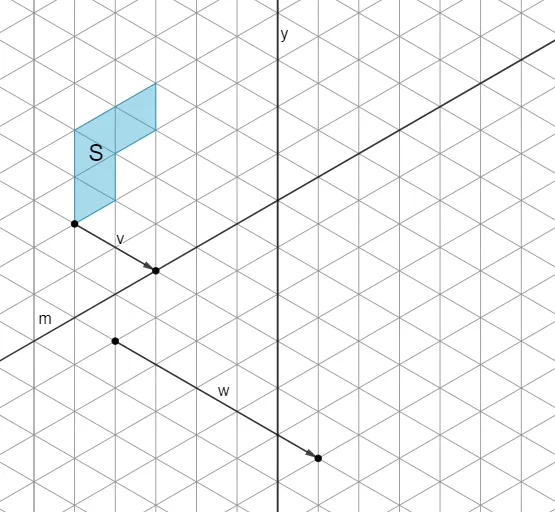
This example demonstrates the concept of rigid transformations, which preserve the shape and size of a figure through translation, rotation, and reflection. It visually shows the relationship between corresponding points, sides, and angles before and after transformation using a polygon and its image. Core mathematical concepts include the definition and properties of rigid transformations (distance preservation, angle preservation, shape preservation) and composition of transformations. Construction highlights: using GeoGebra commands such as Polygon to create the original polygon, Vector to define translation vectors, and Line to construct reflection axes, along with objects like points (A, B, C, D, E, F), polygon poly1, vectors v, and lines I, J, w for interactive manipulation. This resource is suitable for middle or high school geometry classes, helping students understand the connection between motion and congruence, and can be used for teacher demonstrations or student self-exploration.
GeoGebra Commands & Parameters
Polygon(A, B, C, D, E, F) → poly1, a, b, c, d, e, f_1Vector(C, G) → vVector(I, J) → wLine(G, H) → m
AI Drawing Prompt Reference
Draw a hexagon ABCDEF, then draw a vector v from point C to point G, and a line w from point I to point J. Next, translate the hexagon along vector v, and then reflect the translated hexagon across line w.
The prompt above was compiled from the original drawing commands and is for reference only.