
Keep Going (Part 3): Exploring Rotations in the Coordinate Plane
Loading the math board and drawing, please wait…
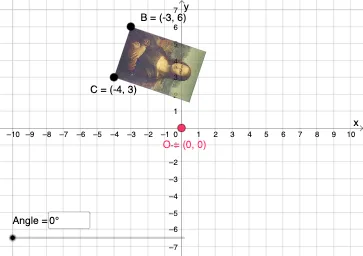
This GeoGebra example demonstrates how to explore rotations of geometric figures, such as quadrilaterals and cuboids, in the coordinate plane. The core mathematical concepts include rotation, translation, vectors, geometric transformations, and coordinate geometry involving integers, fractions, and real numbers. The construction uses commands like Vector, Translate, Rotate, CircleArc, Circle, Line, Mirror, Dilate, Textfield, and Intersect to create multiple points, lines, circles, arcs, and text objects. Through these transformations, multiple copies (e.g., B', C', pic1') are generated, illustrating how rotation angle and center affect the position and orientation of figures. This resource is suitable for middle and high school students learning geometric transformations and coordinate geometry, as well as for teachers to use in classroom demonstrations to help students visualize rotation properties and coordinate changes.
GeoGebra Commands & Parameters
Vector(D, E) → uTranslate(pic1, u) → pic1'Translate(B, u) → B'_{4}Translate(C, u) → C'_{4}Vector(B, B'_{4}) → vRotate(C, δ, O) → C'CircleArc(O, C', C) → cCircleArc(O, C, C') → dCircle(O, C) → eLine(F, G) → fMirror(pic1, f) → pic1'_2Mirror(B, f) → B'_2Mirror(C, f) → C'_2Dilate(pic1, k, O) → pic1'_3Dilate(B, k, O) → B'_3Dilate(C, k, O) → C'_3Rotate(B, δ, O) → B'Rotate(pic1, δ, O) → pic1'_1Circle(O, C) → pCircleArc(O, C', C) → rTextfield(δ) → InputBox1Textfield(k) → InputBox2Intersect(q, eq1) → H
AI Drawing Prompt Reference
Draw a geometric figure's rotation in the coordinate plane, showing rotations of quadrilaterals and cuboids. Start by drawing a shape and two points, then create rotations using vectors to generate multiple rotated copies of the shape. Next, draw arcs connecting the rotation center to corresponding points, and display the rotation angle and scale factor. Finally, illustrate the position and orientation changes of the figure under mirror and dilation operations, labeling key points and transformation parameters.
The prompt above was compiled from the original drawing commands and is for reference only.