
Describing Rotations of Figures
Loading the math board and drawing, please wait…
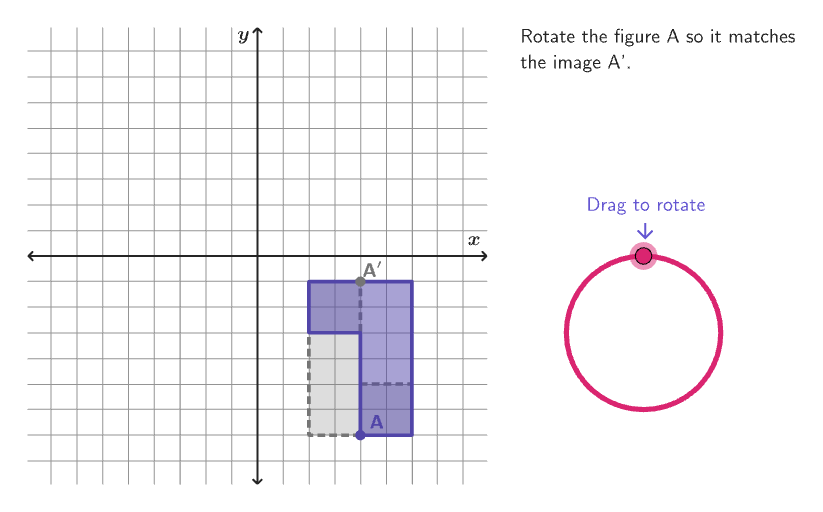
This exploration activity allows students to rotate figures and learn how to describe the transformation. It involves core math concepts like rigid transformations, specifically rotations. Constructed using GeoGebra commands such as Sequence, Circle, Point, Angle, If, Shuffle, Element, Mod, Vector, Translate, KeepIf, Join, Rotate, Textfield, Polygon, Corner, Segment. Suitable for grades 6-8 learning transformations in coordinate geometry.
GeoGebra Commands & Parameters
Sequence(Rotate[D, n°, B], n, 1, 360) → dialPointsCircle(B, 3) → dialPoint(dialPoints) → CAngle(D, B, C) → alphaIf(clockwise, 1, 2) → senseCaseShuffle(Sequence[100]) → randomList8, {72, 50, 38, 13, 2, 44, 99, 100, 75, 98, 71, 89, 87, 25, 37, 84, 58, 29, 11, 51, 7, 47, 8, 81, 65, 28, 54, 16, 26, 19, 90, 49, 68, 20, 76, 55, 27, 9, 61, 33, 91, 34, 53, 59, 17, 41, 62, 64, 57, 82, 86, 78, 32, 24, 1, 15, 3, 4, 79, 67, 22, 31, 93, 6, 83, 48, 56, 95, 60, 52, 14, 66, 10, 23, 63, 5, 21, 70, 12, 80, 74, 94, 42, 88, 36, 96, 73, 45, 69, 35, 85, 30, 39, 43, 40, 18, 92, 97, 77, 46}Shuffle(Sequence[15]) → randomList2, {2, 8, 11, 3, 6, 12, 10, 15, 1, 7, 4, 5, 9, 14, 13}Shuffle(Sequence[15]) → randomList6, {15, 12, 10, 7, 6, 14, 11, 9, 4, 8, 2, 3, 5, 1, 13}Element(randomList2, Mod[countQuestion, 15] + 1) → randomNum2Mod(Element[randomList6, Mod[countQuestion, 15] + 1], 4) → randomNum6Shuffle(Sequence[20]) → randomList1, {14, 3, 1, 9, 7, 4, 11, 12, 2, 6, 18, 8, 16, 10, 19, 5, 13, 20, 15, 17}Element(listCoordInitCenter, Mod[randomNum2, Length[listCoordInitCenter]] + 1) → xInitCenterShuffle(Sequence[15]) → randomList3, {5, 1, 10, 14, 6, 7, 15, 4, 8, 12, 3, 13, 11, 2, 9}Element(randomList3, Mod[countQuestion, 15] + 1) → randomNum3Element({pi / 2, pi, ((-pi)) / 2}, Mod[randomNum3, 3] + 1) → angleImgElement(listCoordInitCenter, Mod[randomNum3, Length[listCoordInitCenter]] + 1) → yInitCenterVector(CenterPoint, (xInitCenter, yInitCenter)) → vectorInitialTranslate(CenterPoint, vectorInitial) → CenterPointPreKeepIf(CenterOKNew[PP, angleImg, CenterPointPre, radiusFig], PP, Flatten[Zip[Zip[(j, k), j, listCoordInitCenter], k, listCoordInitCenter] \ {CenterPointPre}]) → listCentersImgCandidatesElement(listCentersImgCandidates, Mod[randomList8(1), Length[listCentersImgCandidates]] + 1) → RandomCenterJoin({{CenterPointPre, (0, 0)}, {RandomCenter}}) → listCentersImgRotate(Translate[listBasicVertices(randomNum1), vectorInitial], (90° * randomNum6), CenterPointPre) → verticesPreShuffle(Sequence[15]) → randomList5, {12, 6, 3, 13, 8, 9, 2, 1, 11, 14, 5, 10, 15, 7, 4}Element(randomList5, Mod[countQuestion, 15] + 1) → randomNum5Element(listCentersImg, Mod[randomNum5, 3] + 1) → CenterRotShuffle(Sequence[15]) → randomList4, {14, 9, 1, 10, 2, 5, 15, 11, 13, 3, 4, 6, 7, 12, 8}Element(randomList4, Mod[countQuestion, 15] + 1) → randomNum4Element(listCoordInitCenter \ Sequence[xInitCenter - 2, xInitCenter + 2], Mod[randomNum4, Length[listCoordInitCenter \ Sequence[xInitCenter - 2, xInitCenter + 2]]] + 1) → xInitCenterImgElement(listCoordInitCenter \ Sequence[yInitCenter - 2, yInitCenter + 2], Mod[randomNum5, Length[listCoordInitCenter \ Sequence[yInitCenter - 2, yInitCenter + 2]]] + 1) → yInitCenterImgShuffle(Sequence[15]) → randomList7, {14, 4, 7, 6, 13, 3, 2, 8, 12, 10, 15, 5, 11, 1, 9}Textfield(input1) → InputBox1Polygon(Zip[PixelsToPoint[Corner[1], Corner[3], Corner[5], A], A, {(pixelsLeft, pixelsTop), (pixelsLeft, y(Corner[5]) - pixelsBottom), Corner[5] - (pixelsRight, pixelsBottom), (x(Corner[5]) - pixelsRight, pixelsTop)}]) → borderBoxCorner(5) → layoutAppSizePolygon({(9, 9), (-9, 9), (-9, -9), (9, -9)}) → viewBoxSegment((-8.9, 0), (8.9, 0)) → axisXSegment((0, -8.9), (0, 8.9)) → axisYPolygon(verticesPre) → FigurePreRotate(verticesPre, angleImg, CenterRot) → verticesImgPolygon(verticesImg) → FigureImgRotate(verticesPre, (-input1), CenterRot) → verticesStPolygon(verticesSt) → FigureStElement({(("\color{" * colorPink) * "}clockwise"), (("\color{" * colorPurpleDark) * "}counterclockwise")}, senseCase) → senseonboardingTextOffset(Corner[onboardingText, 1], Corner[onboardingText, 3], onboardingCase, Corner[1], Corner[3], Corner[5]) → OnboardingTextOffsetcirclePixels(D, 10 + (7 * pulsing), Corner[1], Corner[3], Corner[5]) → pulsingObject
AI Drawing Prompt Reference
Draw a coordinate-plane rotation scene. First place a rotation center point and draw the x- and y-axes as the horizontal and vertical segments through the origin. Construct a reference circle centered at a point associated with the rotation setup, with radius 3. Build a polygon as the original rigid figure using generated vertices, then rotate the polygon around the rotation center by a chosen angle taken from {90°, 180°, −90°} to obtain the rotated figure. Show the rotation angle with an angle arc and angle label formed by two rays starting at the same vertex, and add a short text cue indicating whether the rotation is clockwise or counterclockwise.
The prompt above was compiled from the original drawing commands and is for reference only.