
Lamp Shade:Geometric and Calculus Integration Example
Loading the math board and drawing, please wait…
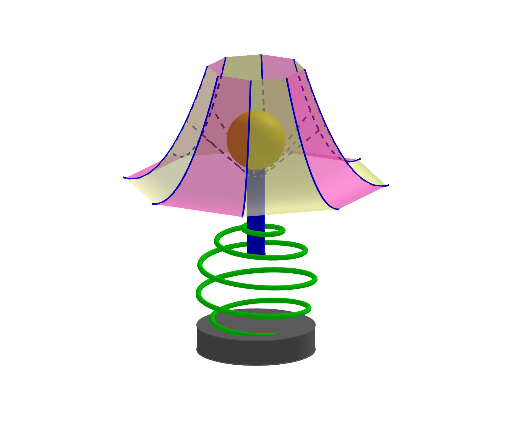
This example demonstrates how to construct a lamp shade using geometric and calculus concepts. It involves core mathematical concepts such as curve sketching, rotation, surface, and optimization problems. The construction requires using GeoGebra commands like CurveCartesian, Rotate, Surface, and Cylinder. It is suitable for high school students or college freshmen to learn geometric construction and calculus fundamentals.
GeoGebra Commands & Parameters
CurveCartesian(t, t, (1.2 * (t - 3)^(2)) + 2.5, t, 1.04, 3.2) → aRotate(a, 45°, zAxis) → bRotate(a, 90°, zAxis) → cRotate(a, 135°, zAxis) → dRotate(a, 180°, zAxis) → eRotate(a, 225°, zAxis) → fRotate(a, 270°, zAxis) → gRotate(a, 315°, zAxis) → hSurface(((1 - u) * a(t)) + (u * b(t)), u, 0, 1, t, pi / 3, pi) → iSurface(((1 - u) * b(t)) + (u * c(t)), u, 0, 1, t, pi / 3, pi) → jSurface(((1 - u) * c(t)) + (u * d(t)), u, 0, 1, t, pi / 3, pi) → kSurface(((1 - u) * d(t)) + (u * e(t)), u, 0, 1, t, pi / 3, pi) → lSurface(((1 - u) * e(t)) + (u * f(t)), u, 0, 1, t, pi / 3, pi) → mSurface(((1 - u) * g(t)) + (u * h(t)), u, 0, 1, t, pi / 3, pi) → oSurface(((1 - u) * h(t)) + (u * a(t)), u, 0, 1, t, pi / 3, pi) → pPoint(zAxis) → APoint(zAxis) → CSphere(A, C) → qPoint(zAxis) → BPoint(zAxis) → FPoint(zAxis) → GIntersect(zAxis, yAxis) → HCylinder(C, H, 0.3) → t, c_1, d_1, uCurveCartesian(((2 * sin(t / ((2 * n)))) * cos(t)), ((2 * sin(t / ((2 * n)))) * sin(t)), (2 * cos(t / ((2 * n)))) - 1, t, 0, (12 * pi)) → sCylinder(I, J, 2) → v, e_1, f_1, wSurface(((1 - u) * f(t)) + (u * g(t)), u, 0, 1, t, pi / 3, pi) → rPoint(h) → KPoint(zAxis) → DSegment(D, K) → g_1Rotate(D, -45°, zAxis) → D'Rotate(K, -45°, zAxis) → K'Segment(D', K') → h_1Rotate(D', -45°, zAxis) → D''Rotate(K', -45°, zAxis) → K''Segment(D'', K'') → i_1Rotate(D'', -45°, zAxis) → D'''Rotate(K'', -45°, zAxis) → K'''Segment(D''', K''') → j_1Rotate(D''', -45°, zAxis) → ERotate(K''', -45°, zAxis) → LSegment(E, L) → k_1Rotate(E, -45°, zAxis) → E'Rotate(L, -45°, zAxis) → L'Segment(E', L') → l_1Rotate(E', -45°, zAxis) → E''Rotate(L', -45°, zAxis) → L''Segment(E'', L'') → m_1Rotate(E'', -45°, zAxis) → E'''Rotate(L'', -45°, zAxis) → L'''Segment(E''', L''') → n_1
AI Drawing Prompt Reference
Create a 3D “lamp shade” geometry combining rotation surfaces and connected shape segments. First draw a Cartesian curve in space with a parameter t, defining its height along the vertical direction. Rotate this curve around the z-axis by successive angles of about 45° to obtain multiple rotated copies (covering a full fan). Use ruled/patch surface construction to build several surface bands between adjacent rotated curves over a shared parameter range, forming a continuous shade surface from bottom to top. Add a sphere by choosing two points on the z-axis to define its center and radius. Then define a few line segments involving points on the z-axis and rotate these segments repeatedly by −45° about the z-axis to form the connected outline details that fit into the overall lamp-shade shape.
The prompt above was compiled from the original drawing commands and is for reference only.