
Kite and Its Properties
Loading the math board and drawing, please wait…
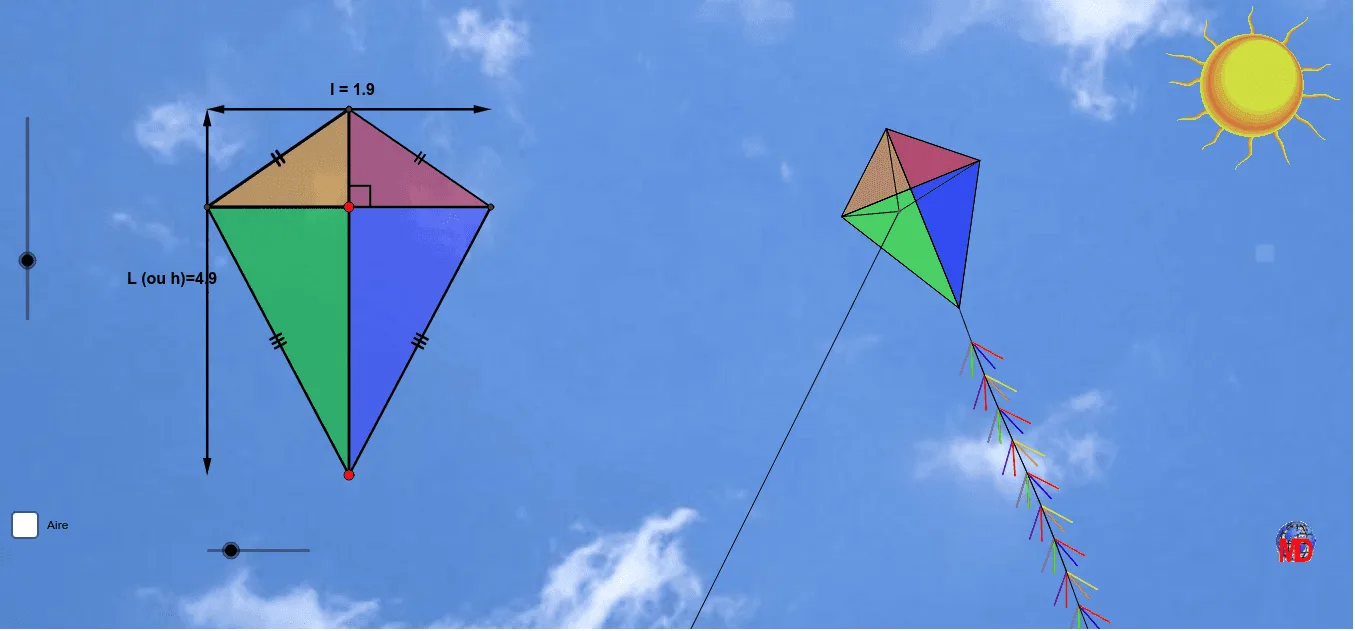
This example demonstrates the geometric properties and symmetry of a kite. It involves core concepts like polygons, reflection, vectors, and transformations. GeoGebra commands and objects such as Circle, Point, Rotate, Polygon, Dilate, Segment, and Mirror are used in the construction. Suitable for high school students to understand plane figures and transformation geometry, as well as analytical geometry drawing.
GeoGebra Commands & Parameters
CircleArc(Ι, Κ, G) → pPoint(p) → ΑCircle(Α, 1) → cPoint(c) → ΜPoint(c) → ΝCircleArc(Α, Μ, Ν) → sPoint(s) → ΒRotate(Β, 60°, Α) → Β'Polygon(Β', Β, 3) → poly2, h_3, i, j, ΗPolygon(Β, Β', 6) → poly1, a, Ζ, b, d, e, f, g, BB, D, ΕEllipse(Ε, D, Α) → kPoint(k) → AADilate(Η, -3, Α) → Η'Dilate(Η, 3.2, Α) → Η'_1Function(r, -3, x(AA)) → qSegment(Η, Η'_1) → a_7Angle(a_7, xAxis) → αFunction(f_1, x(Η), x(Η) + a_7) → g_1Rotate(g_1, (-α), Η) → wSequence(Η + ((i * a_7 / 8), 0), i, 1, 15) → liste1Sequence((x(Element[liste1, i]), g_1(Element[liste1, i])), i, 1, 20) → liste2Rotate(liste2, (-α), Η) → liste2'Sequence(Rotate[Element[liste2', i + 1], 20°, Element[liste2', i]], i, 1, 14) → liste3Sequence(Rotate[Element[liste2', i + 1], 340°, Element[liste2', i]], i, 1, 16) → liste4Rotate(Η, 30°, Η) → Η'_2Element(liste4, 3) → Α_1Element(liste4, 5) → Ε_1Element(liste2', 8) → Α_2Element(liste3, 7) → Ζ_2Element(liste4, 7) → Η_2Sequence(Segment[Element[liste2', i], Element[liste4, i]], i, 1, Length[liste4]) → liste6Sequence(Segment[Element[liste2', i], Element[liste3, i]], i, 1, Length[liste3], 1) → liste5Sequence(Segment[Element[liste2', i], Element[liste3, i]], i, 1, Length[liste3], 2) → liste7Sequence(Segment[Element[liste2', i], Element[liste4, i]], i, 1, Length[liste4], 2) → liste8Sequence(Rotate[Element[liste2', i + 1], 320°, Element[liste2', i]], i, 1, 16) → liste9Sequence(Rotate[Element[liste2', i + 1], 40°, Element[liste2', i]], i, 1, 16) → liste10Sequence(Segment[Element[liste2', i], Element[liste9, i]], i, 1, Length[liste9]) → liste11Sequence(Segment[Element[liste2', i], Element[liste10, i]], i, 1, Length[liste10]) → liste12Sequence(Segment[Element[liste2', i], Element[liste9, i]], i, 1, Length[liste9], 2) → liste13Sequence(Segment[Element[liste2', i], Element[liste10, i]], i, 1, Length[liste10], 2) → liste14Sequence(Segment[Element[liste2', i], Element[liste2', i + 1]], i, 1, Length[liste2']) → liste15Segment(Α, E) → c_1Midpoint(e) → FSegment(F, Η) → l_2Segment(BB, Ζ) → mPoint(m) → HSegment(H, Η) → nSegment(Β', Η) → a_1Point(m) → ISegment(I, F) → d_1Segment(F, H) → e_1Intersect(c_1, l_2) → JPolygon(F, I, J) → poly3, j_1, f_2, i_1Polygon(F, J, H) → poly4, h_1, f_3, j_2Intersect(l_2, n) → KPolygon(I, K, J) → poly5, j_3, i_2, k_1Polygon(J, H, K) → poly6, k_2, j_4, h_2Point(c_1) → CSegment(I, C) → l_1Segment(C, H) → m_1Segment(C, K) → n_1Segment(F, C) → p_1Segment(C, E) → q_1Segment(L, M) → r_1Point(r_1) → NSegment(O, N) → s_1Mirror(O, r_1) → O'Polygon(M, O, N) → poly7, n_2, m_2, o_1Polygon(O, L, N) → poly8, n_3, o_2, l_3Polygon(M, O', N) → poly9, n_4, m_3, o'Polygon(N, O', L) → poly10, l_4, n_5, o'_1Line(O', r_1) → t_1Line(O, r_1) → a_2Line(M, m_3) → b_2Line(L, m_3) → c_2Intersect(b_2, a_2) → PIntersect(t_1, b_2) → QIntersect(a_2, c_2) → RIntersect(t_1, c_2) → SPolygon(P, Q, S, R) → poly11, p_2, q_2, s_2, r_2Midpoint(r_2) → TMidpoint(p_2) → UVector(T, P) → u_1Vector(T, R) → v_1Vector(M, Q) → w_1Vector(M, P) → z_1Mod(abs((e_2 * 10)), 2) → aaPolygon(L, R, O) → poly12, o_3, l_5, r_3Polygon(L, S, O') → poly13, o'_2, l_6, s_3Polygon(M, Q, O') → poly14, o'_3, m_4, q_3Polygon(P, M, O) → poly15, o_4, p_3, m_5Angle(O', N, M) → β
AI Drawing Prompt Reference
Draw a kite and its properties to demonstrate its geometric characteristics and symmetry. Start by drawing a circle and marking points on it. Use these points to create new circles and connect their intersections to form the two pairs of equal sides of the kite. Rotate one vertex by 60 degrees around the center to get the other vertex, and connect these vertices to complete the kite. Then, draw an ellipse and generate a series of related shapes like parallelograms and triangles through rotation and dilation transformations. Finally, combine these elements to showcase the kite's symmetry and transformation properties.
The prompt above was compiled from the original drawing commands and is for reference only.