
Kaleidoscope on a Sphere
Loading the math board and drawing, please wait…
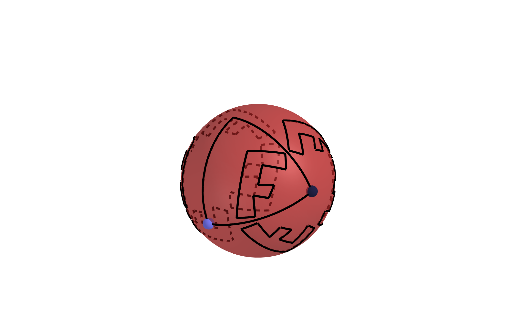
This example demonstrates kaleidoscopic images on a sphere, using geometric construction to illustrate the concepts of intersection points, mirror lines, and mirror planes. Main GeoGebra commands used include Intersect, PointIn, Line, OrthogonalPlane, IntersectPath, and Point. Suitable for high school mathematics education, particularly in solid and transformation geometry.
GeoGebra Commands & Parameters
Intersect(xAxis, zAxis) → ASphere(A, 1) → aPointIn(a) → BLine(A, B) → fOrthogonalPlane(A, f) → pIntersectPath(p, a) → cPoint(c) → CPlane(C, f) → qOrthogonalLine(A, q) → gIntersect(g, c, 1) → DCircleArc(A, B, D) → dCircleArc(A, C, D) → eCircleArc(A, B, C) → hPointIn(a) → EPointIn(a) → FCircleArc(A, E, F) → kPointIn(a) → GCircleArc(A, F, G) → rPointIn(a) → HCircleArc(A, G, H) → sPointIn(a) → ICircleArc(A, H, I) → tPointIn(a) → JCircleArc(A, I, J) → c_1PointIn(a) → KCircleArc(A, J, K) → d_1PointIn(a) → LCircleArc(A, K, L) → e_1PointIn(a) → MCircleArc(A, L, M) → f_1PointIn(a) → NCircleArc(A, M, N) → g_1CircleArc(A, N, E) → h_1Plane(A, D, B) → p_1Mirror(k, p_1) → k'Mirror(h_1, p_1) → k_1Mirror(g_1, p_1) → q_1Mirror(f_1, p_1) → r_1Mirror(e_1, p_1) → s_1Mirror(d_1, p_1) → t_1Mirror(c_1, p_1) → c_2Mirror(t, p_1) → t'Mirror(s, p_1) → s'Mirror(r, p_1) → r'Mirror(s, p) → s'_{1}Mirror(t, p) → t'_{1}Mirror(c_1, p) → d_2Mirror(d_1, p) → e_2Mirror(e_1, p) → f_2Mirror(f_1, p) → g_2Mirror(g_1, p) → h_2Mirror(h_1, p) → k_2Mirror(k, p) → k'_{1}Mirror(k, q) → k'_{2}Mirror(h_1, q) → p_2Mirror(g_1, q) → q_2Mirror(f_1, q) → r_2Mirror(e_1, q) → s_2Mirror(d_1, q) → t_2Mirror(c_1, q) → c_3Mirror(t, q) → t'_{2}Mirror(s, q) → s'_{2}Mirror(r, q) → r'_{2}Mirror(p_2, p_1) → d_3Mirror(k'_{2}, p_1) → e_3Mirror(r'_{2}, p_1) → f_3Mirror(s'_{2}, p_1) → g_3Mirror(t'_{2}, p_1) → h_3Mirror(c_3, p_1) → k_3Mirror(t_2, p_1) → p_3Mirror(s_2, p_1) → q_3Mirror(r_2, p_1) → r_3Mirror(p_2, q) → t_3Mirror(r'_{2}, p) → c_4Mirror(k'_{2}, p) → d_4Mirror(p_2, p) → e_4Mirror(q_2, p) → f_4Mirror(r_2, p) → g_4Mirror(s_2, p) → h_4Mirror(t_2, p) → k_4Mirror(t'_{2}, p) → q_4Mirror(s'_{2}, p) → r_4Mirror(q_1, q) → s_4Mirror(r, p) → r'_{1}Mirror(s'_{1}, p_1) → s_3Mirror(r'_{1}, p_1) → p_4Mirror(k'_{1}, p_1) → t_4Mirror(k_2, p_1) → c_5Mirror(h_2, p_1) → d_5Mirror(g_2, p_1) → e_5Mirror(f_2, p_1) → f_5Mirror(e_2, p_1) → g_5Mirror(d_2, p_1) → h_5Mirror(t', p) → t''Mirror(t_4, q) → k_5Mirror(p_4, q) → p_5Mirror(s_3, q) → q_5Mirror(t'', q) → t'''Mirror(h_5, q) → r_5Mirror(g_5, q) → s_5Mirror(f_5, q) → t_5Mirror(e_5, q) → c_6Mirror(d_5, q) → d_6Mirror(c_5, q) → e_6Mirror(d_2, q) → f_6
AI Drawing Prompt Reference
Draw a kaleidoscope pattern on a sphere by first finding the intersection point of the coordinate axes and using it as the center to create a sphere. Select a random point on the sphere, connect it to the intersection point to form a line, and create a plane perpendicular to the sphere along this line. Create points at the intersection of this plane with the sphere and draw circular arcs centered at these points to form closed polygons. Finally, use mirror operations to symmetrically replicate these polygons around the sphere, creating a symmetric kaleidoscope effect.
The prompt above was compiled from the original drawing commands and is for reference only.