
Isosceles Triangles between Curves
Loading the math board and drawing, please wait…
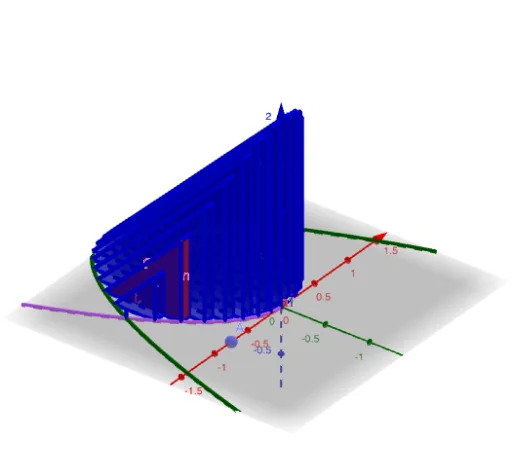
This example demonstrates dynamically constructing isosceles triangles between two curves. Key math concepts include isosceles triangle properties, coordinate geometry, function graphs, and definite integrals. Construction involves commands like Point, Polygon, Segment, Textfield, Prism, Sequence, with objects such as y1, y2, radius, f, g, h for interactive curve analysis. Suitable for high school and above mathematics education, exploring function behavior and geometric transformations.
GeoGebra Commands & Parameters
Point(xAxis) → APolygon((x(A), y2(x(A)), 0), (x(A), y1(x(A)), 0), (x(A), y2(A), (2 * radius(x(A))))) → poly1, f, g, hSegment((x(A), axle(x(A)) - radius(x(A))), (x(A), axle(x(A)) + radius(x(A)))) → baseTextfield(y1) → InputBox1Prism(poly1, dx) → a, B, edge3, edge4, edge5, edge6, C, D, face1, face2, face3, face4, edge1, edge2Textfield(y2) → InputBox2Textfield() → InputBox3Textfield() → InputBox4Sequence(Prism[Polygon[(t, y2(t), 0), (t, y1(t), 0), (t, y2(t), (2 * radius(t)))], dx], t, L, R, dx) → slices