
Toro Mathematical Example
Loading the math board and drawing, please wait…
In collections
geometriadinamica.es
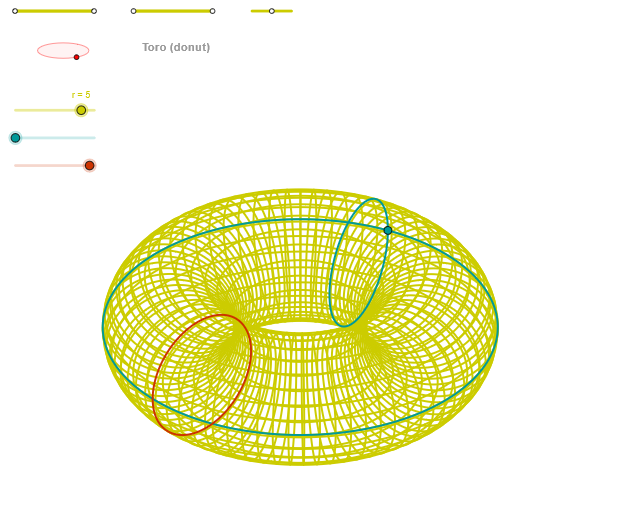
This example demonstrates the geometric construction process of a figure named Toro. It involves core mathematical concepts such as integers, indefinite integrals, piecewise functions, rational functions, and binomial distribution. The construction utilizes GeoGebra commands/objects like Segment (line segment), Point (point), OrthogonalLine (perpendicular line), Circle (circle), Intersect (intersection), Ellipse (ellipse), Angle (angle), CurveCartesian (Cartesian curve), and Sequence (sequence). Suitable for high school students and teachers exploring the intersection of geometry and algebra in complex figures.
GeoGebra Commands & Parameters
Segment(Q3, Q4) → p2Point(p2) → P3Segment(P3, Q4) → p4Point(p4) → P4Segment(Q1, Q2) → p1Point(p1) → P1Segment(P1, Q2) → p3Point(p3) → P2OrthogonalLine(C, yAxis) → zz1Circle(C, 0.62) → zz0Intersect(zz0, zz1, 1) → ZZ1Intersect(zz0, zz1, 2) → ZZ2Ellipse(ZZ1, ZZ2, 0.65) → zElipse1Intersect(zElipse1, zz1) → ZZ5, ZZ6Point(zElipse1) → XYAngle(ZZ6, C, XY) → zAngRotOrthogonalLine(C, xAxis) → zz2Intersect(zz0, zz2, 2) → ZZ3Intersect(zz0, zz2, 1) → ZZ4Ellipse(ZZ3, ZZ4, 0.65) → zElipse2Intersect(zElipse2, zz2) → ZZ7, ZZ8Point(zElipse2) → ZAngle(ZZ8, C, Z) → zAngIncSegment(Q5, Q6) → p5Point(p5) → P5CurveCartesian(((R + (r * cos(u))) * ((-sin(zAngRot))) / 3), ((((-(R + (r * cos(u)))) * (-cos(zAngRot))) * sin(zAngInc)) + ((r * sin(u)) * cos(zAngInc))) / 3, u, u1, u2) → curva1Segment(ZZ5, ZZ6) → zz4Segment(ZZ7, ZZ8) → zz3Intersect(zElipse2, zElipse1, 1) → zPunto1Intersect(zElipse2, zElipse1, 4) → zPunto2Segment(zPunto1, zPunto2) → zSeg2CurveCartesian(((((R + (r * cos(α))) * cos(v)) * sin(zAngRot)) + (((R + (r * cos(α))) * sin(v)) * cos(zAngRot))) / 3, (((((-(R + (r * cos(α)))) * cos(v)) * cos(zAngRot)) * sin(zAngInc)) + ((((R + (r * cos(α))) * sin(v)) * sin(zAngRot)) * sin(zAngInc)) + ((r * sin(α)) * cos(zAngInc))) / 3, v, v1, v2) → curva2CurveCartesian(((((R + (r * cos(u))) * cos(β)) * sin(zAngRot)) + (((R + (r * cos(u))) * sin(β)) * cos(zAngRot))) / 3, (((((-(R + (r * cos(u)))) * cos(β)) * cos(zAngRot)) * sin(zAngInc)) + ((((R + (r * cos(u))) * sin(β)) * sin(zAngRot)) * sin(zAngInc)) + ((r * sin(u)) * cos(zAngInc))) / 3, u, u1, u2) → aSequence(CurveCartesian[((((R + (r * cos(u))) * cos(v)) * sin(zAngRot)) + (((R + (r * cos(u))) * sin(v)) * cos(zAngRot))) / 3, (((((-(R + (r * cos(u)))) * cos(v)) * cos(zAngRot)) * sin(zAngInc)) + ((((R + (r * cos(u))) * sin(v)) * sin(zAngRot)) * sin(zAngInc)) + ((r * sin(u)) * cos(zAngInc))) / 3, u, u1, u2], v, v1, v2, paso) → list2Sequence(CurveCartesian[((((R + (r * cos(u))) * cos(v)) * sin(zAngRot)) + (((R + (r * cos(u))) * sin(v)) * cos(zAngRot))) / 3, (((((-(R + (r * cos(u)))) * cos(v)) * cos(zAngRot)) * sin(zAngInc)) + ((((R + (r * cos(u))) * sin(v)) * sin(zAngRot)) * sin(zAngInc)) + ((r * sin(u)) * cos(zAngInc))) / 3, v, v1, v2], u, u1, u2, (3 * paso)) → list1
AI Drawing Prompt Reference
Construct a coordinate plane with two perpendicular axes through a common point, then use a circle centered at that point to obtain intersection points with the two perpendicular lines. Use these intersection locations as the defining parameters to draw an initial ellipse, then find where this ellipse meets one of the perpendicular lines and use the resulting points to determine an angle at the center relative to a reference point on the ellipse. Next, repeat the process with the circle and the other perpendicular line to define a second ellipse, and use intersections between the two ellipses to pick key points and connect them. Finally, generate a family of Cartesian curves by using the two previously defined angular directions as parameters, sampling the curves over two variables to produce the Toro-like ring/torus curve network.
The prompt above was compiled from the original drawing commands and is for reference only.