
GeoGebra Geometry and Calculus Example: Triangle and Integral Calculation
Loading the math board and drawing, please wait…
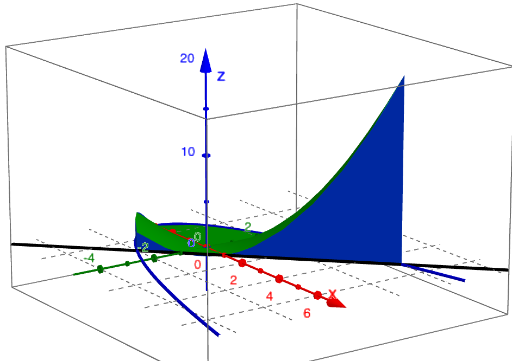
This example demonstrates constructing a triangle and calculating its area and integral using GeoGebra. Key mathematical concepts include geometric construction, integral calculus, and coordinate geometry. Construction involves using commands like Surface, Textfield, Element to set coordinate ranges, create triangle objects, add text annotations, and compute integral regions. Suitable for high school students or college freshmen for learning geometry and calculus fundamentals, useful for math teaching and self-study.
GeoGebra Commands & Parameters
Surface(xmin, (u * ymin(xmin)) + ((1 - u) * ymax(xmin)), (v * zmin(xmin, (u * ymin(xmin)) + ((1 - u) * ymax(xmin)))) + ((1 - v) * zmax(xmin, (u * ymin(xmin)) + ((1 - u) * ymax(xmin)))), u, 0, 1, v, 0, 1) → leftSurface(xmax, (u * ymin(xmax)) + ((1 - u) * ymax(xmax)), (v * zmin(xmax, (u * ymin(xmax)) + ((1 - u) * ymax(xmax)))) + ((1 - v) * zmax(xmax, (u * ymin(xmax)) + ((1 - u) * ymax(xmax)))), u, 0, 1, v, 0, 1) → rightTextfield(xmin) → textfield1Textfield(xmax) → textfield2Textfield(ymin) → textfield3Textfield(ymax) → textfield4Textfield(zmin) → textfield5Textfield(zmax) → textfield6Surface((u / 3 * xmin) + ((1 - u / 3) * xmax), ymin((u / 3 * xmin) + ((1 - u / 3) * xmax)), (v / 3 * zmin((u / 3 * xmin) + ((1 - u / 3) * xmax), ymin((u / 3 * xmin) + ((1 - u / 3) * xmax)))) + ((1 - v / 3) * zmax((u / 3 * xmin) + ((1 - u / 3) * xmax), ymin((u / 3 * xmin) + ((1 - u / 3) * xmax)))), u, 0, 3, v, 0, 3) → frontSurface((u / 3 * xmin) + ((1 - u / 3) * xmax), (v / 3 * ymax((u / 3 * xmin) + ((1 - u / 3) * xmax))) + ((1 - v / 3) * ymin((u / 3 * xmin) + ((1 - u / 3) * xmax))), zmax((u / 3 * xmin) + ((1 - u / 3) * xmax), (v / 3 * ymax((u / 3 * xmin) + ((1 - u / 3) * xmax))) + ((1 - v / 3) * ymin((u / 3 * xmin) + ((1 - u / 3) * xmax)))), u, 0, 3, v, 0, 3) → upSurface((u / 3 * xmin) + ((1 - u / 3) * xmax), ymax((u / 3 * xmin) + ((1 - u / 3) * xmax)), (v / 3 * zmin((u / 3 * xmin) + ((1 - u / 3) * xmax), ymax((u / 3 * xmin) + ((1 - u / 3) * xmax)))) + ((1 - v / 3) * zmax((u / 3 * xmin) + ((1 - u / 3) * xmax), ymax((u / 3 * xmin) + ((1 - u / 3) * xmax)))), u, 0, 3, v, 0, 3) → backSurface((u / 3 * xmin) + ((1 - u / 3) * xmax), (v / 3 * ymax((u / 3 * xmin) + ((1 - u / 3) * xmax))) + ((1 - v / 3) * ymin((u / 3 * xmin) + ((1 - u / 3) * xmax))), zmin((u / 3 * xmin) + ((1 - u / 3) * xmax), (v / 3 * ymax((u / 3 * xmin) + ((1 - u / 3) * xmax))) + ((1 - v / 3) * ymin((u / 3 * xmin) + ((1 - u / 3) * xmax)))), u, 0, 3, v, 0, 3) → downElement(vdir, faces) → Selectvec
AI Drawing Prompt Reference
Create a geometric construction of a triangle with integral calculation, showing three edges and three faces of the triangle, distinguish the left and right faces with different colors, label the coordinate ranges of each face, and draw integral regions on the three faces to form a complete solid triangle model for teaching geometry and integral concepts.
The prompt above was compiled from the original drawing commands and is for reference only.