
GeoGebra Geometric Construction and Calculus Example
Loading the math board and drawing, please wait…
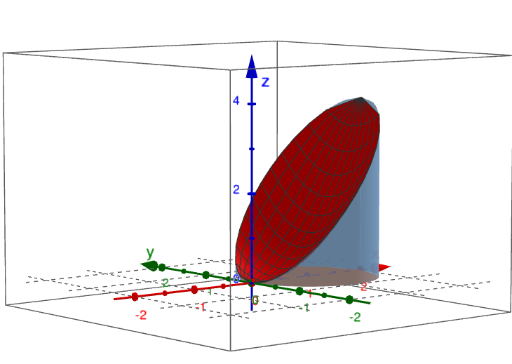
This example demonstrates the use of GeoGebra tools for geometric construction and the integration of calculus concepts. Key mathematical concepts include triangles, circles, coordinate geometry, continuity in calculus, and the hypergeometric distribution. Construction involves using commands like Surface, Textfield, Element, and objects such as xmin, xmax, ymax, zmin, zmax. Suitable for high school students or college freshmen to learn foundational geometry and calculus.
GeoGebra Commands & Parameters
Surface(xmin, (u * ymin(xmin)) + ((1 - u) * ymax(xmin)), (v * zmin(xmin, (u * ymin(xmin)) + ((1 - u) * ymax(xmin)))) + ((1 - v) * zmax(xmin, (u * ymin(xmin)) + ((1 - u) * ymax(xmin)))), u, 0, 1, v, 0, 1) → leftSurface(xmax, (u * ymin(xmax)) + ((1 - u) * ymax(xmax)), (v * zmin(xmax, (u * ymin(xmax)) + ((1 - u) * ymax(xmax)))) + ((1 - v) * zmax(xmax, (u * ymin(xmax)) + ((1 - u) * ymax(xmax)))), u, 0, 1, v, 0, 1) → rightTextfield(xmin) → textfield1Textfield(xmax) → textfield2Textfield(ymin) → textfield3Textfield(ymax) → textfield4Textfield(zmin) → textfield5Textfield(zmax) → textfield6Surface((u / 3 * xmin) + ((1 - u / 3) * xmax), ymin((u / 3 * xmin) + ((1 - u / 3) * xmax)), (v / 3 * zmin((u / 3 * xmin) + ((1 - u / 3) * xmax), ymin((u / 3 * xmin) + ((1 - u / 3) * xmax)))) + ((1 - v / 3) * zmax((u / 3 * xmin) + ((1 - u / 3) * xmax), ymin((u / 3 * xmin) + ((1 - u / 3) * xmax)))), u, 0, 3, v, 0, 3) → frontSurface((u / 3 * xmin) + ((1 - u / 3) * xmax), (v / 3 * ymax((u / 3 * xmin) + ((1 - u / 3) * xmax))) + ((1 - v / 3) * ymin((u / 3 * xmin) + ((1 - u / 3) * xmax))), zmax((u / 3 * xmin) + ((1 - u / 3) * xmax), (v / 3 * ymax((u / 3 * xmin) + ((1 - u / 3) * xmax))) + ((1 - v / 3) * ymin((u / 3 * xmin) + ((1 - u / 3) * xmax)))), u, 0, 3, v, 0, 3) → upSurface((u / 3 * xmin) + ((1 - u / 3) * xmax), ymax((u / 3 * xmin) + ((1 - u / 3) * xmax)), (v / 3 * zmin((u / 3 * xmin) + ((1 - u / 3) * xmax), ymax((u / 3 * xmin) + ((1 - u / 3) * xmax)))) + ((1 - v / 3) * zmax((u / 3 * xmin) + ((1 - u / 3) * xmax), ymax((u / 3 * xmin) + ((1 - u / 3) * xmax)))), u, 0, 3, v, 0, 3) → backSurface((u / 3 * xmin) + ((1 - u / 3) * xmax), (v / 3 * ymax((u / 3 * xmin) + ((1 - u / 3) * xmax))) + ((1 - v / 3) * ymin((u / 3 * xmin) + ((1 - u / 3) * xmax))), zmin((u / 3 * xmin) + ((1 - u / 3) * xmax), (v / 3 * ymax((u / 3 * xmin) + ((1 - u / 3) * xmax))) + ((1 - v / 3) * ymin((u / 3 * xmin) + ((1 - u / 3) * xmax)))), u, 0, 3, v, 0, 3) → downElement(vdir, faces) → Selectvec
AI Drawing Prompt Reference
Create a 3D surface visualization using boundary functions and parameter ranges: define xmin and xmax, along with ymin(x), ymax(x), zmin(x,y), and zmax(x,y). Construct four separate surface patches from the boundary surfaces by interpolating with parameters u and v within fixed intervals. Build a left patch tied to the x = xmin boundary and a right patch tied to x = xmax, using ymin/ymax to set the y-direction and zmin/zmax to set the z-direction. Then construct additional scaled patches over the interval between xmin and xmax by taking the middle third mapping, producing front/up/back/down oriented surface pieces that combine the corresponding y and z boundary choices. Include a simple vector/arrow to indicate the viewing direction.
The prompt above was compiled from the original drawing commands and is for reference only.