
Constructing with Circles: Parallels, Perpendiculars, and Intersections
Loading the math board and drawing, please wait…
In collections
Authomath GeoGebra Basics Course
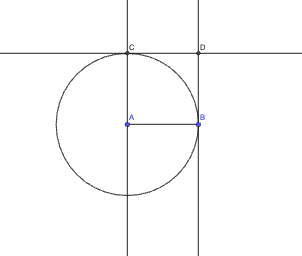
This GeoGebra example demonstrates how to build a circle-based configuration using parallel and perpendicular line relationships, then locate key intersection points to reveal the resulting geometric structure. It focuses on core concepts such as circle geometry, parallelism and perpendicularity (via orthogonal constructions), line intersection, and the underlying idea connected to tangent line behavior. The construction uses GeoGebra commands: Segment to create guiding segments, Circle to define the circle, OrthogonalLine to draw perpendicular/orthogonal lines, Intersect to compute intersection points, and Line to form supporting lines. The involved objects include named points (e.g., A, B, C, D and others) and the circle/lines (e.g., a circle c and line objects f, g, h, i). Suitable for middle to high school geometry lessons and for student-led exploration of classic straightedge-and-compass style reasoning.
GeoGebra Commands & Parameters
Segment(A, B) → fCircle(A, B) → cOrthogonalLine(A, f) → gOrthogonalLine(B, f) → hIntersect(c, g, 2) → CLine(C, f) → iIntersect(h, i) → D
AI Drawing Prompt Reference
Draw a segment AB, then construct a circle centered at A with radius equal to AB. Through points A and B, draw perpendicular lines to segment AB. Let C be the intersection of the circle with one of these perpendicular lines. Through C, draw a line parallel to AB, and let D be the intersection of this parallel line with the other perpendicular line.
The prompt above was compiled from the original drawing commands and is for reference only.