
Notable Points in a Triangle via Angle Bisectors and Perpendiculars
Loading the math board and drawing, please wait…
In collections
Besondere Punkte/Special Points
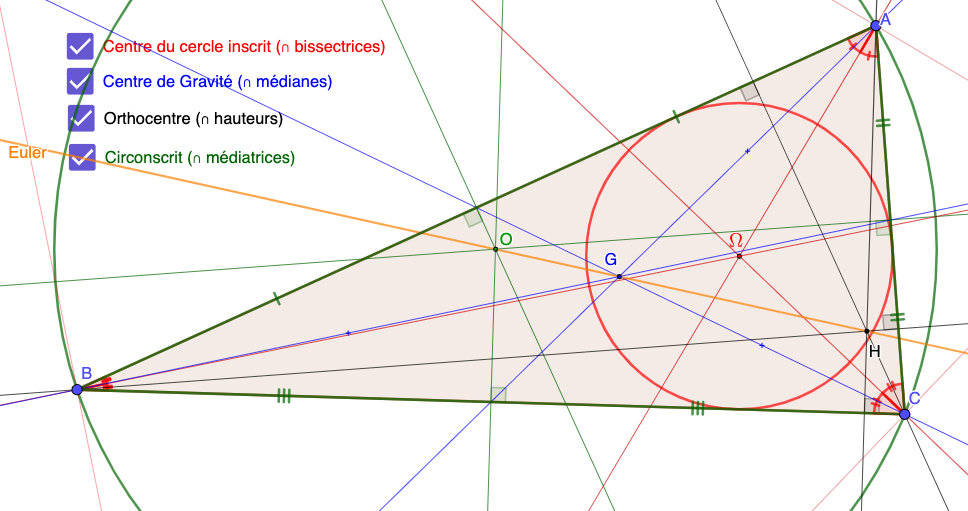
This GeoGebra example demonstrates how to construct a set of notable (characteristic) points of a given triangle by combining classical constructions. It highlights the interplay between angle bisectors, perpendicular lines, circles, and intersection points. Key concepts include triangle notable points, angle-bisector geometry, symmetry ideas, and determining key points via intersections. The construction workflow uses Polygon to create triangle ABC, Midpoint to compute side midpoints, OrthogonalLine to draw perpendiculars, and AngularBisector to build angle bisectors. Lines (Line) are then intersected (Intersect) to obtain the characteristic points, while Circle and Segment are used to introduce circular constraints and segment measurements. The interactive objects are organized around the triangle’s vertices and the intersection-derived points (e.g., D, E, F, etc.), enabling a dynamic understanding of the underlying relationships. Suitable for upper-secondary geometry, contest training, and educational dynamic visualization of triangle geometry and its links to analytic expressions (e.g., coordinate relations and quadratic/trigonometric connections).
GeoGebra Commands & Parameters
Polygon(A, B, C) → t1, c, a, bMidpoint(A, B) → DMidpoint(B, C) → EMidpoint(C, A) → FOrthogonalLine(D, c) → fOrthogonalLine(F, b) → gOrthogonalLine(E, a) → hAngularBisector(c, a) → k, lAngularBisector(b, a) → m, nAngularBisector(c, b) → i, jLine(A, E) → pLine(B, F) → qLine(D, C) → rIntersect(q, p) → GIntersect(n, j) → H_{1}Intersect(h, f) → OOrthogonalLine(A, a) → sOrthogonalLine(B, b) → tOrthogonalLine(C, c) → dIntersect(s, d) → HLine(H, O) → eAngle(C, E, O) → αAngle(O, F, C) → βAngle(B, D, O) → γAngle(c, d) → δAngle(b, t) → εAngle(a, s) → ζCircle(O, A) → c_1Segment(A, D) → f_1Segment(B, D) → g_1Segment(A, F) → h_1Segment(C, F) → i_1Segment(B, E) → j_1Segment(C, E) → k_1Midpoint(B, G) → IMidpoint(A, G) → JMidpoint(C, G) → KCircle(H_{1}, Distance[H_{1}, a]) → d_1Angle(B, C, H_{1}) → κAngle(A, C, H_{1}) → ιAngle(B, A, H_{1}) → ηAngle(H_{1}, A, C) → θAngle(H_{1}, B, A) → μAngle(C, B, H_{1}) → λ
AI Drawing Prompt Reference
Draw a triangle and showcase a set of significant points constructed via angle bisectors and perpendiculars. Start by drawing the triangle's sides and vertices, then find the midpoints of each side and draw perpendicular lines. Next, construct the angle bisectors and locate the intersection points of the perpendiculars with the angle bisectors. These intersection points, associated with the triangle's vertices and sides, form a series of significant points. Finally, draw circles and segments through these points to illustrate their symmetry and geometric relationships.
The prompt above was compiled from the original drawing commands and is for reference only.