
Locus of the pole (polar) from tangents to the incircle
Loading the math board and drawing, please wait…
In collections
Besondere Punkte/Special Points
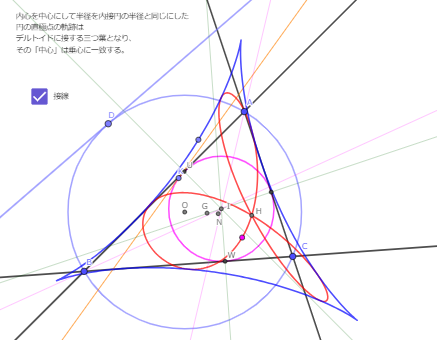
This example demonstrates how the “pole” (direct pole point in the polar/polar-line sense) corresponding to a tangent line of a triangle’s incircle moves as the tangent varies, producing a geometric locus.
Key concepts include: the incircle of a triangle, tangency, pole–polar relationships (dual geometry), and the locus method. By treating “tangent line → corresponding pole” as a parameterized mapping, the construction tracks the changing pole directly in the plane.
Construction workflow (from the GeoGebra command set): TriangleCenter to define relevant triangle centers/auxiliary geometric points; Circle to represent the incircle; Tangent to build a tangent at a variable point; Point to represent the tangent point and the resulting pole; OrthogonalLine, Line, Intersect, and Distance to determine necessary auxiliary lines, intersection points, and distances; LineBisector when angle-bisector constraints are needed; and finally Locus to render the path of the pole.
Suitable for: advanced high-school enrichment or introductory university courses on synthetic geometry, polar geometry, and locus visualization.
GeoGebra Commands & Parameters
TriangleCenter(A, B, C, 3) → OLine(A, B) → fLine(B, C) → gLine(C, A) → hCircle(B, C, A) → cPoint(c) → DTangent(D, c) → i,OrthogonalLine(A, i) → jOrthogonalLine(C, i) → kOrthogonalLine(B, i) → lIntersect(i, l) → EIntersect(i, j) → FIntersect(i, k) → G_1OrthogonalLine(E, h) → mOrthogonalLine(F, g) → pOrthogonalLine(G_1, f) → nIntersect(m, p) → H_1TriangleCenter(A, B, C, 4) → HTriangleCenter(A, B, C, 1) → ITriangleCenter(A, B, C, 5) → NOrthogonalLine(P, g) → q_1Intersect(g, q_1) → WOrthogonalLine(P, f) → p_1Intersect(f, p_1) → UCircle(P, Distance[I, U]) → dPoint(d) → KTangent(K, d) → q, n_1OrthogonalLine(A, q) → rOrthogonalLine(C, q) → sOrthogonalLine(B, q) → tIntersect(r, q) → LIntersect(q, s) → MIntersect(t, q) → N_1OrthogonalLine(L, g) → bOrthogonalLine(M, f) → eOrthogonalLine(N_1, h) → f_1Intersect(e, f_1) → O_1TriangleCenter(A, B, C, 2) → GLocus(O_1, K) → loc1Locus(H_1, D) → loc2Point(c) → JLine(P, J) → g_1OrthogonalLine(A, g_1) → h_1OrthogonalLine(B, g_1) → i_1Intersect(g_1, h_1) → RIntersect(g_1, i_1) → SOrthogonalLine(S, h) → k_1OrthogonalLine(R, g) → m_1OrthogonalLine(C, g_1) → j_1Intersect(g_1, j_1) → QOrthogonalLine(Q, f) → l_1Intersect(k_1, m_1) → TOrthogonalLine(P, h) → r_1Intersect(r_1, h) → VLineBisector(U, W) → s_1LineBisector(U, V) → t_1Distance(W, N) → distanceWN
AI Drawing Prompt Reference
Start with a triangle ABC. Draw its incircle and consider a varying tangent line to this incircle at a moving tangency point. For each such tangent, construct the corresponding pole point K using the pole–polar relationship: build the needed auxiliary perpendicular lines from the incircle tangent setup, intersect with the appropriate lines defined by the triangle, and use the resulting intersections to place the pole. Trace the locus of K as the tangent changes, producing the curve of the pole under the tangent variation. Optionally, also plot the locus of the related constructed point based on the same auxiliary construction involving D, to show the paired locus behavior.
The prompt above was compiled from the original drawing commands and is for reference only.