
Geometric Decomposition and Integral Area of a Regular Dodecagon
Loading the math board and drawing, please wait…
In collections
GeoGebra and Laser Cutting
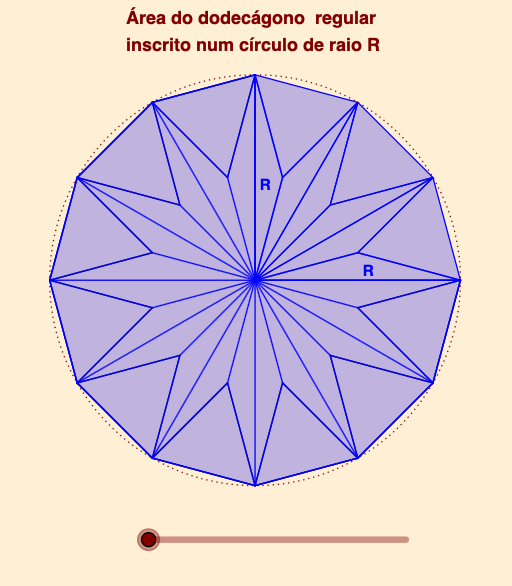
This example demonstrates how to compute the area of a regular dodecagon by exploiting symmetry to decompose it into congruent geometric parts, then expressing the resulting region using function relationships suitable for (definite) integral area computation. Key concepts include properties of regular polygons, relationships between equilateral triangles and circumcircle geometry, boundary modeling via linear or piecewise functions, and the integral idea for converting geometric regions into area formulas. The construction starts by locating the center and key vertices, using rotations and translations to generate the full dodecagon and its dividing triangles. Vectors and segments define the decomposition boundaries; intersection points are obtained with an intersect operation to capture where auxiliary lines meet. A circle provides the circumradius context, and the geometry is linked to function objects (e.g., f, g, h, …) that represent the needed height/measure for the area calculation, culminating in an integral-based area result. From the construction summary, the main GeoGebra commands and objects are: Point, Rotate, Polygon, Vector, Segment, Intersect, Translate, Circle, together with several constructed polygons (pol1, pol2, pol5, pol7) and multiple function/auxiliary objects (f, g, h, i, j, k, l, m, n, p, q, r) used to drive the computation. Suitable for high-school geometry enrichment and early calculus/precampus lessons on connecting polygon areas with integrals.
GeoGebra Commands & Parameters
Point(xAxis) → BPoint(xAxis) → ARotate(B, 15°, A) → B'Polygon(A, B', 12) → pol1, f, p, q, r, C, D, E, F, G, H, I, g, J, K, L, h, i, j, k, l, m, nPolygon(D, E, 3) → pol5, h_1, i_1, j_1, PVector(P, B') → v_1Polygon(F, G, 3) → pol7, n_1, p_1, q_1, RVector(R, I) → u_1Polygon(A, B', 3) → pol2, s, t, a, MPolygon(B', C, 3) → pol3, b, c, d, NPolygon(C, D, 3) → pol4, e, f_1, g_1, OPolygon(E, F, 3) → pol6, k_1, l_1, m_1, QPolygon(G, H, 3) → pol8, r_1, s_1, t_1, SPolygon(H, I, 3) → pol9, a_1, b_1, c_1, TPolygon(I, J, 3) → pol10, d_1, e_1, f_2, UPolygon(J, K, 3) → pol11, g_2, h_2, i_2, VPolygon(K, L, 3) → pol12, j_2, k_2, l_2, WPolygon(L, A, 3) → pol13, m_2, n_2, p_2, ZSegment(A, G) → q_2Segment(L, F) → r_2Segment(K, E) → s_2Segment(J, D) → t_2Segment(I, C) → a_2Segment(H, B') → b_2Intersect(q_2, r_2) → A_1Segment(M, A_1) → c_2Segment(N, A_1) → d_2Segment(O, A_1) → e_2Segment(P, A_1) → f_3Segment(Q, A_1) → g_3Segment(R, A_1) → h_3Segment(S, A_1) → i_3Segment(T, A_1) → j_3Segment(U, A_1) → k_3Segment(V, A_1) → l_3Segment(W, A_1) → m_3Segment(Z, A_1) → n_3Rotate(K, 60°, L) → K'Vector(Q, K') → uTranslate(pol6, Vector[(u * o)]) → pol6'Translate(pol7, Vector[(u_1 * o)]) → pol7'Translate(pol5, Vector[(v_1 * o)]) → pol5'Polygon(A_1, R, G) → t1, g_4, p_3, r_3Translate(A_1, Vector[(u_1 * o)]) → B_1Translate(R, Vector[(u_1 * o)]) → R'Translate(G, Vector[(u_1 * o)]) → G'Polygon(B_1, R', G') → t1', g', q_3, r'Polygon(A_1, D, P) → t2, p_4, s_3, d_3Translate(A_1, Vector[(v_1 * o)]) → C_1Translate(D, Vector[(v_1 * o)]) → D'Translate(P, Vector[(v_1 * o)]) → P'Polygon(C_1, D', P') → t2', p', t_3, d'Polygon(A_1, R, F) → t3, f_4, a_3, r_4Vector(R, H) → vTranslate(Polygon[Rotate[A_1, (120° * o), R], Rotate[R, (120° * o), R], Rotate[F, (120° * o), R]], Vector[(v * o)]) → t4Polygon(F, Q, A_1) → t5, b_3, f_5, q_4Vector(A_1, K') → wTranslate(Polygon[Rotate[F, (30° * o), A_1], Rotate[Q, (30° * o), A_1], Rotate[A_1, (30° * o), A_1]], Vector[(w * o)]) → t6Polygon(A_1, Q, E) → t7, e_3, c_3, q_5Translate(Polygon[Rotate[A_1, ((-(30°)) * o), A_1], Rotate[Q, ((-(30°)) * o), A_1], Rotate[E, ((-(30°)) * o), A_1]], Vector[(w * o)]) → t8Polygon(A_1, P, E) → t9, e_4, h_4, p_5Vector(P, C) → w_1Translate(Polygon[Rotate[A_1, ((-(120°)) * o), P], Rotate[P, ((-(120°)) * o), P], Rotate[E, ((-(120°)) * o), P]], Vector[(w_1 * o)]) → t10Polygon(G, A_1, H, D, C, B', A, L, K, J, I) → pol14, g_5, i_5, h_5, i_4, d_4, c_4, b', a_4, l_4, k_4, j_4Segment(A_1, K) → m_4Segment(A_1, L) → n_4Circle(A_1, B') → s_4
AI Drawing Prompt Reference
Draw a regular dodecagon and decompose it into 12 congruent equilateral triangles. Start by creating points A and B on the x-axis, then rotate B around A by 15 degrees to get B'. Use A and B' as vertices to construct the regular dodecagon pol1 and generate auxiliary functions f, g, h, etc. Further construct other equilateral triangles like pol5 and pol7 through rotation and translation, and generate corresponding auxiliary lines and functions. Finally, use intersection operations to determine the intersection points of auxiliary lines, such as A1, and construct more triangles like t1 and t1', to complete the area calculation of the dodecagon.
The prompt above was compiled from the original drawing commands and is for reference only.