
Isosceles Trapezoid Template by Tim Brzezinski (2)
Loading the math board and drawing, please wait…
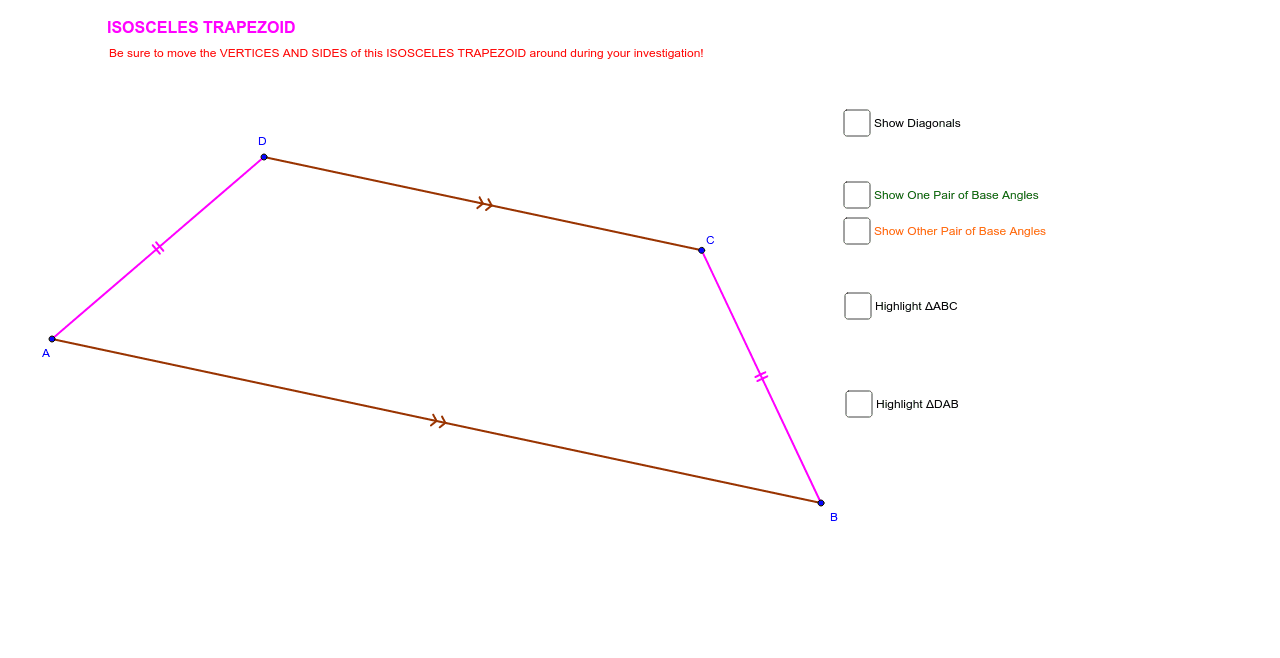
This example demonstrates the properties of an isosceles trapezoid, involving key mathematical concepts such as geometric construction and the characteristics of isosceles trapezoids. Using GeoGebra commands like Segment, Midpoint, OrthogonalLine, etc., the construction process of the isosceles trapezoid is visually demonstrated. Suitable for middle school and above students or teachers.
GeoGebra Commands & Parameters
Segment(A, B) → aMidpoint(a) → C_1OrthogonalLine(C_1, a) → bSegment(A, D) → cOrthogonalLine(D, b) → dIntersect(b, d) → ESegment(D, E) → eMirror(D, b) → C_2Mirror(E, b) → E'Segment(C_2, E') → e'Mirror(A, b) → B_2Mirror(D, b) → CSegment(B_2, C) → c'Segment(D, C_2) → fSegment(A, C_2) → gSegment(D, B) → hIntersect(g, h) → FSegment(A, F) → iSegment(F, C_2) → jSegment(D, F) → kSegment(F, B) → lAngle(D, C_2, F) → αAngle(F, C_2, B) → βAngle(A, D, F) → γAngle(F, D, C_2) → δAngle(B, A, F) → εAngle(F, A, D) → ζAngle(F, B, A) → ηAngle(C_2, B, F) → θAngle(B, A, D) → ιAngle(A, D, C_2) → κAngle(D, C_2, B) → λAngle(C_2, B, A) → μPolygon(A, B, C) → poly1, c_1, a_1, b_1Mirror(A, i) → A'Mirror(B, i) → B'Mirror(C, i) → C'Polygon(A', B', C') → poly1', c'_1, a', b'Polygon(D, A, B) → poly2, b_2, d_1, a_2Mirror(D, l) → D'Mirror(A, l) → A'_1Mirror(B, l) → B'_1Polygon(D', A'_1, B'_1) → poly2', b'_1, d', a'_1
AI Drawing Prompt Reference
Draw an isosceles trapezoid by first constructing the perpendicular bisectors of the top and bottom sides, then using these bisectors to form the legs of the trapezoid. Connect the vertices to complete the shape, and label the key angles and sides to illustrate the geometric properties of the isosceles trapezoid.
The prompt above was compiled from the original drawing commands and is for reference only.