
Isosceles Trapezoid Demo
Loading the math board and drawing, please wait…
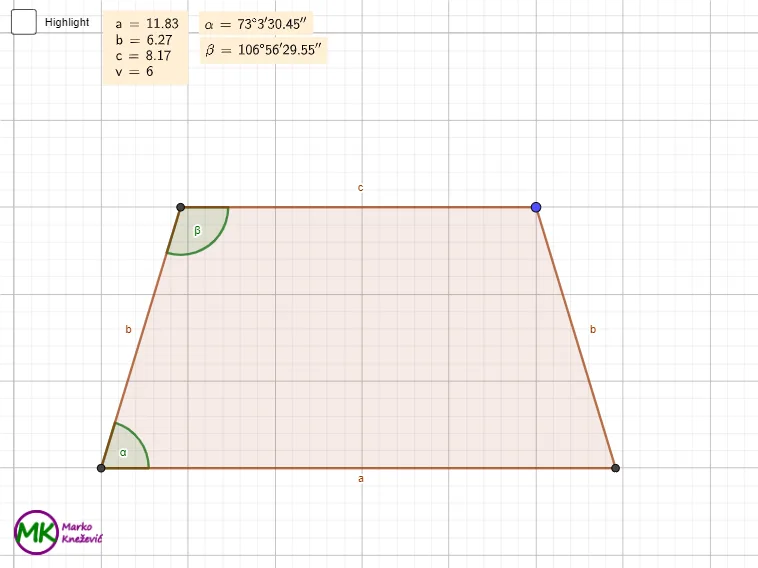
This example demonstrates the geometric properties of an isosceles trapezoid and its application with trigonometric functions. Core concepts include the definition of isosceles trapezoids, similar triangles, sine and cosine theorems, and coordinate geometry. Construction highlights involve commands like Intersect, Line, Point, Circle, Polygon, OrthogonalLine, Segment, Angle, TableText, and LaTeX. Suitable for high school mathematics education, focusing on geometric constructions and the integration of trigonometric functions.
GeoGebra Commands & Parameters
Intersect(xAxis, yAxis) → ALine(C, xAxis) → fLine(A, C) → gPoint(g) → SCircle(S, A) → c_2Intersect(c_2, xAxis, 2) → BCircle(S, C) → dIntersect(d, f, 2) → DPolygon(A, B, C, D) → q1, a, b, c, b_1OrthogonalLine(D, a) → hIntersect(h, a) → ESegment(D, E) → vAngle(B, A, D) → αTableText({LaTeX[a, true, true]}, {LaTeX[b, true, true]}, {LaTeX[c, true, true]}, {LaTeX[v, true, true]}) → text1Angle(D, E, A) → γPolygon(D, E, A) → t1, a_1, d_1, eOrthogonalLine(C, c) → jIntersect(j, a) → FSegment(C, F) → kAngle(B, F, C) → δAngle(A, D, C) → βLaTeX(α, true, true) → text2LaTeX(β, true, true) → text3
AI Drawing Prompt Reference
Draw an isosceles trapezoid ABCD with A and C as the two vertices of the base, and B and D as the two non-parallel vertices. Start by marking point A at the intersection of the x-axis and y-axis, then draw a line g through A and C, and find point S on g. Draw two circles c_2 and d centered at S, intersecting the x-axis to get points B and D. Connect A, B, C, and D to form the trapezoid q1 and draw its height v. Then mark angles α, β, γ, and δ, and convert them to LaTeX format for display.
The prompt above was compiled from the original drawing commands and is for reference only.