
Irregular Quadrilateral Perimeter Calculation
Loading the math board and drawing, please wait…
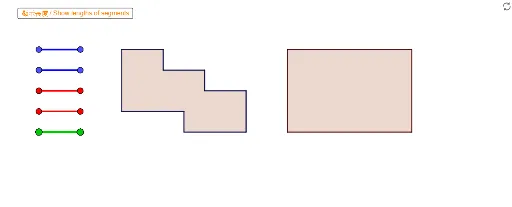
This example demonstrates how to calculate the perimeter of an irregular quadrilateral. Key mathematical concepts include geometric construction and vectors. Using GeoGebra commands such as Segment and Polygon, the construction process of the quadrilateral is visually demonstrated. Suitable for 4th grade students to learn about the perimeter calculation of geometric shapes.
GeoGebra Commands & Parameters
Segment(Blue01a, Blue01b) → Blue01Segment(Blue02a, Blue02b) → Blue02Segment(Blue03a, Blue03b) → Blue03Segment(Blue04a, Blue04b) → Blue04Segment(Red01a, Red01b) → Red01Segment(Red02a, Red02b) → Red02Segment(Red03a, Red03b) → Red03Segment(Red04a, Red04b) → Red04Segment(Blue05a, Blue05b) → Blue05Segment(Red05a, Red05b) → Red05Segment(Blue06a, Blue06b) → Blue06Segment(Red06a, Red06b) → Red06Segment(Blue07a, Blue07b) → Blue07Segment(Blue08a, Blue08b) → Blue08Segment(Blue09a, Blue09b) → Blue09Segment(Blue10a, Blue10b) → Blue10Segment(Blue11a, Blue11b) → Blue11Segment(Blue12a, Blue12b) → Blue12Segment(Red07a, Red07b) → Red07Segment(Red08a, Red08b) → Red08Segment(Red09a, Red09b) → Red09Segment(Red10a, Red10b) → Red10Segment(Red11a, Red11b) → Red11Segment(Red12a, Red12b) → Red12Segment(Green01a, Green01b) → Green01Segment(Green02a, Green02b) → Green02Segment(Green03a, Green03b) → Green03Segment(Green04a, Green04b) → Green04Segment(Green05a, Green05b) → Green05Segment(Green06a, Green06b) → Green06Segment(Green07a, Green07b) → Green07Segment(Green08a, Green08b) → Green08Segment(Green09a, Green09b) → Green09Segment(Green10a, Green10b) → Green10Segment(Green11a, Green11b) → Green11Segment(Green12a, Green12b) → Green12Segment(Green13a, Green13b) → Green13Segment(Green14a, Green14b) → Green14Polygon(VPoly2Fa, VPoly2Fb, VPoly2Fc, VPoly2Fd) → Poly2F, SPoly2Fa, SPoly2Fb, SPoly2Fc, SPoly2FdPolygon(VPoly2Ma, VPoly2Mb, VPoly2Mc, VPoly2Md) → Poly2M, SPoly2Ma, SPoly2Mb, SPoly2Mc, SPoly2MdPolygon(VPoly1Fa, VPoly1Fb, VPoly1Fc, VPoly1Fd, VPoly1Fe, VPoly1Ff, VPoly1Fg, VPoly1Fh, VPoly1Fi, VPoly1Fj) → Poly1F, SPoly1Fa, SPoly1Fj, SPoly1Fb, SPoly1Fc, SPoly1Fd, SPoly1Fe, SPoly1Ff, SPoly1Fg, SPoly1Fh, SPoly1FiPolygon(VPoly1Ma, VPoly1Mb, VPoly1Mc, VPoly1Md, VPoly1Me, VPoly1Mf, VPoly1Mg, VPoly1Mh, VPoly1Mi, VPoly1Mj) → Poly1M, SPoly1Ma, SPoly1Mj, SPoly1Mb, SPoly1Mc, SPoly1Md, SPoly1Me, SPoly1Mf, SPoly1Mg, SPoly1Mh, SPoly1MiSegment(A, B) → R1Segment(C, D) → R2Segment(E, F) → R3Segment(G, H) → R4Segment(I, J) → L1Segment(K, L) → L2Segment(M, N) → L3Segment(O, P) → L4Segment(Q, R) → L5Segment(S, T) → L6Segment(U, V) → L7Segment(W, Z) → L8Segment(A_1, B_1) → L9Segment(C_1, D_1) → L10
AI Drawing Prompt Reference
Draw an irregular quadrilateral using blue, red, and green segments to form its sides, showing how to connect points to create polygons and label each side and vertex for perimeter calculation, suitable for learning geometric construction and vectors.
The prompt above was compiled from the original drawing commands and is for reference only.