
Making Quadrilaterals 4 (Parallelogram)
Loading the math board and drawing, please wait…
In collections
P4 4S1 Making Quadrilaterals
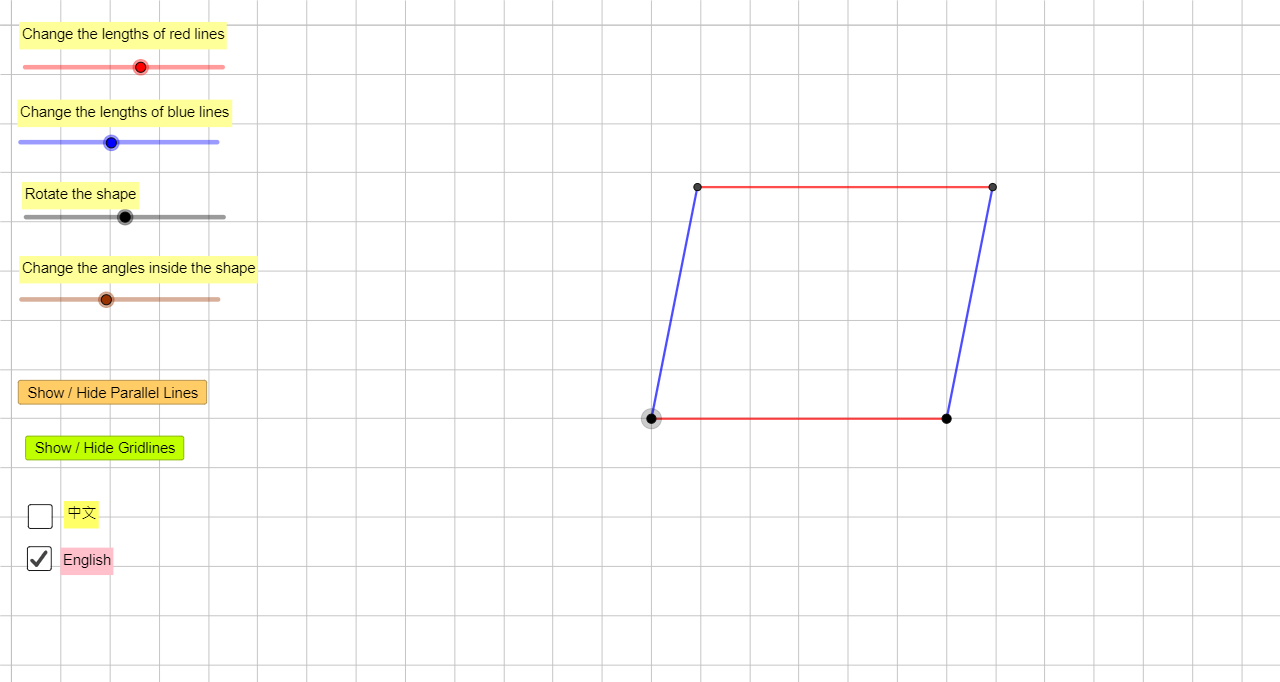
This example demonstrates how to construct a parallelogram through geometric construction, showing its dynamic properties. Core math concepts include the definition and properties of parallelograms, parallel lines, congruent triangles, and applications of rotation and intersection. Construction highlights: using GeoGebra commands such as Circle, Point, Rotate, Segment, Ray, Intersect, Line, and If, along with multiple auxiliary objects (e.g., ParaPo1, ParaLeng1, ParaCir1) to step-by-step build the vertices and sides of the parallelogram, with buttons and checkboxes to toggle parallel lines and grid display. Suitable for middle school geometry lessons to help students understand parallelogram construction and its relation to congruence and rotation.
GeoGebra Commands & Parameters
Circle(ParaPo1, ParaLeng1) → ParaCir1Point(ParaCir1) → ParaPo1AuxRotate(ParaPo1Aux, (-ParaAngle1), ParaPo1) → ParaPo2Segment(ParaPo1, ParaPo2) → ParaSeg1Circle(ParaPo1, ParaLeng2) → ParaCir2Ray(ParaPo1, ParaPo2) → ParaRay1Intersect(ParaCir2, ParaRay1, 1) → ParaPo2AuxRotate(ParaPo2Aux, ParaAngle2, ParaPo1) → ParaPo3Segment(ParaPo1, ParaPo3) → ParaSeg2Line(ParaPo3, ParaSeg1) → ParaLine3Line(ParaPo2, ParaSeg2) → ParaLine4Intersect(ParaLine3, ParaLine4) → ParaPo4Line(ParaPo1, ParaPo2) → ParaLine1Line(ParaPo1, ParaPo3) → ParaLine2Segment(ParaPo3, ParaPo4) → ParaSeg3Segment(ParaPo4, ParaPo2) → ParaSeg4If(ShowChi, "改變紅線長度", "Change the lengths of red lines") → Text3If(ShowChi, "改變藍線長度", "Change the lengths of blue lines") → Text4If(ShowChi, "旋轉圖形", "Rotate the shape") → Text5If(ShowChi, "改變圖形內角的大小", "Change the angles inside the shape") → Text6
AI Drawing Prompt Reference
Draw a parallelogram. The figure should include four vertices, two opposite sides, and two diagonals. The construction order starts from a point, draws a line segment, then uses rotation and intersection to generate other vertices, and finally connects all vertices to form the parallelogram.
The prompt above was compiled from the original drawing commands and is for reference only.