
Rotation About the Origin: Building Rotated Triangles and Conic Features
Loading the math board and drawing, please wait…
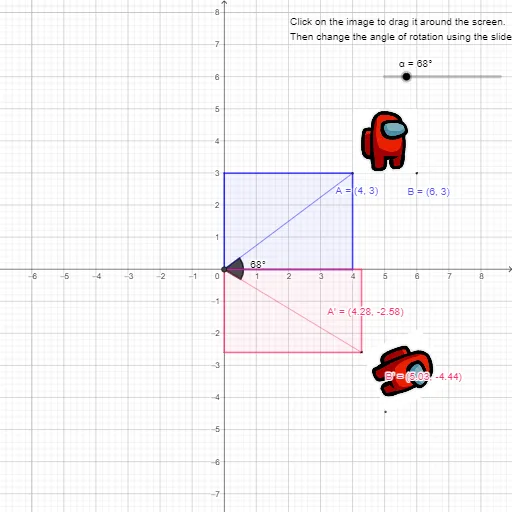
This GeoGebra example demonstrates a rotation transformation about the origin: selected points and segments are rotated by a fixed angle to produce their corresponding images, while geometric relationships (intersections, angles, and orthogonality) assemble a composite figure featuring polygonal structures (including equilateral-triangle-like components) alongside conic-related elements. The central mathematics includes rotation about the origin, coordinate-geometry relationships, angle construction, and perpendicular-line constraints that support the transformation workflow. Construction highlights: Intersect is used to compute key intersection points (e.g., point C and related vertices), Segment and Polygon build the underlying geometric skeleton, Rotate generates rotated objects (such as A′, B′, and rotated subfigures like pic1′), OrthogonalLine provides perpendicular helper lines, and Angle labels the critical angles (α and β) governing the rotation. Suitable for secondary school and early university geometry/construction practice, classroom demonstrations of transformations, and student exploration of how rigid motions preserve structure.
GeoGebra Commands & Parameters
Intersect(xAxis, yAxis) → CSegment(C, A) → fRotate(pic1, (-α), C) → pic1'Rotate(A, (-α), C) → A'Rotate(B, (-α), C) → B'Segment(C, A') → gOrthogonalLine(A, xAxis) → hOrthogonalLine(A, h) → iIntersect(yAxis, i) → DIntersect(xAxis, h) → EIntersect(i, h) → FPolygon(C, E, A, D) → q1, c, e, a, dOrthogonalLine(A', yAxis) → jOrthogonalLine(A', xAxis) → kIntersect(j, yAxis) → GIntersect(xAxis, k) → HPolygon(G, C, H, A') → q2, g_1, c_1, h_1, a'Angle(A', C, A) → β
AI Drawing Prompt Reference
Draw a triangle with one vertex at the origin and the other two on the axes. Rotate the entire triangle about the origin by a fixed angle counterclockwise, producing a second triangle. From the original triangle's non-origin vertices, draw perpendiculars to the axes, forming a rectangle with the axes. Similarly, from the rotated triangle's vertices, draw perpendiculars to the axes, forming another rectangle. The two rectangles and both triangles together create a composite figure with equilateral-triangle-like parts and conic-related features. Label the angle between the original and rotated positions of a vertex, and indicate the rotation angle.
The prompt above was compiled from the original drawing commands and is for reference only.