
Introduction to Rectangular Coordinates by Ronan Downes
Loading the math board and drawing, please wait…
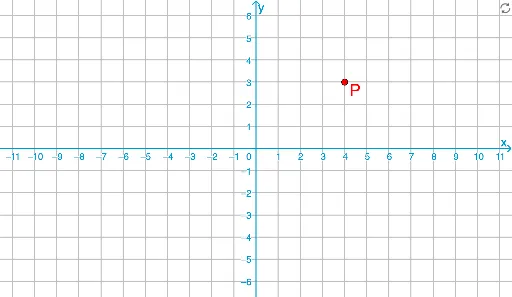
This GeoGebra example demonstrates the dynamic positioning of points and the drawing of polygons in rectangular coordinates, illustrating core concepts such as coordinate representation, vector operations, polygon properties, and geometric transformations. Key construction elements include the use of DynamicCoordinates for real-time coordinate display, Polygon for shape creation, Vector for direction representation, and Point for defining vertices; objects like P, P_x, P_y manage point projections, while poly1 to poly4 enable varied polygon demonstrations, supported by interactive buttons and text labels. Ideal for middle or high school mathematics education, it provides an intuitive introduction to coordinate geometry.
GeoGebra Commands & Parameters
DynamicCoordinates(P', round((10 * x(P'))) / 10, round((10 * y(P'))) / 10) → PPolygon((0, 0), (x(Corner[3]), 0), Corner[3], (0, y(Corner[3]))) → poly1, a, b, c, dPolygon((0, 0), (x(Corner[4]), 0), Corner[4], (0, y(Corner[4]))) → poly2, e, f, g, iPolygon((0, 0), (x(Corner[1]), 0), Corner[1], (0, y(Corner[1]))) → poly3, j, k, l, mPolygon((0, 0), (x(Corner[2]), 0), Corner[2], (0, y(Corner[2]))) → poly4, n, p, q, r_1Vector(P, P_y) → hVector(P, P_x) → vPoint(L_1, t) → AVector((0, 0), If[y(A) ≟ 0, A, (x(P), 0)]) → u_1Vector(If[y(A) ≟ 0, A, (x(P), 0)], A) → u_2
AI Drawing Prompt Reference
Create a rectangular coordinate system with a dynamic point P that has projections onto the x-axis and y-axis, labeled P_x and P_y. Construct four polygons, each based on a different corner point, with vertices at the origin, a point on the x-axis, the corner point itself, and a point on the y-axis. Draw two vectors from P to P_y and from P to P_x to represent directions. Additionally, place a point A on a line and create two vectors based on A and the x-coordinate of P. The illustration demonstrates fundamental concepts in coordinate geometry, including point coordinates, polygons, and vector operations.
The prompt above was compiled from the original drawing commands and is for reference only.