
Introduction to Fractions
Loading the math board and drawing, please wait…
In collections
Elementary School
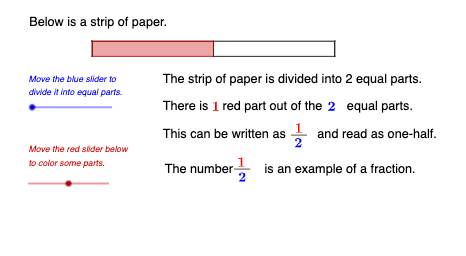
This example dynamically demonstrates the geometric representation of fractions, visually showing the meaning of fractions. It involves core math concepts like fractions, geometric segmentation, function graphs, and rotation. GeoGebra commands and objects used include Intersect, Segment, Polygon, Sequence, Element, and Point. Suitable for middle school mathematics teaching, helping students understand the relationship between fractions and geometric shapes, and enhancing spatial imagination.
GeoGebra Commands & Parameters
Intersect(xAxis, yAxis) → BSegment(A, B) → fSegment(A, C) → gSegment(C, D) → hSegment(D, B) → iSegment(E, C) → jSegment(E, B) → kPolygon(E, B, D, C) → q1, e, b_1, d_1, cSequence(Segment[((4 / n, 0) * i), ((4 / n * i), 0.25)], i, 0, n) → l1, {0.25, 0.25, 0.25}Segment(F, G) → lPolygon((0, 0), (0, 0.25), ((4 / n * b), 0.25), ((4 / n * b), 0), (0, 0)) → poly1, m, p, q, r, sElement(numrtr, b + 1) → nmrtrtxtElement(dmtr, n - 1) → dmtrtxtsElement(dmtrp, n - 1) → dmtrtxtpElement(numrtr_{1}, b_{3} + 1) → nmrtrtxt_{1}Element(dmtr_{1}, n_{2} - 1) → dmtrtxts_{1}Point(Circle[H, 0.26]) → ISegment(H, I) → tPoint(m) → JSegment(J, C) → aPoint(r) → KSegment(K, D) → f_1Point(Circle[L, 0.24]) → MSegment(L, M) → g_1Point(Circle[N, 0.24]) → OSegment(N, O) → h_1
AI Drawing Prompt Reference
Draw a coordinate system with a square at the origin, dynamically divide it into n equal parts, and color each segment differently. Include a function graph and a rotating geometric shape to visually demonstrate the geometric meaning of fractions and their relationship with functions and rotation, suitable for middle school students to understand the connection between fractions and geometric shapes.
The prompt above was compiled from the original drawing commands and is for reference only.