
Integer Multiplication by Variable
Loading the math board and drawing, please wait…
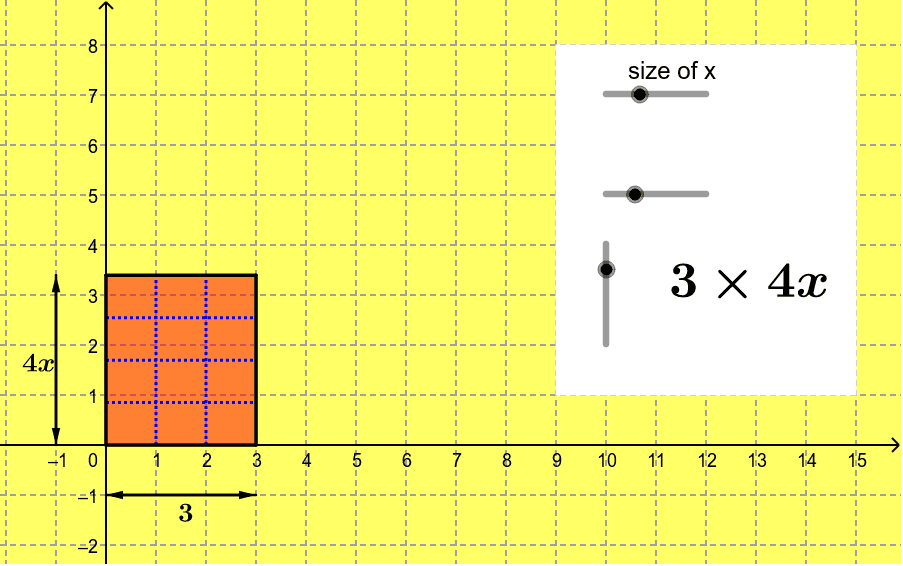
This example demonstrates the geometric interpretation of multiplying an integer by a variable [a×bx] using an area model. Key math concepts include algebraic operations, multiplication principles, and area calculations. It is constructed using GeoGebra commands like Sequence, Polygon, Vector, and Midpoint. Suitable for middle school and above students to understand the connection between algebraic expressions and geometric figures, ideal for classroom demonstrations or concept reinforcement.
GeoGebra Commands & Parameters
Sequence((i, 0), i, 1, int - 1) → list1Sequence((i, y(B)), i, 1, int - 1) → list2Sequence((0, xsize * i), i, 1, noofx - 1) → list3Sequence((x(C), xsize * i), i, 1, noofx - 1) → list4Sequence(Segment[Element[list1, i], Element[list2, i]], i, 1, int - 1) → list5Sequence(Segment[Element[list3, i], Element[list4, i]], i, 1, noofx - 1) → list6Polygon(A, B, D, C) → poly1, b, c, d, eVector(E, F) → uVector(F, E) → vMidpoint(E, F) → GVector(H, I) → wVector(I, H) → zMidpoint(I, H) → JPolygon(K, L, M, N) → poly2, k, l, m, n
AI Drawing Prompt Reference
Draw a geometric figure to demonstrate the multiplication of an integer by a variable using an area model. Start by creating a rectangle using sequences to generate multiple line segments forming the edges, then connect these segments to form a closed polygon. Add two vectors to indicate direction and find their midpoints. Finally, use these points and vectors to draw another rectangle, illustrating the geometric meaning of multiplication.
The prompt above was compiled from the original drawing commands and is for reference only.