
Area Model for Multiplying 4-Digit by 3-Digit Numbers
Loading the math board and drawing, please wait…
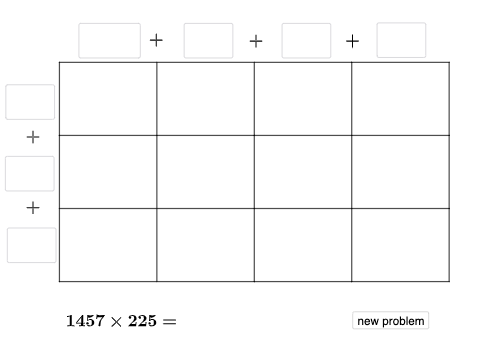
This GeoGebra example demonstrates how to multiply a 4-digit number by a 3-digit number using a flexible area model. The key idea is that the product can be visualized as a grid of sub-rectangles: each small rectangle’s area corresponds to a partial product coming from place-value decomposition, and the final multiplication result emerges by summing these areas. It connects core concepts such as place-value breaking, area-sum reasoning, and structured summation ideas (including an intuitive link to upper/lower sums or Riemann-sum style thinking). The construction also references related geometry concepts present in the model/theme, such as similar triangles and (where applicable) inscribed circle relationships, and includes calculus-related elements like the derivative as an optional interpretive extension. Construction-wise, the example uses GeoGebra commands—Random, Intersect, Point, Polygon, Segment, Textfield, If, Vector, and Translate—to generate variable geometry, compute intersection points for boundaries, build the subdivided region as polygons/segments, add labels, and use vectors/translations to position and update the grid blocks dynamically. Suitable for middle school through early high school math (number sense, place value, and number-geometry visualization), and for learners using dynamic geometry to build intuition for summation-based reasoning.
GeoGebra Commands & Parameters
Random(1, 9) → wRandom(0, 9) → vRandom(1, 9) → u_{4}Random(0, 9) → v_3Intersect(xAxis, yAxis) → ARandom(1, 9) → a_1Random(0, 9) → w_1Random(0, 9) → b_2Point(yAxis) → DPoint(xAxis) → EPoint(xAxis) → FPoint(yAxis) → LPolygon(A, E, G, L) → q1, a_{2}, e, g_{4}, l_{2}Polygon(E, F, H, G) → q2, e_1, f_{2}, h_{4}, g_1Polygon(G, H, K, J) → q5, g_2, h_3, k_1, j_{2}Polygon(L, G, J, D) → q6, l_1, g_3, j_1, d_{2}Segment(D, A) → q_{3}Segment(J, E) → s_{4}Segment(K, F) → t_{4}Random(1, 9) → o_{3}Random(1, 9) → b_1Textfield(d_1) → aTextfield(m_1) → bTextfield(t_1) → gTextfield(u_1) → hTextfield(o_1) → mTextfield(p_1) → nTextfield(r_1) → qTextfield(s_1) → rTextfield(ansguess) → uIf(n_1 ≟ v, "√", "X") → text3If(ansguess ≟ produc, "☺", "☹ ") → text7Segment(L, H) → r_{3}Segment(A, F) → m_{2}Segment(D, K) → p_{3}Vector(L, D) → c_{3}Translate(D, c_{3}) → D'Translate(J, c_{3}) → J'Translate(K, c_{3}) → K'Vector(D, J) → i_{5}Translate(H, i_{5}) → H'Translate(K, i_{5}) → K'_{1}Translate(F, i_{5}) → F'Translate(K', i_{5}) → K''Segment(D', K'') → j_{5}Segment(K'', F') → m_{3}Segment(F', F) → f_1Segment(H, H') → h_1Segment(K, K'_{1}) → i_1Segment(K', K) → h_2Segment(J', J) → i_2Segment(D', D) → k_2Textfield(c_2) → iTextfield(e_2) → jTextfield(n_2) → kTextfield(o_2) → oTextfield(p_2) → sTextfield(q_2) → fTextfield(r_2) → cIf(sidetrue, "√", "X") → text5If(toptrue, "√", "X") → text2Polygon(D, J, J', D') → q3, d_3, j_3, j', d'Polygon(J, K, K', J') → q4, j_4, k_3, k', s_2Polygon(K, K'_{1}, K'', K') → q7, k_4, k'_{1}, k'', t_2Polygon(H, H', K'_{1}, K) → q8, h_5, h', f_3, k_5Polygon(F, F', H', H) → q9, f_4, f', i_3, h_6Translate(F', i_{5}) → F''Translate(H', i_{5}) → H''Translate(K'_{1}, i_{5}) → BTranslate(K'', i_{5}) → K'''Segment(K'', K''') → l_3Segment(K''', B) → n_3Segment(B, K'_{1}) → s_3Segment(H', H'') → t_3Segment(H'', B) → a_3Segment(F', F'') → b_3Segment(F'', H'') → e_3Textfield(u_2) → dTextfield(v_2) → lTextfield(w_2) → pTextfield(u_3) → tPolygon(K'_{1}, B, K''', K'') → q10, i_4, b_4, k''', l_4Polygon(H', H'', B, K'_{1}) → q11, m_4, h'', b_5, n_4Polygon(F', F'', H'', H') → q12, p_4, f'', q_4, r_4
AI Drawing Prompt Reference
Draw a multiplication grid based on an area model. The grid consists of multiple rectangles, each representing a partial product. The area of each rectangle is labeled with a number. Rectangles are arranged in a grid, with boundaries defined by axes and points. Rectangles are connected by line segments to form a clear grid. The drawing should include axes, origin, grid points, and labeled numbers. The construction order is: first generate random numbers, then draw axes and origin, then build the rectangle grid, and finally add area labels and connecting line segments. The grid should intuitively show the decomposition and summation process of multiplication, suitable for math teaching.
The prompt above was compiled from the original drawing commands and is for reference only.