
3.4.2 Museo de Onda: Azulejo 2—Geometric Construction and Derivative Insight
Loading the math board and drawing, please wait…
In collections
geometriadinamica.es
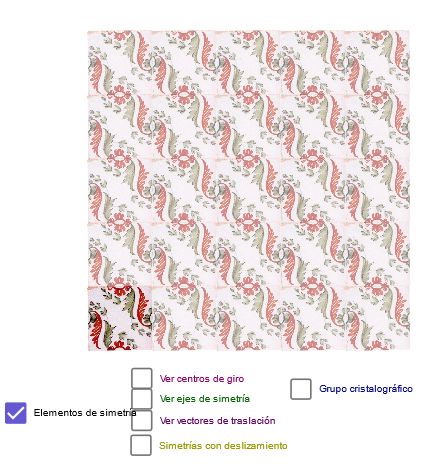
This example recreates a “wave museum (Museo de Onda) tile” style pattern (Azulejo 2) by combining straight-line constructions with symmetry and translation, letting learners explore how a structured graphic emerges from a small set of geometric rules. It highlights core concepts such as geometric construction (lines, intersection points, midpoints), transformation geometry (mirror and translation), and vector-based direction relationships. The construction also incorporates Min to select extremal quantities and uses additional difference/variation objects (e.g., dif-like variables and derivative-related entities) to support an intuition for how certain measures change—linking the visualization to derivative/changes in value. Key GeoGebra commands include Line and Point to create base elements; OrthogonalLine and Intersect to build perpendicular constraints and compute intersections; Midpoint to establish symmetry baselines; Mirror for reflection; Vector to represent directional relationships; Translate to move parts of the figure; and Min to determine minimal related values. Designed for classroom demonstration and student exploration in later middle school through early university, especially for lessons connecting transformation geometry with calculus ideas (derivative/variation).
GeoGebra Commands & Parameters
Line(A, B) → bLine(G, b) → ePoint(e) → JOrthogonalLine(J, e) → hOrthogonalLine(G, e) → fPoint(f) → HOrthogonalLine(H, f) → gIntersect(g, h) → EMidpoint(E, H) → IMidpoint(I, E) → B_1Midpoint(G, J) → DMidpoint(J, E) → FMidpoint(H, G) → KMidpoint(D, I) → LMidpoint(K, L) → MMidpoint(L, F) → NMidpoint(F, J) → OMidpoint(J, D) → PMidpoint(G, D) → QMidpoint(K, G) → RMidpoint(Q, M) → SMidpoint(L, D) → TMidpoint(P, N) → UMidpoint(F, E) → VMidpoint(K, H) → WMidpoint(W, V) → ZMidpoint(H, I) → A_1Midpoint(N, B_1) → C_1Midpoint(Z, W) → D_1Midpoint(D, U) → E_1Midpoint(U, J) → F_1Midpoint(T, Q) → G_1Midpoint(S, G) → H_1Midpoint(S, K) → I_1Midpoint(M, T) → J_1Midpoint(T, N) → K_1Midpoint(N, O) → L_1Midpoint(F, C_1) → M_1Midpoint(C_1, L) → N_1Midpoint(L, D_1) → O_1Midpoint(D_1, K) → P_1Midpoint(H, D_1) → Q_1Midpoint(D_1, I) → R_1Midpoint(I, C_1) → S_1Midpoint(C_1, E) → T_1Mirror(F_1, h) → U_1Mirror(L_1, h) → V_1Mirror(M_1, h) → W_1Mirror(T_1, h) → Z_1Mirror(B_1, h) → A_2Line(Q, A_2) → dLine(F, d) → iLine(C_1, d) → kLine(S_1, k) → lLine(R_1, L_1) → jLine(D_1, j) → mLine(M, j) → nLine(I, j) → pLine(S, A_1) → tLine(I, T) → a_1Line(U, B_1) → b_1Line(E_1, N_1) → c_1Line(F_1, M_1) → d_1Line(G_1, R_1) → e_1Line(W_1, P_1) → g_1Line(Q_1, Z_1) → h_1Point(a_1) → F_2Mirror(F_2, m) → L_2Mirror(F_2, m) → M_2Point(b) → A1Min(90, ((a - 1) * 90)) → r1Line(G_1, O_1) → l_1OrthogonalLine(G_1, l_1) → m_1OrthogonalLine(J_1, l_1) → q_1OrthogonalLine(O_1, l_1) → r_1OrthogonalLine(R_1, l_1) → s_1OrthogonalLine(E_1, m_1) → t_1OrthogonalLine(F_1, m_1) → a_2Point(a_1) → COrthogonalLine(F_2, d) → i_1OrthogonalLine(C, d) → j_1Min(180, ((a - 1) * 180)) → r2Min(270, ((a - 1) * 270)) → r3Min(180, ((a - 5.5) * 180)) → r4Vector(R, S) → z_1Vector(R, G) → u_2Translate(pic1, u_2) → pic1'Translate(pic1', u_2) → pic1''Translate(pic1'', u_2) → pic1'''Translate(pic1, z_1) → pic1'_1Translate(pic1'_1, z_1) → pic2Translate(pic2, z_1) → pic2'Translate(pic2', z_1) → pic2''Translate(pic1', z_1) → pic1''_1Translate(pic1'', z_1) → pic1'''_1Translate(pic1'''_1, z_1) → pic3Translate(pic1''', z_1) → pic4Translate(pic4, z_1) → pic4'Translate(pic1''_1, z_1) → pic5Translate(pic5, z_1) → pic5'Translate(pic5', z_1) → pic5''Translate(pic4', z_1) → pic4''Translate(pic4'', z_1) → pic4'''Translate(pic3, z_1) → pic3'Translate(pic3', z_1) → pic3''Translate(pic1''', u_2) → pic6Translate(pic4, u_2) → pic4'_1Translate(pic4'_1, z_1) → pic7Translate(pic7, z_1) → pic7'Translate(pic7', z_1) → pic7''Midpoint(H_1, G_1) → B_2Midpoint(G_1, E_1) → C_2Midpoint(E_1, F_1) → D_2Midpoint(F_1, U_1) → E_2Midpoint(O, U) → G_2Midpoint(U, T) → H_2Midpoint(T, S) → I_2Midpoint(S, R) → J_2Midpoint(I_1, J_1) → K_2Midpoint(J_1, K_1) → N_2Midpoint(K_1, L_1) → O_2Midpoint(L_1, V_1) → P_2Midpoint(F, N) → Q_2Midpoint(N, L) → R_2Midpoint(L, M) → S_2Midpoint(M, K) → T_2Midpoint(P_1, O_1) → U_2Midpoint(O_1, N_1) → V_2Midpoint(N_1, M_1) → W_2Midpoint(M_1, W_1) → Z_2Midpoint(V, C_1) → A_3Midpoint(C_1, Z) → B_3Midpoint(Z, D_1) → C_3Midpoint(D_1, W) → D_3
AI Drawing Prompt Reference
Start with a base line, then construct a perpendicular line through a point on it, forming a rectangular grid framework. Generate a series of symmetrically placed points by repeatedly taking midpoints within the grid, creating a tile-like geometric pattern. Use the perpendicular line as an axis of symmetry to mirror some points to the other side, ensuring left-right symmetry. The final figure consists of lines, perpendiculars, midpoints, and mirrored points, forming a regular decorative geometric design suitable for exploring symmetry and transformations.
The prompt above was compiled from the original drawing commands and is for reference only.