
Vector Fields and Line Integrals Explorer
Loading the math board and drawing, please wait…
In collections
₂ΛM 1: Lagrange Multipliers with One Constraint. Examples
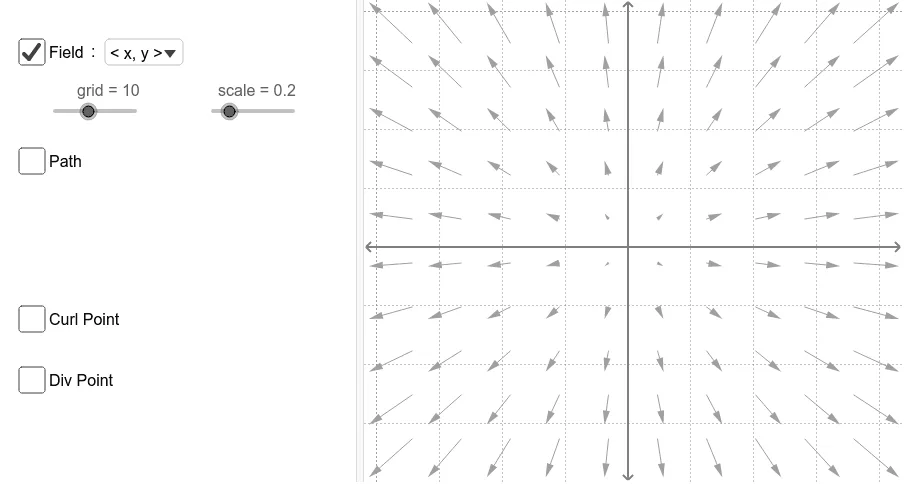
This example demonstrates the exploration of vector fields, line integrals, divergence, and curl. It involves core mathematical concepts such as vector fields, line integrals, divergence (div), curl (curl), and vector operations. The construction utilizes GeoGebra commands and objects like SelectedIndex, Midpoint, Sequence, Element, Circle, CurveCartesian, Sum, Segment for dynamic path generation, divergence/curl point calculation, and visualization. Suitable for university calculus, linear algebra courses, and advanced high school students studying vector calculus applications.
GeoGebra Commands & Parameters
SelectedIndex(fieldNames) → fieldIndexMidpoint(A, B) → MSequence(Segment[Rotate[curlPt - (0.25, 0), k + curlAngle, curlPt], Rotate[curlPt + (0.25, 0), k + curlAngle, curlPt]], k, 0, 2.0943951024, 1.0471975512) → spokesElement(curlList, fieldIndex) → curlElement(divList, fieldIndex) → divCircle(divPt, 0.2) → divGlowCircleElement(gList, fieldIndex) → gElement(fList, fieldIndex) → fSequence(Sequence[Vector[(j, k), (j + (scale * f(j, k)), k + (scale * g(j, k)))], j, xmin, xmax, xstep], k, ymin, ymax, ystep) → vFieldSelectedIndex(pathNames) → pathIndexElement(pathList, pathIndex) → pathCurveCartesian(x(path(t)), y(path(t)), t, 0, s) → partPathSum(Sequence[((path(i + dS) - path(i)) * (f(x(path(i + dS / 2)), y(path(i + dS / 2))), g(x(path(i + dS / 2)), y(path(i + dS / 2))))), i, 0, s - dS, dS]) → workSequence(Vector[path(s), path(s) + ((scale * f(x(path(s)), y(path(s)))), (scale * g(x(path(s)), y(path(s)))))], s, 0, 1, 0.1) → pathVectorsSegment(path(0.2), path(0.21)) → arrow1Segment(path(0.5), path(0.51)) → arrow2Segment(path(0.8), path(0.81)) → arrow3
AI Drawing Prompt Reference
Create a dynamic vector field and line integral explorer, showing the relationships between vector fields, line integrals, divergence, and curl. Begin by generating a vector field with arrows indicating direction and magnitude at each point. Select a path and draw vectors along it, marking the start, midpoint, and end of the path with arrows. Calculate and visualize divergence and curl, using circles for divergence and rotating lines for curl. Finally, plot the path as a curve and add vectors along the path to demonstrate the interaction between the vector field and the path.
The prompt above was compiled from the original drawing commands and is for reference only.