
Flux Approximation Demo
Loading the math board and drawing, please wait…
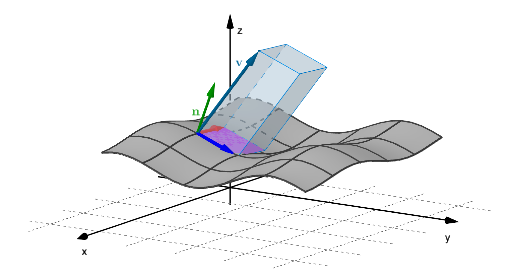
This example demonstrates the approximation of flux in three-dimensional vector fields, visualizing concepts like derivatives, polygons, prisms, and vector operations. It uses commands like Surface, Derivative, Translate, Polygon, Prism, Vector in GeoGebra to construct vector fields, calculate flux, and generate geometric solids, making it suitable for high school and above students studying vector calculus applications.
GeoGebra Commands & Parameters
Surface(u, v, (0.1 * cos((2 * u))) + (0.2 * sin((2 * v))) + 3, u, 0.5, 10, v, 0.5, 10) → aDerivative(F, x) → dFxDerivative(F, y) → dFyDerivative(G, x) → dGxDerivative(G, y) → dGyDerivative(H, x) → dHxDerivative(H, y) → dHySurface(F(u, v), G(u, v), H(u, v), u, 0.5, 10.5, v, 0.5, 10.5) → surfTranslate(Vector[(0, 0, 0), B], A) → uSurface(u, v, plane(u, v), u, Ax - 10 / 12, Ax, v, Ay, Ay + 10 / 12) → smallPlaneTranslate(Vector[(-0.4, 1, 1.5)], A) → vTranslate(A, v) → A'Polygon(A, A2, A3, A1) → Pol1, a_1, a2, a3, a1Prism(Pol1, A') → flux, C, edgeA2C, edgeA3D, edgeA1E, edgeA'C, edgeCD, edgeDE, edgeA'E, D, E, faceAA'CA2, faceA2A3DC, faceA1A3DE, faceAA'EA1, faceA'CDE, edgeAA'Vector(A, A2) → aaVector(A, A1) → bb
AI Drawing Prompt Reference
Draw a 3D vector field flux approximation, starting with a surface, calculate its derivatives in the x and y directions, then construct a geometric solid using these derivatives, and finally translate the solid and create a plane.
The prompt above was compiled from the original drawing commands and is for reference only.