
Gradient Quiz: Calculate the Slope from Two Points
Loading the math board and drawing, please wait…
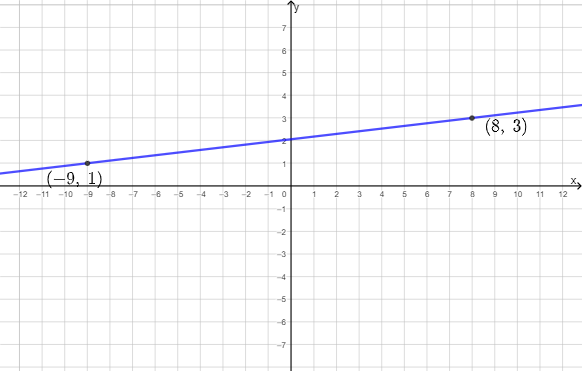
This GeoGebra example presents an interactive quiz that demonstrates how to calculate the gradient (slope) of a line. Given two points on a line, students compute the rate of change using the slope formula and then select the correct answer. The key math ideas are the line gradient from coordinates, the interpretation of slope as direction change, and the relationship between vectors and proportional differences. Construction and implementation rely on GeoGebra commands such as Sample and RandomElement to generate randomized data, Shuffle to mix answer options, If to check whether the user’s choice is correct, Line to draw the geometric line segments through points (e.g., A, B, C, D), Vector to display direction information, and Dilate to transform/scale geometric elements for consistent visualization. The scene also includes objects for feedback and progression (buttonNext, picCorrect, picWrong1/2/3, marks, and multilingual text like textCHI/textENG) so learners immediately see correct vs. incorrect reasoning. Suitable for late middle school through early college students learning calculus/coordinate geometry and practicing gradient-slope calculations.
GeoGebra Commands & Parameters
Sample(-11…11, 2, false) → listX, {8, -9}RandomElement((-5…5) \ {x1, x2}) → y2RandomElement((-5…5) \ {x1, x2}) → y1RandomElement({textWrong3a, textWrong3b}) → textWrong3, "\frac{1+3}{-9+8}"Shuffle({A, B, C, D}) → listPos, {(9, 3), (9, 0), (0, 3), (0, 0)}If(x1 > x2, (x1, y1), (x2, y2)) → MIf(x1 > x2, (x2, y2), (x1, y1)) → NLine(M, N) → fDilate(T, If[0 < s ≤ 1, s, 1], N) → N'Vector(N, N') → uDilate(M, If[1 < s ≤ 2, s - 1, 1], T) → M'Vector(T, M') → v
AI Drawing Prompt Reference
Create an interactive slope calculation quiz visualization: draw a line passing through two randomly generated points on the plane, and display directional vectors at these points showing the line's orientation and inclination. Provide four answer choice positions on the interface, including the correct slope value and three incorrect options that vary based on the randomly generated coordinate data. Include areas for displaying correct and wrong feedback images, along with a button to proceed to the next question. The entire scene presents a coordinate geometry learning context with multilingual explanatory text.
The prompt above was compiled from the original drawing commands and is for reference only.