
Tangram-Based Exploration of Polygon Areas
Loading the math board and drawing, please wait…
In collections
Tangram & Maths
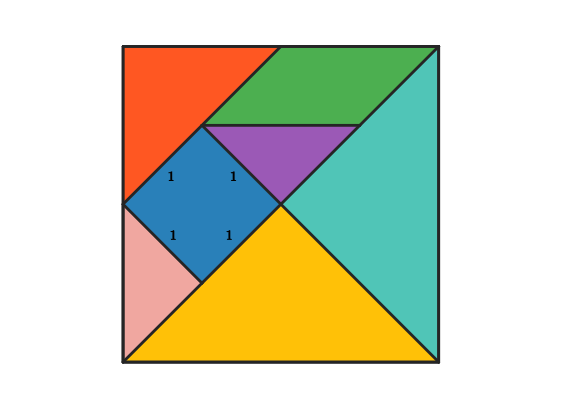
This example uses a tangram to construct and decompose polygons, helping learners compare and verify area relationships in a visual way. It centers on polygon area, geometric partitioning ideas (such as area additivity/equality when shapes are rearranged), midpoint-based geometry, and how key segment/line constructions support area arguments. The construction highlights how Tangram pieces (several polygon objects like poli1–poli4) are assembled into larger polygonal frames while using midpoint information to guide consistent partitioning. GeoGebra construction uses Polygon to create polygonal regions, Segment for essential edges, Midpoint to locate segment midpoints (to build midlines/partition lines), Line for auxiliary lines, Intersect to compute intersection points for precise fitting, and Rotate to position tangram pieces correctly. It relies on named points and variables (e.g., A, B, C, D, E, F, G, H, I, plus intermediate points such as j/J/K/L/M and reference structure like frame1–frame5). Suitable for middle school geometry instruction, hands-on area reasoning, and geometric construction activities.
GeoGebra Commands & Parameters
Polygon(A, B, 4) → poli1, frame3, frame4, frame1, frame2, C, DSegment(A, C) → frame12Midpoint(D, C) → EMidpoint(D, A) → FSegment(F, E) → frame5Midpoint(A, C) → GSegment(B, G) → frame9Midpoint(F, E) → HMidpoint(G, C) → ISegment(H, I) → frame7Segment(G, H) → frame8Line(F, frame8) → jIntersect(j, frame12) → JSegment(F, J) → frame11Polygon(A, G, B) → poli2, b_1, a_1, g_1Rotate(O + (a_1, 0), Angle[B - G] + Angle[O - N] - Angle[G - A], O) → PPolygon(N, O, P) → poli4, p, n, oPolygon(B, G, C) → poli3, c_1, b_2, g_2Rotate(L + (b_2, 0), Angle[C - G] + Angle[L - K] - Angle[G - B], L) → MPolygon(K, L, M) → poli5, m, k_1, lPolygon(H, E, C, I) → poli6, h_1, e_1, c_2, i_1Rotate(R + (e_1, 0), Angle[C - E] + Angle[R - Q] - Angle[E - H], R) → SRotate(S + (c_2, 0), Angle[I - C] + Angle[S - R] - Angle[C - E], S) → TPolygon(Q, R, S, T) → poli7, q, r, s, tPolygon(H, G, I) → poli8, i_2, h_2, g_3Rotate(V + (h_2, 0), Angle[I - G] + Angle[V - U] - Angle[G - H], V) → WPolygon(U, V, W) → poli9, w, u, vPolygon(F, H, G, J) → poli10, f_1, h_3, g_4, j_1Rotate(A_1 + (h_3, 0), Angle[G - H] + Angle[A_1 - Z] - Angle[H - F], A_1) → B_1Rotate(B_1 + (g_4, 0), Angle[J - G] + Angle[B_1 - A_1] - Angle[G - H], B_1) → C_1Polygon(Z, A_1, B_1, C_1) → poli11, z, a_2, b_3, c_3Polygon(F, J, A) → poli12, a_3, f_2, j_2Rotate(E_1 + (f_2, 0), Angle[A - J] + Angle[E_1 - D_1] - Angle[J - F], E_1) → F_1Polygon(D_1, E_1, F_1) → poli13, f_3, d_1, e_2Polygon(F, D, E) → poli14, e_3, f_4, d_2Rotate(H_1 + (f_4, 0), Angle[E - D] + Angle[H_1 - G_1] - Angle[D - F], H_1) → I_1Polygon(G_1, H_1, I_1) → poli15, i_3, g_5, h_4
AI Drawing Prompt Reference
Start with a given configuration determined by points A, B, and C. Construct several polygonal regions by forming segments that connect the key points and by using midpoints on segments related to A–C and D–C to create partition lines. Build an overall polygonal frame using multiple tangent-like pieces, first forming a base polygon from A, B, C and then adding additional polygon pieces defined by triples or quadruples of existing points. Place each piece into the target position by rotating it around specified reference points according to angle relationships, and refine the boundaries at intersection points when needed so the pieces fit consistently. The final drawing should show a larger outer polygon together with several polygon pieces arranged to support area decomposition and comparison.
The prompt above was compiled from the original drawing commands and is for reference only.