
Area Model for 3-Digit × 3-Digit Multiplication: Visual Region Partitioning
Loading the math board and drawing, please wait…
In collections
Multiplication with Area Models
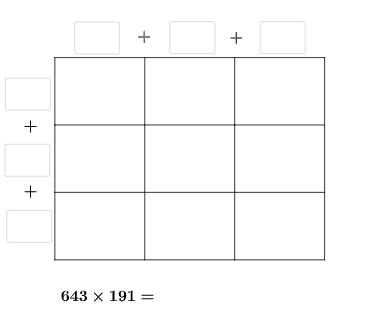
This GeoGebra example demonstrates how to visualize 3-digit by 3-digit multiplication using an area model by partitioning the product into several rectangular/region “area blocks” that are computed and combined. It highlights core ideas such as representing multi-digit multiplication as an area calculation, using distributive reasoning via region decomposition, and deriving equal-area relationships through geometric construction; similarity-based thinking can also be used to interpret proportional resizing. Construction approach (from the command summary): Intersect to locate key intersection points; Random to generate variable numbers for practice or testing; Point and Segment to define the geometric skeleton; Polygon to build the partitioned regions representing area parts; Vector together with Translate to copy/shift blocks consistently; Textfield for displaying or inputting the numbers; If for conditional behavior such as checking results or controlling the diagram; and object management through named points/labels (e.g., q_2, r_2, u_1, t_1, and region boundary points like D–L). Suitable for upper elementary through early middle school instruction and interactive practice, especially for teaching area-model multiplication and helping students connect arithmetic decomposition with geometric areas.
GeoGebra Commands & Parameters
Intersect(xAxis, yAxis) → ARandom(1, 9) → wRandom(0, 9) → vRandom(1, 9) → uRandom(1, 9) → a_1Random(0, 9) → w_1Random(0, 9) → b_2Point(yAxis) → DPoint(xAxis) → EPoint(xAxis) → FPoint(yAxis) → LPolygon(A, E, G, L) → q1, a_{2}, e, g_{4}, l_{2}Polygon(E, F, H, G) → q2, e_1, f_{2}, h_{4}, g_1Polygon(G, H, K, J) → q5, g_2, h_3, k_1, j_{2}Polygon(L, G, J, D) → q6, l_1, g_3, j_1, d_{2}Segment(D, A) → q_{3}Segment(J, E) → sSegment(K, F) → tRandom(1, 9) → o_{3}Random(1, 9) → b_1Textfield(d_1) → aTextfield(m_1) → bTextfield(t_1) → fTextfield(u_1) → gTextfield(o_1) → lTextfield(p_1) → mTextfield(r_1) → oTextfield(s_1) → pTextfield(ansguess) → rIf(n_1 ≟ v, "√", "X") → text3If(ansguess ≟ produc, "☺", "☹ ") → text7Segment(L, H) → r_{3}Segment(A, F) → m_{2}Segment(D, K) → p_{3}Vector(L, D) → c_{3}Translate(D, c_{3}) → D'Translate(J, c_{3}) → J'Translate(K, c_{3}) → K'Vector(D, J) → iTranslate(H, i) → H'Translate(K, i) → K'_{1}Translate(F, i) → F'Translate(K', i) → K''Segment(D', K'') → j_{5}Segment(K'', F') → m_{3}Segment(F', F) → f_1Segment(H, H') → h_1Segment(K, K'_{1}) → i_1Segment(K', K) → h_2Segment(J', J) → i_2Segment(D', D) → k_2Textfield(c_2) → hTextfield(e_2) → jTextfield(n_2) → kTextfield(o_2) → nTextfield(p_2) → qTextfield(q_2) → dTextfield(r_2) → cIf(sidetrue, "√", "X") → text5If(toptrue, "√", "X") → text2Polygon(D, J, J', D') → q3, d_3, j_3, j', d'Polygon(J, K, K', J') → q4, j_4, k_3, k', s_2Polygon(K, K'_{1}, K'', K') → q7, k_4, k'_{1}, k'', t_2Polygon(H, H', K'_{1}, K) → q8, h_5, h', f_3, k_5Polygon(F, F', H', H) → q9, f_4, f', i_3, h_6
AI Drawing Prompt Reference
Draw a 3-digit by 3-digit multiplication area model. The figure should consist of a large rectangle divided into smaller rectangles, representing the parts of the multiplication. Lines connect the rectangles to form a grid. Include labeled numbers for the multiplicand, multiplier, and product. The model should clearly show the division and combination of areas, illustrating the core idea of using area to represent multiplication.
The prompt above was compiled from the original drawing commands and is for reference only.